



script: More control over existing audio clips in the audio track or in the media library
Hello,
Can you:
1) Prevent clips added with the code, from cutting in half already existing audios in the track, so for example:
var Times=[14,20,34];
You get 3 clips each one has a duration of 10 seconds.
If you insert clip 1 at 14 seconds, and clip 2 at 20 seconds
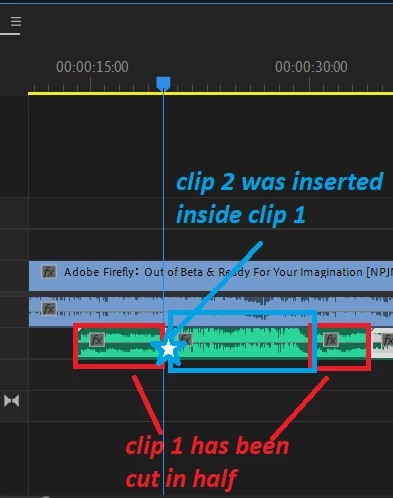
Then clip 1 will be cut after 6 seconds, leaving its second half AFTER clip 2.
I would like to know if its possible to prevent the second half from moving to after clip2. Meaning Clip 1 will simply keep part 1 instead of having part 1 and part 2 coming after clip2.
second part of clip 1 MUST NOT be generated or must be delted automatically somehow.
2) Reduce the length of an audio (making it faster then), using code. Wether the audio is on a Track (or not yet). Can this be possible with code? (aand even altering other parameters why not), but most importantly just reducing its size (while keeping the entirety of the clip sped up).
Thanks
3) Is it possible to code removing a part of an audio clip? sor for an instance if a clip is 5 seconds, but I want to remove the part from sec 3 to sec 4, and leave only 0->3 and 4->5 (togehter in the same clip, meaning we simply got rid of 3->4 within the same clip). Could we somewhat get this level of control?
4) Is it possible to analyse through code "pauses" within the same audio clip (lower audio profil ) and code their "removing" (related to question 3, but simply being able to analyse the audio profil somehow to automate part 3).
Thanks

 AdChoices