
Participant
June 28, 2014
Answered

Scripting for Premiere Pro CC / Premiere Pro CC 2014

  • June 28, 2014
  • 1 reply
  • 3435 views

Using Extendscript Toolkit I've found that it can possible to scripting for Premiere Pro CC and Premiere Pro CC 2014, but my question is:

Why Adobe don't provide any relative scripting guide?? (It's essential to see at least the Object Model)
This topic has been closed for replies.
Correct answer Bruce Bullis

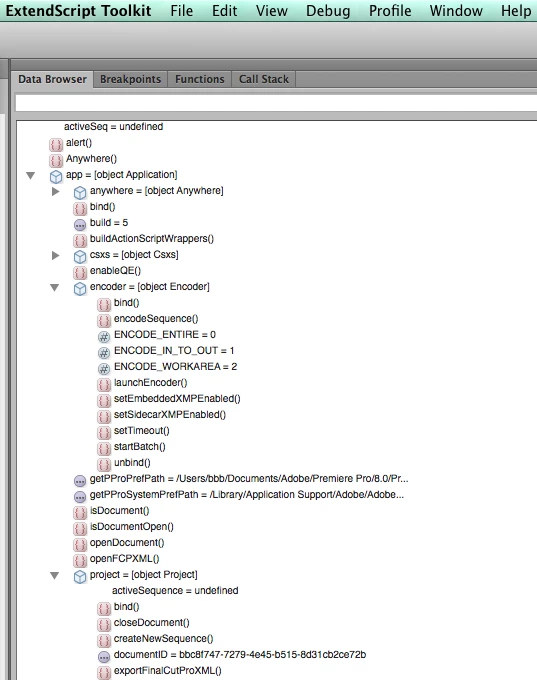
What app is that? Here's what I see, in the current version of ExtendScript Toolkit:

Also, see the JavaScript Tools Guide included with ESTK, for more information on the Reflection object, which can be used to learn about any object.

1 reply

Bruce Bullis
Community Manager
Community Manager
July 2, 2014

The Object Model is already visible and available in ExtendScript Toolkit.

Search "JavaScript Tools Guide CC.pdf" (in ESTK's /SDK folder), for more information on ExtendScript's "Reflection Object"; you can use this to get the params for any function.

You can also write me directly for help; b b b at adobe dot com.

Kelly Anderson
Inspiring
October 16, 2014

Sorry, I do not see the Object Model for Premiere Pro in the ExtendScript Toolkit.  I've attached an image of the options I see.

Bruce Bullis
Community Manager
Bruce BullisCommunity ManagerCorrect answer
Community Manager
October 16, 2014

What app is that? Here's what I see, in the current version of ExtendScript Toolkit:

Also, see the JavaScript Tools Guide included with ESTK, for more information on the Reflection object, which can be used to learn about any object.