
Inspiring
May 8, 2024
Answered

Search and delete any word, not just filler words

  • May 8, 2024
  • 1 reply
  • 496 views

I am looking for a way in the Text editor to search and delete all instances of your non-typical filler words. Words I've seen time and time again overused sometimes 3 times in one sentence... 

  • "you know"
  • "so now"
  • "in looking at this/ look at this"


Currently I'm working on a 1hr 30min video with "you know" 448 times ( I wish I was kidding) 
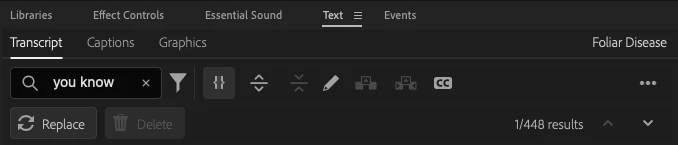
I can search the phrase, but it gives me no option to 'delete' or 'delete all' in either regular or Beta...

Is this already a feature and mine is bugging, or should I elevate this to an idea? 

This topic has been closed for replies.
Correct answer Rachilli

The replace field is empty. I apparently was working with a static transcript, not a text-editing based transcript... 🤦🏼‍ I remember re-transcribing it at some point, and apparently chose the wrong type.

In the text-editing transcript I was able to delete all!

1 reply

AnnikaKoenig
Legend
May 8, 2024

Oh, that sounds tedious! 😉 Leave the field for Replace with empty. That should get rid of it!


Hope it helps, 

Annika

RachilliAuthorCorrect answer
Inspiring
May 8, 2024

The replace field is empty. I apparently was working with a static transcript, not a text-editing based transcript... 🤦🏼‍ I remember re-transcribing it at some point, and apparently chose the wrong type.

In the text-editing transcript I was able to delete all!