


Participant
March 28, 2023
Answered

Search/Filter in bin in Premiere Pro not showing any files at all despite them existing

  • March 28, 2023
  • 15 replies
  • 13399 views

I'm unsure when this started, and I've made sure to update my software just in case, but I can no longer find any file by searching within the bins in my projects. This doesn't happen with effects, but purely in the project window. It's really slowing down my workflow for searching for a quick graphic or music file during an edit. I can't find anything on google or this forum that helps with this problem.

I've tried clearing the cache, updating the software. It just won't come back and I need to try and get it fixed ASAP if I can.

Any help would be reatly appreciated.


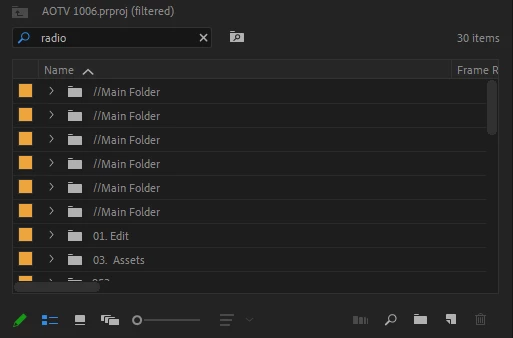
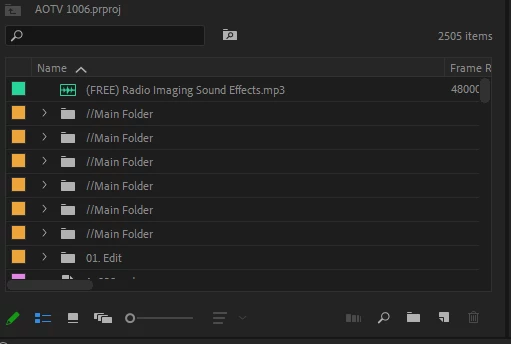
To illustrate the problem, I attach 2 photos. One with an unfiltered bin showing a file with "radio" clearly present in the name, then with the word being searched and it showing none of the files, even though several radio imaging mp3s contain this word.


Correct answer Cody26028596y0a9

I was having the same issue. I tried duplicating the project file to see if the bug would persist in the new duplicate project. That fixed the issue for me.

15 replies

ben-erwin
Known Participant
December 20, 2023

This is an Eggregious bug that needs immediate attention! I'm about to go into my busy season and this is going to cost me so much time and hassle, even if I just want to organize. I need to be able to locate assets and sequences instantly. Please fix this. 
I saw this bug had a history in 2019 and some of the answers came back reset preferences. Resetting preferences is not a solution and Adobe support suggests that shamefully often without fixing the root causes. Please fix it outright.

KatieThingybob
Participant
December 20, 2023

Can't believe I just came to search this and find your comment from 15 mins ago! It's driving me crazy while I'm trying to finish up work that needs to be done for Christmas. Losing my tiny mind!

Participant
November 29, 2023

Same issue for me. On Version 24.0.3 Was able to get it working by going back to a previous version's Autosave file. Wonder if it has something to do with putting the project and all associated files in a newly created parent folder?


Participating Frequently
October 6, 2023

Moving it to Discussions

Known Participant
October 29, 2023

.

Participating Frequently
October 6, 2023

I decided to roll back to an autosave and that's working. VERY ODD behavior though. Praying it's a one-time weird glitch and not something I now need to deal with on a regular basis. If someone knows how to fix this please report your findings as I'm sure someone else will find it useful. Or I may need it in a distant future

Participating Frequently
October 6, 2023

I also just had this exact bug pop up. Never seen it before. I opened a different project and it's working just fine but in my main project search is essentially broken only showing bins not files. Tried everything I can think of and it's just not showing any sequences or files in no matter what you search. Completely breaks the way I work. Worth nothing I recently updated to 23.6.0 so perhaps that has something to do with it? If any one has any ideas that would be lovely but seeing as no one responded to this thread it must be a rare issue

Known Participant
October 29, 2023

I'm having this exact issue right now, running the latest update.  And I guess nobody has a solution for it.