Participant
January 4, 2019
Answered

Second Clip I drag to the timeline misses video

  • January 4, 2019
  • 2 replies
  • 343 views

Hi there,

Hope to find some expert who can help me! I'm losing my mind about one issue I got since the last Premiere Pro CC Update (v 12.1.2):

I open my source clip (mp4), create in and out and drag it to the timeline. So far so good! But if I drag the next clip to the timeline it only shows up the audio. Video is missing. If I close Premiere Pro and start again it's the same: The first clip's alright the next ones are missing Video.

Can You please help me? Hope You can!!!!!!!

Thanx

Olli

OS: Windows 7, 64-bit
This topic has been closed for replies.
Correct answer Meg The Dog

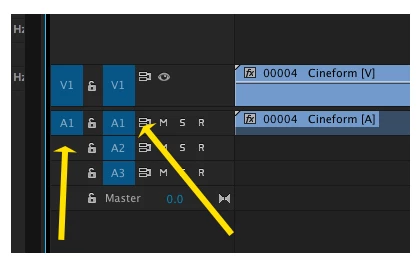
Verify your Source Patching and Track Targeting are toggled on (blue) and set correctly:

MtD

2 replies

Kevin J. Monahan Jr.
Legend
January 4, 2019

Olli,

More info on that topic, if you need it: Patching source sequences in Premiere Pro

Thank You,
Kevin

Kevin Monahan - Sr. Community and Engagement Strategist – Adobe Pro Video and Audio
Participant
January 4, 2019

Thank You sooo much! You made my day ;-))))

Kevin J. Monahan Jr.
Legend
January 4, 2019

You're welcome. Also, check out my friend Boone's video. It's pretty good.

Kevin Monahan - Sr. Community and Engagement Strategist – Adobe Pro Video and Audio
Meg The DogCorrect answer
Inspiring
January 4, 2019

Verify your Source Patching and Track Targeting are toggled on (blue) and set correctly:

MtD