
Participant
March 25, 2024
Answered

Selecting the Layers underneath`

  • March 25, 2024
  • 1 reply
  • 298 views

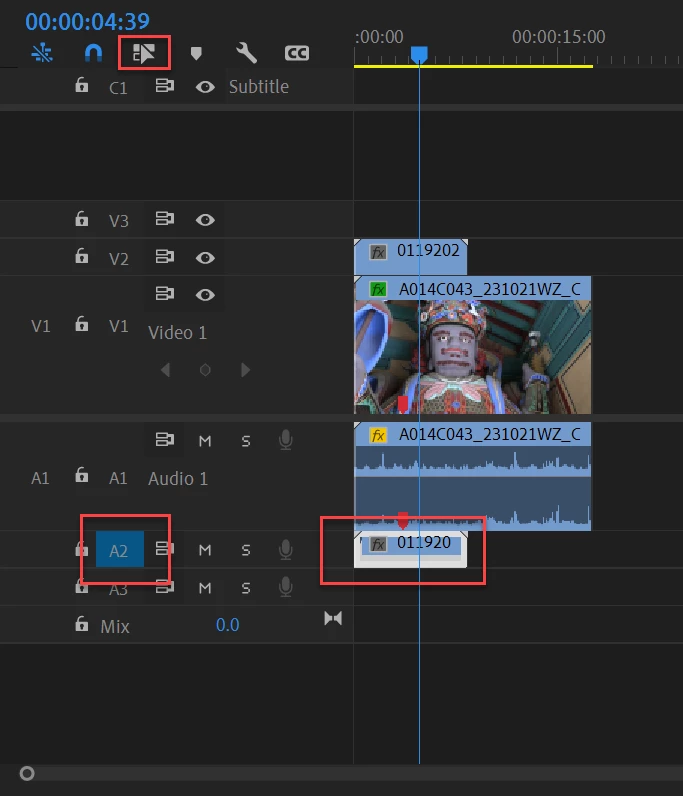
How can i select a audio layer underneath a video layer without using mouse. I meant, do we have any shortcut or any action tools available for this.  For example please find the attachement where i have i video layer and a couple of audio layers. Now my selection is in the video layer and is it possible for me to select the respective audio layers underneath with out using mouse. FYI: the video and audio are unlinked.
This topic has been closed for replies.
Correct answer Ann Bens

Selection follows playhead is triggered by track targeting. So if only one audio track is targeted and unlink selection is unchecked, your audio clip will be selected.


1 reply

Ann Bens
Community Expert
Community Expert
March 25, 2024

Selection follows playhead.

Participant
March 25, 2024

@Ann Bens Appreciate your reply. But as i said earlier the video and audio were unlinked and so this is not working. KIndly let me know whether we have any other options to do that with a short cut or something.

Ann Bens
Community Expert
Ann BensCommunity ExpertCorrect answer
Community Expert
March 25, 2024

Selection follows playhead is triggered by track targeting. So if only one audio track is targeted and unlink selection is unchecked, your audio clip will be selected.