jans80374482
Participant
January 5, 2019
Answered

Sequence

  • January 5, 2019
  • 5 replies
  • 758 views

Hey guys,

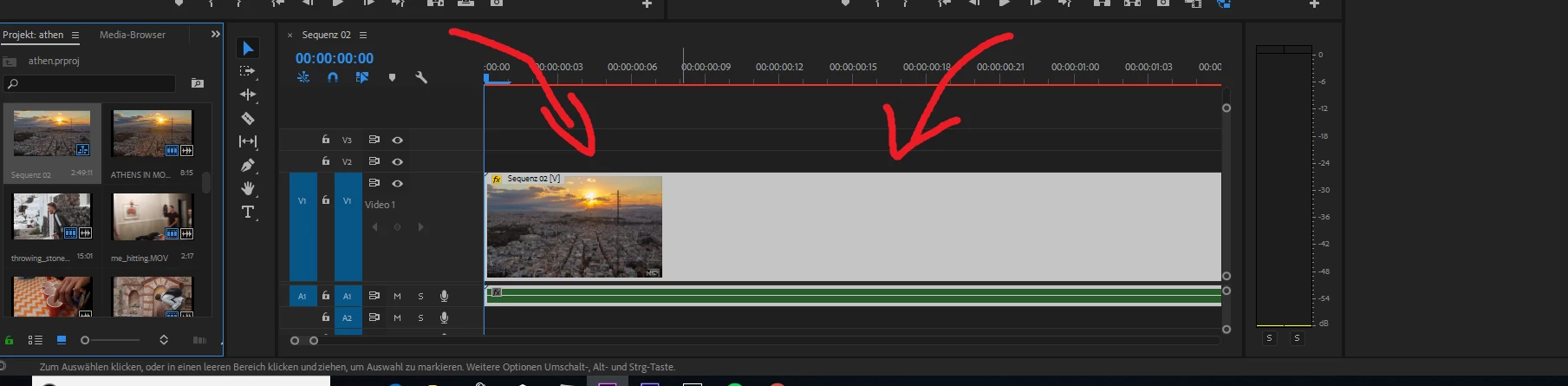
beginners question: I worked on a video (had many different clips in this sequence) and saved it. Now that I reopened Premiere, it only shows the whole sequence in the timeline, not the clips that I had there before. How can I go back to showing the clips in the timeline instead of the sequence?

I know this is probably a really basic question, but I couldn't find a solution online. So, thanks a lot for helping. I wasn't finished on some of the clips inside of the sequence and now I am not able to work on them individually anymore. I can only edit the whole sequence.

    This topic has been closed for replies.
    Correct answer Meg The Dog

    Find the sequence you want to work on in your Project Panel and double click on it to open it.

    It looks like you dragged a sequence into another sequence.

    MtD

    5 replies

    Legend
    January 5, 2019

    Premiere Pro is complex software.  Don't skip reading the manual.

    https://helpx.adobe.com/pdf/premiere_pro_reference.pdf

    Ann Bens
    Community Expert
    Community Expert
    January 5, 2019

    This button determines how a sequence is dropped in the timeline:

    @mj
    Community Expert
    Community Expert
    January 5, 2019

    As Meg says, seems like you might have a nested sequence.

    Try double clicking on sequence 02 on the timeline. That will open that sequence and reveal the individual clips

    Good luck

    rickyj89135955
    Known Participant
    January 5, 2019

    New Sequence won't work in the current version of CC and causes the program to crash or act buggy. 

    #sueAdobe

    Meg The DogCorrect answer
    Inspiring
    January 5, 2019

    Find the sequence you want to work on in your Project Panel and double click on it to open it.

    It looks like you dragged a sequence into another sequence.

    MtD

    Participant
    January 5, 2020

    You are correct. Thank you.