Youtuber23
Participant
March 27, 2018
Answered

Sequence Help
  • March 27, 2018
  • 1 reply
  • 190 views

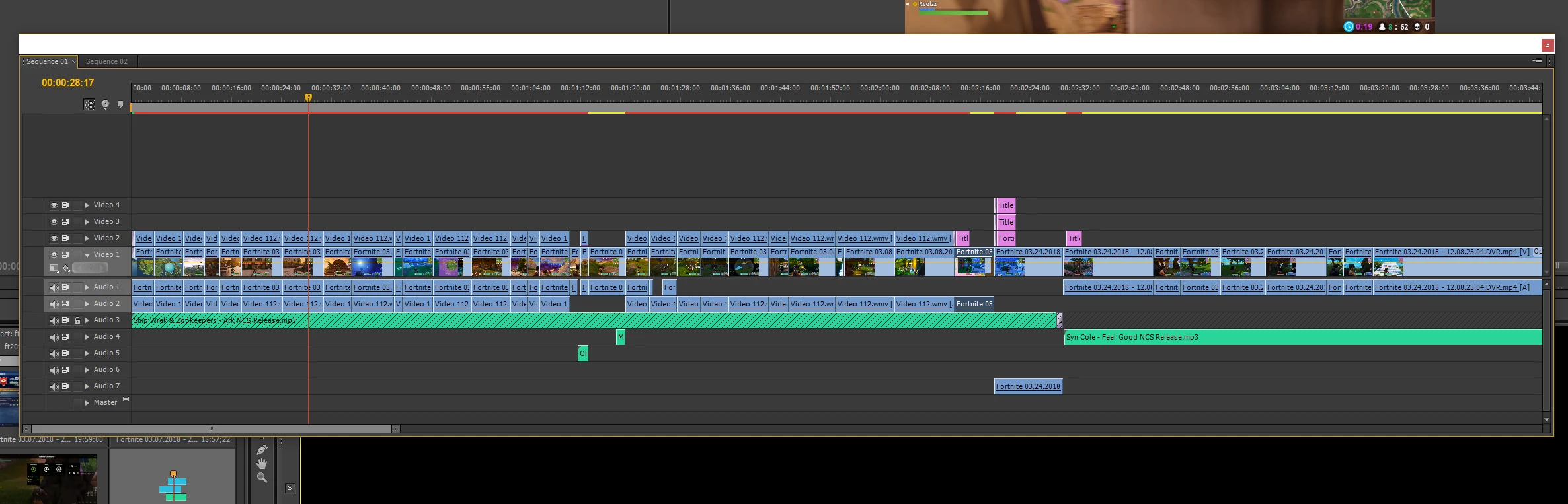
Please if anyone could help me, while editing I accidentally clicked on something on which I had no idea as to what it would do. Whatever it was, made my sequence it's own movable tab, and I would just like to revert it back to it's locked position. Please help, it will be like this on any project I start. If someone could help it would mean so much.

    This topic has been closed for replies.
    Correct answer bucksommerkamp

    Don't panic - you haven't done anything wrong! You just "broke away" the sequence into its own floating window. The nice thing is - you can glue it back to where you want it! Just click and drag the title bar to the area on the left of your screen where sequences normally are (assuming it's on the left)...when an area turns blue, that means it's a "drop zone" and you can lock the sequence back into that area.

    Go here to the "Dock, Group or Float Panels" section: https://helpx.adobe.com/premiere-pro/using/workspaces.html

    Use and customize workspaces in Premiere Pro

    And...breathe.

    Buck

    1 reply

    bucksommerkamp
    Community Expert
    bucksommerkampCommunity ExpertCorrect answer
    Community Expert
    March 27, 2018

    Don't panic - you haven't done anything wrong! You just "broke away" the sequence into its own floating window. The nice thing is - you can glue it back to where you want it! Just click and drag the title bar to the area on the left of your screen where sequences normally are (assuming it's on the left)...when an area turns blue, that means it's a "drop zone" and you can lock the sequence back into that area.

    Go here to the "Dock, Group or Float Panels" section: https://helpx.adobe.com/premiere-pro/using/workspaces.html

    Use and customize workspaces in Premiere Pro

    And...breathe.

    Buck