Participant
September 1, 2018
Answered

Sequence pieces are there but not in project

  • September 1, 2018
  • 1 reply
  • 214 views

I'm fairly new to PP and bought a template so I've figured out how to do sequences. I had 3 "scenes" and was working to make them all one. I say a tutorial where you make a new sequence and add the other to it to make one long continuous sequence. This worked great for "Scene" 1 & 2 but when I got to 3, there was only a folder with some items to move over. I see "Scene 3" in the timeline and all the pieces are there but now there is no "Scene 3" in the project area to drag it to the "final cut" Sequence.

Any help is appreciated!
    This topic has been closed for replies.
    Correct answer Meg The Dog

    If I understand you correctly, you have three separate timelines (Scene 1, Scene 2 and Scene 3) and a 4th timeline you are using to combine the first three?

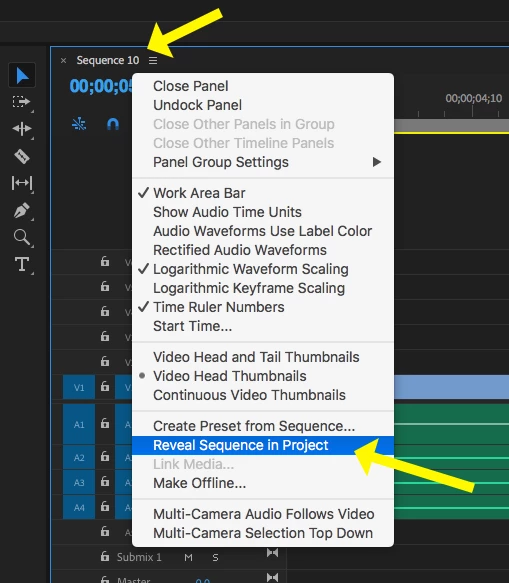
    If you can see the Scene 3 timeline, select it. Then right click on the Sequence Name  in the timeline and choose Reveal Sequence in Project in the drop down menu.

    This should locate the timeline in the Project Panel.

    MtD

    1 reply

    Meg The DogCorrect answer
    Inspiring
    September 1, 2018

    If I understand you correctly, you have three separate timelines (Scene 1, Scene 2 and Scene 3) and a 4th timeline you are using to combine the first three?

    If you can see the Scene 3 timeline, select it. Then right click on the Sequence Name  in the timeline and choose Reveal Sequence in Project in the drop down menu.

    This should locate the timeline in the Project Panel.

    MtD

    Participant
    September 2, 2018

    That was incredibly helpful and exactly what I needed! Thank you so very much