Participant
January 22, 2020
Answered

Sequence Preset Query

  • January 22, 2020
  • 1 reply
  • 325 views

I'm somewhat of a novice so please bear with me...


I shot a 2.7k video on my GoPro at a work event but can't find a sequence preset setting to fit with my video info & frame rate - which is 2704 x 2028 and 59.94 fps. 


There's nothing in the 2K preset folder that seems to line up. Can anyone recommend the best setting for me to be using?
This topic has been closed for replies.
Correct answer Averdahl

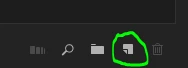
You can either create a preset manually by clicking on Settings and set the Editing Mode to Custom and then enter the correct values for Timebase, Frame Size, etc, etc. Or, just import the clip into Premiere Pro and drag&drop the clip to the New Item icon down right in the Project Panel. This will create a new timeline based on the specifications of the clip.

1 reply

Averdahl
Community Expert
AverdahlCommunity ExpertCorrect answer
Community Expert
January 22, 2020

You can either create a preset manually by clicking on Settings and set the Editing Mode to Custom and then enter the correct values for Timebase, Frame Size, etc, etc. Or, just import the clip into Premiere Pro and drag&drop the clip to the New Item icon down right in the Project Panel. This will create a new timeline based on the specifications of the clip.