
Inspiring
January 6, 2023
Answered

Seriously faulty error found in premiere pro

  • January 6, 2023
  • 8 replies
  • 2318 views

I will get right in to the topic

I am using a windows 10 system

intel 13700k asus z790

32gb ram 3600

rtx 3060ti

scarlett solo 3rd

Earthworks ETHOS


the problem I found is that the obs recording does not has any audio clicks or pops in the original footage, but when I render it out, sometimes it makes an audio pop like you see in the wave form, Ive exported the same footage without touching anything. the one above is when I rendered it out when it was having that click happening. that differrence makes this very clear "click" or "pop" sound. How can this be possible?
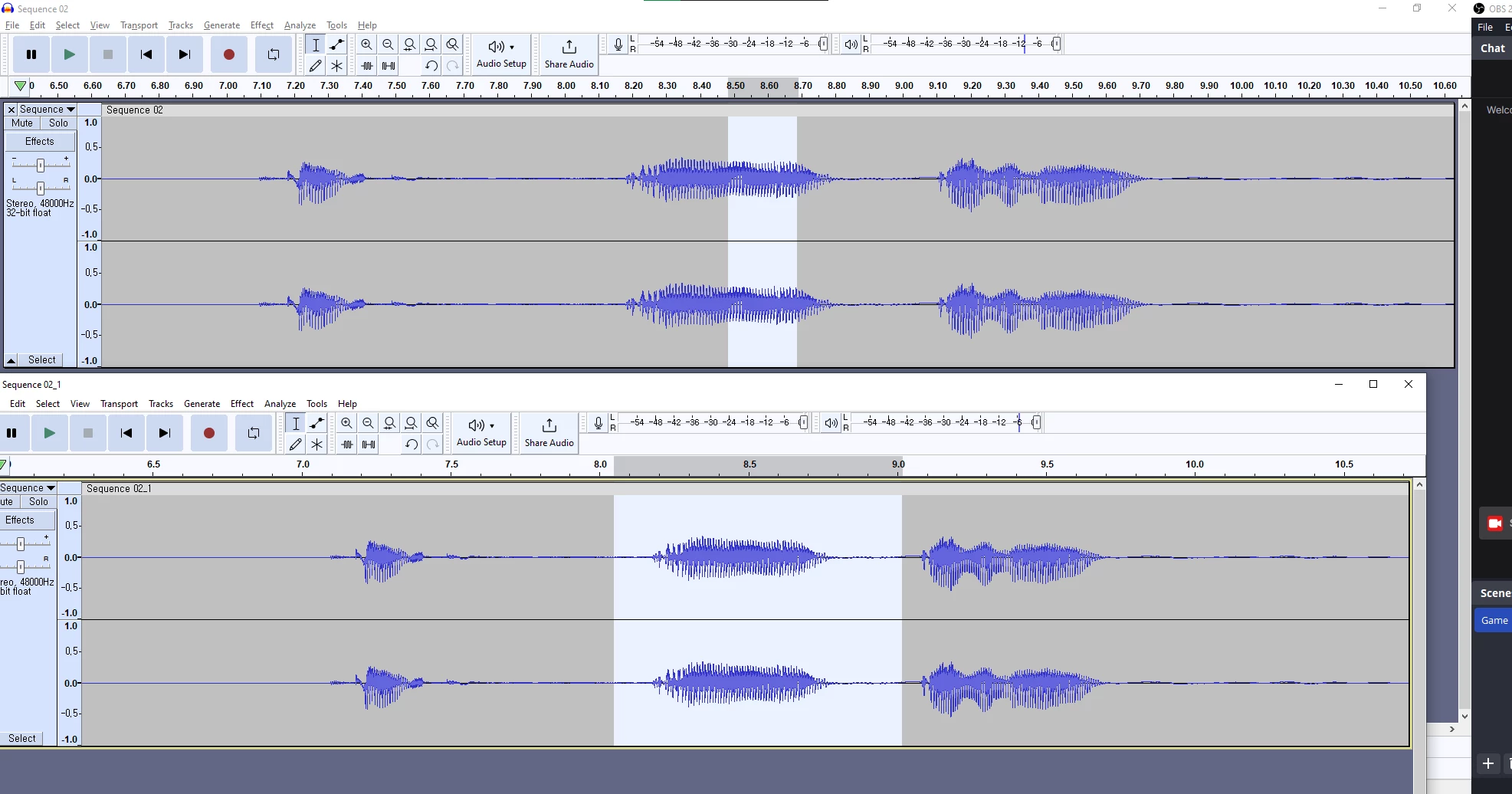


I thought it was a mic or interface problem so I replaced them but no use, I thought it was a ryzen motherboard X570 infinity fabric usb connectivity issue but it was not, I ran a ram test using the windows ram test and it was all good.

I cant work at all when I know these kind of unstable results can happen, please please I need help.


these pops happen in the playback of the video, but not everywhere, randomly at some spots. but the problem is that pop that I can hear in the playback, gets exported even though the original media does not contain that pop. the media itself is VFR but I dont think this is a problem because Ive been making videos for a long time and this is the first time it happened. 


This topic has been closed for replies.
Correct answer SunWuChoi

I think I found the reason

it was not the hardware problem

I think its sometsort of obs remuxed mp4 or VFR container making issues on premiere pro 23.0 version again


I have evidence, I have watched excessive youtube videos through out my life and I recently started to notice few of the youtubers I watch have the same audio pop rendered out. they have a studio better and more stable than mine but probably they also used obs for their screen capture method

watch this video around 2 min 6 seconds in, its not a cut, its the same audio drop but he has a whole stable studio so probably the same problem as I have, its a recent video so Im assuming his editors are using the earliest premiere pro, 23.0

https://youtu.be/9fI-1Bz9RzM?t=122


Also I listen to triforce podcast then they also have the same pop, did not heard of this before but only started to hear like few weeks ago. I will post the link to the video and time when I find it but the audio pop they had were the exactly the same as the video above and what I had too.


I think there is definately a problem with the newest premiere pro, 23.0. I reverted to 22.0 and 1 hours in, no audio pop

I hope the premiere pro team checks this out since there are some other cases from others that also got affected in the rendered results like the video above.

I have spent like few thousand dollars to nail down the problem, audio interface, mic, cpu, MB, m.2 ssd, but sadly it was from a software glitch. I feel bad to my gears that I assumed they were broken.


I attached how it looks like when you hear the audio pop in the premiere pro 23.0

use audio track 3 on VLC or put it on premiere pro to listen the two tracks

8 replies

Warren Heaton
Community Expert
Community Expert
January 7, 2023

In video production and post production, use Linear PCM audio files to significantly minimize if not avoid entirely unexpected issues with audio. 

SunWuChoiAuthor
Inspiring
January 7, 2023
Is it possible to get that while recording voice through a computer using
an audio interface? I see what you mean but I'm not sure if it's possible
to people who generate video/audio files on a pc setup. Also I'm not
entirely sure what linear pcm means, I'll do my study and figure out if I
can convert the audio in the mp4 to linear pcm
Warren Heaton
Community Expert
Community Expert
January 7, 2023

It's a software setting.  Look for settings like 48 kHz or 44.1 kHz, 16-bit, stereo or mono, then WAV or AIF file format.  


Adobe Audition is a good option.

MyerPj
Community Expert
Community Expert
January 7, 2023

I'm waiting to hear from you on the clip specs I have but I can tell you from just listening to it via Potplayer, that there is a little thud under 'today we're gonna play' and a slight tick after 'interactive'. Are these what we are looking for?

SunWuChoiAuthor
Inspiring
January 7, 2023

the thing is when you play it on a media player like VLC or even audacity, there is no problem and the wave form looks fine. it only happens when you play it on premiere pro 23. the thud or tick are my voice sound. the mp4 file I posted where I marked correct has a demonstration. play that on the second audio track and you will see why Im so crazy about this. its not a ignorable tick, its massive

MyerPj
Community Expert
Community Expert
January 7, 2023

I only have audio on track 1, there's no sound or waveform on audio 2

SunWuChoiAuthorCorrect answer
Inspiring
January 7, 2023

I think I found the reason

it was not the hardware problem

I think its sometsort of obs remuxed mp4 or VFR container making issues on premiere pro 23.0 version again


I have evidence, I have watched excessive youtube videos through out my life and I recently started to notice few of the youtubers I watch have the same audio pop rendered out. they have a studio better and more stable than mine but probably they also used obs for their screen capture method

watch this video around 2 min 6 seconds in, its not a cut, its the same audio drop but he has a whole stable studio so probably the same problem as I have, its a recent video so Im assuming his editors are using the earliest premiere pro, 23.0

https://youtu.be/9fI-1Bz9RzM?t=122


Also I listen to triforce podcast then they also have the same pop, did not heard of this before but only started to hear like few weeks ago. I will post the link to the video and time when I find it but the audio pop they had were the exactly the same as the video above and what I had too.


I think there is definately a problem with the newest premiere pro, 23.0. I reverted to 22.0 and 1 hours in, no audio pop

I hope the premiere pro team checks this out since there are some other cases from others that also got affected in the rendered results like the video above.

I have spent like few thousand dollars to nail down the problem, audio interface, mic, cpu, MB, m.2 ssd, but sadly it was from a software glitch. I feel bad to my gears that I assumed they were broken.


I attached how it looks like when you hear the audio pop in the premiere pro 23.0

use audio track 3 on VLC or put it on premiere pro to listen the two tracks

SunWuChoiAuthor
Inspiring
January 7, 2023

the reason this is happening seems like when you press play on premiere pro, it renders the video up to few seconds to show it on the playback. while that is happening, it has a software glitch that the audio signal is dropped like the original post above. this might be that premiere pro 23.0 has a cpu scheduling issue or the algorithm that handles this is having a memory issue. then the faulty audio that was rendered to show it on the playback was stored in the media cache or something like that and got rendered out to the customers ear. Or premiere pro 23 cant handle VFR videos cuz these audio pops does not happen with computer sound recorded, only a sound that went through an audio interface. I used yamaha ag06, audient iD mk2, scarlett solo 3rd, and all generated the same pops, not that they are faulty to look back now.


In conclusion, its something about when you record your voice through a screen capture, aka VFR container mp4 and that was going into premiere pro 23's playback render system and the audio had some issue of it doesnt know how to handle the VFR container and the audio. I tested a Sony A7M4 with ECM-b1m 16 bit 48khz video but that did not have any pops what so ever. its something to do with audio from an external device hooked up with a VFR container on premiere pro 23

MyerPj
Community Expert
Community Expert
January 7, 2023

I'm not sure if using the Adobe method here in the forum keeps the original as is, here's the proprties screen from the clip I received. Let me know if we are seeing the same thing:


SunWuChoiAuthor
Inspiring
January 7, 2023

here is a mp4 clip that makes the audio pop, kinda embarassing but at this point I will do anything to know what causes this

recorded on obs and mkv remuxed to mp4 after recording was done, the file is VFR but this did not make any audio issue before 2022 ish. so probably its not the obs or container problem. I cant upload mkv since its not supported.


MyerPj
Community Expert
Community Expert
January 7, 2023

BTW: If you can upload a clip and give us test procedures I can give it try here.

Win11, 12900K, PP 23.1


SunWuChoiAuthor
Inspiring
January 7, 2023
Ok I'll try to upload the problematic clip, let me know if it makes that
audio drop while in playback. It happens as soon as 3 seconds in if you're
lucky

It's very hard to nail down the root of this problem, sorry about that. I'm
also very confused but I appreciate the help from all of you.
MyerPj
Community Expert
Community Expert
January 7, 2023

I think Basil's suggestions are good, except his determination that it's not hardware. I don't think one could be so certain. If you are up for changing those things, then do it.


Is it a clean install of Windows? Was there a reason to stick with Win10 instead of 11? Since you have a new SSD, you got your old one around. I'd clean install Win11, and use the prior SSD as a data drive.

Peru Bob
Community Expert
Community Expert
January 6, 2023

Are you using any audio effects?

The Denoiser had this issue in a previous version.

SunWuChoiAuthor
Inspiring
January 6, 2023
Literally no effect or gain change, I was testing premiere pro to
reconstruct this problem and trying to see if the render also carries the
problem. I then tried to see the waveform in audacity and this was the
difference.

I think it's an audio drop out problem and I'm gonna try to change my power
supply and ram, since I recently changed motherboard and cpu and ssd to
eliminate this problem but nothing changed
Inspiring
January 6, 2023

If I got it right, the issue happens during processing stage, not during recording. So no need to change hardware, it won't help. I'd reset premiere settings, and clear cache (manually, including audio part). If that's not help, rollback to previous version that worked. Another option to consider is to separate audio and encode it as .wave before importing to premiere