
Participant
June 4, 2025
Question

Set Audio Channel Preset in Premier 2025
  • June 4, 2025
  • 1 reply
  • 175 views


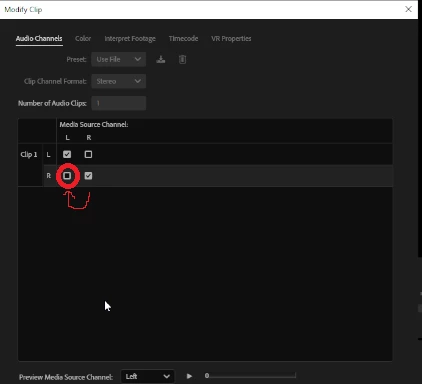
I use a professional microphone to record audio in Premier. Since the Audio Input Mapping setting is gone from a previous version I cant find anywhere on the internet a way to set every new audio clip by default to the correct media source channel so that I can play and hear them. I have to now select on all my audio clips the correct source channels to hear them which is annoying. How can I do this?

1 reply

Community Expert
June 4, 2025

Hi there,

Could you give us more about your equipment setup and what you're trying to accomplish? From the screen shot you posted it looks like you're trying to put both channels from a stereo recording into the same side, which is odd. It seems like maybe you want a single channel (mono) recording. Is your microphone not recording in mono?

I will say that the audio input options are now handled at the OS level, meaning that your Mac or PC is controlling the recording level and input channels. At least that's how it is in Premiere; you have a bit more control in Audition.

-------------------------------------------------------------------------JVK | Editor/Designer/Software Instructor. Pr, Ae, Ch, Ps, Ai, Id