Inspiring
February 14, 2017
Answered

"Set default timecode for future sequences" checkbox is gone?

  • February 14, 2017
  • 6 replies
  • 2343 views

In Premiere Pro 2015/2015.3 the option to save the default timecode used in all future sequences was found by clicking the menu button in the sequence's tab and selecting Start Time, then entering a timecode and checking "Set as default for future sequences".
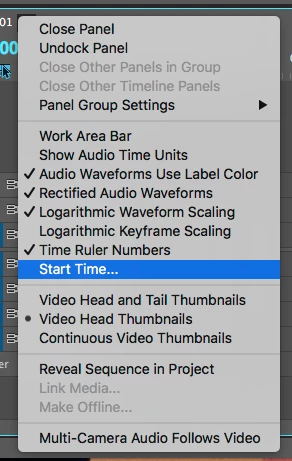
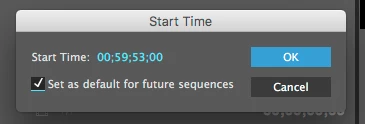
In PP 2017 this is no longer the case. When you select Start Time the checkbox now says "Set by first clip".
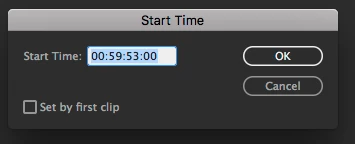
How do I set the default timecode used for all future sequences now? This is vital for me as I work in a commercial broadcast environment and all of our sequences must start at 00:59:53:00 to ensure we use a 5 second slate, two beep, and picture start at 1:00:00:00. This is a chore to do manually and there does not seem to be a way for me to set the default timecode for all sequences now. Any help is appreciated.

This topic has been closed for replies.
Correct answer SteveHoeg

Hey jshannon00, sorry for any disruption caused to your workflow here, we are working on fixing this.

6 replies

marque1968-w6ydtQ
Participant
May 10, 2017

Where is the "Set by first clip" gone?!!?!?!?!?!?!?! This is assential to my workflow. All our interviews are moved to a seperate time-line EACH and need to start with the clip's timecode, for the rest of our handling. Also additional material (e.g. GoPro's) are put in a seperate timeline, so we can do color-correction at the end of making the program, by just editing that time-line, and all occurances will have that correction implemented instantly.

Meanwhile, how can I downgrade to 2017.0.2??????

Participating Frequently
March 3, 2018

I just upgraded to the latest version of 2017 and now am hoping to get back to 2017.0.2 just so I can have this feature back. I work with hundreds of multicam sequences and need to be able to set by first clip. Was this feature removed? And if so will it be reinstated?

Inspiring
April 23, 2017

It looks like April 19th's update to Premiere Pro 2017.1 re-added this feature. I want to thank SteveHoeg for bringing attention to the issue and I'll be updating all my workstations on Monday to take advantage of it.

SteveHoeg
Adobe Employee
SteveHoegCorrect answer
Adobe Employee
March 19, 2017

Hey jshannon00, sorry for any disruption caused to your workflow here, we are working on fixing this.

Inspiring
March 20, 2017

That's fantastic news Steve, I appreciate your interest in this issue we're having. I'll await further news before rolling back to 2015.5.

Kevin J. Monahan Jr.
Legend
March 17, 2017

Hi JShannon,

Is Richard M Knight's answer working for you? Please let us know.

Thanks,
Kevin

Kevin Monahan - Sr. Community and Engagement Strategist – Adobe Pro Video and Audio
Inspiring
March 18, 2017

I was hoping that the answer would be that this option was renamed or relocated somewhere else in the preferences. Unfortunately making a template sequence and duplicating is not a viable option. Here's why:

I work at a post production facility that specializes in 'versioning' retail commercials. We are provided commercial elements and graphics and create multiple versions for different markets, using different prices, product shots, VO, etc. We have a team of 4 editors to produce on average over 75 unique retail commercials per week for several different clients. We produce commercials for Canada, the US and Latin American markets in frame rates of 23.976, 25 and 29.97 fps; and frame sizes of 720, 1080 and even some SD-only markets. (From this information you can understand that making one template to duplicate does not work in this environment.) However, the one common specification of every single commercial we produce is that each master and submaster file we export for delivery needs a start time of 59:53:00. Clicking the 'set as default for future sequences' checkbox was a one-time, one-step process that ensured that no matter what workstation, editor, frame size or frame rate of the elements provided, the default timecode for every new sequence matched our delivery standard every time. It is then up to the editor to ensure that the slate, two beep, audio, and picture all align with the timecode of the sequence from the very beginning. It also ensures that NESTING a sequence, no matter the source timecode, forces the nested sequence to also have a start time of 59:53:00.

I hope this sheds some light on the situation. It's been very frustrating this past month, enough so that we will likely roll back Premiere Pro on all our workstations to 2015.5 by the end of the month if another solution isn't found. Thanks for any other ideas you may have.

Community Expert
February 14, 2017

I would make a default sequence and use it as a template.

shooternz
Legend
February 14, 2017

Me too.

shooternz
Legend
February 14, 2017
This is vital for me as I work in a commercial broadcast environment and all of our sequences must start at 00:59:53:00 to ensure we use a 5 second slate, two beep, and picture start at 1:00:00:00.

I am surprised these workflows still exist in digital broadcast today!