
Known Participant
December 1, 2023
Answered

Setting workarea in and out of a Sequence with Automation Blocks (aescript plugin)

  • December 1, 2023
  • 4 replies
  • 1278 views

I would like to set the workarea (render-area) of a Sequence to timecode in: X and out: Y.
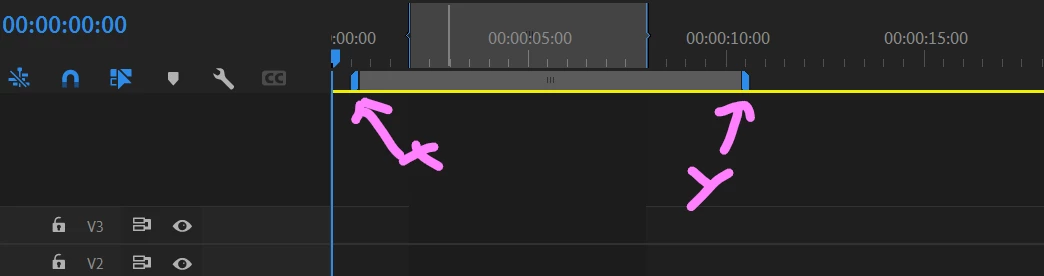
It looks like the set attribute [   ]  of sequence block doesn't provide the workarea as an option.

Is there another way to do it, or, can it be implemented?
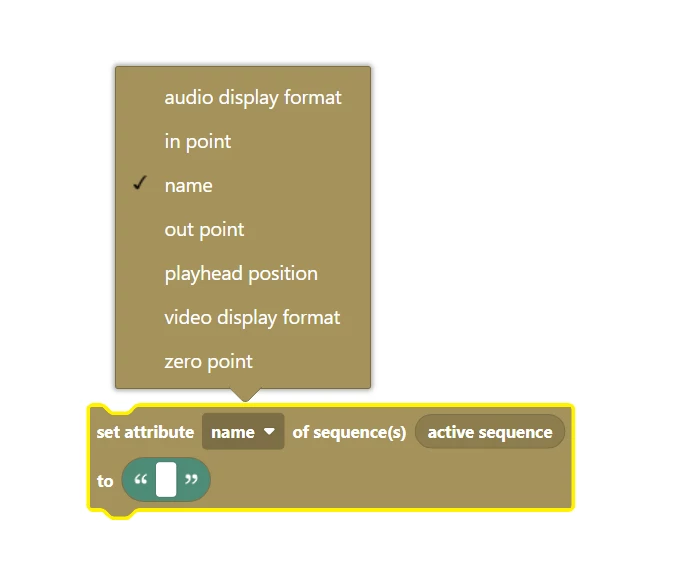


In ExtendScript I would expect to be implemented:

seqItem.isWorkAreaEnabled() - check if there is a workarea
seqItem.setWorkAreaEnabled(true) - enable or disable a sequence's workarea
seqItem.setWorkAreaInPoint() - set sequence workarea inpoint
seqItem.setWorkAreaOutPoint() - set sequence workarea outpoint
seqItem.getWorkAreaInPointAsTime() - get sequence workarea inpoint
 seqItem.getWorkAreaOutPointAsTime()  - get sequence workarea outpoint

As also found here:  https://github.com/Adobe-CEP/Samples/blob/master/PProPanel/jsx/PPRO/Premiere.jsx
 
This topic has been closed for replies.
Correct answer Mathias Moehl

The Set Property of Sequence block of Automation Blocks 1.1.000 now actually supports properties "workarea in", "workarea out" and "workarea enabled". But note that these functions don't work reliably in Pr's scripting API (and I guess that's also the reason why they are not documented). See the API bug infos here:

https://docs.mamoworld.com/automation-blocks/block-reference/prSequence#work-area-enabled--in-point--out-point


4 replies

Participant
April 16, 2024
Mathias Moehl
Community Expert
Mathias MoehlCommunity ExpertCorrect answer
Community Expert
April 16, 2024

The Set Property of Sequence block of Automation Blocks 1.1.000 now actually supports properties "workarea in", "workarea out" and "workarea enabled". But note that these functions don't work reliably in Pr's scripting API (and I guess that's also the reason why they are not documented). See the API bug infos here:

https://docs.mamoworld.com/automation-blocks/block-reference/prSequence#work-area-enabled--in-point--out-point


Mathias Möhl - Developer of tools like BeatEdit and Automation Blocks for Premiere Pro and After Effects
Participant
April 16, 2024
Hello, the link mentions bugs in setting in and out point programmatically.
In my case, I just read them programmatically, so it is reliable enough.
Thanks!
Jonathan-David
Mathias Moehl
Community Expert
Community Expert
December 1, 2023

Automation Blocks does not support the workarea, yet. You can set in/out but not the work area. I have just put it on my list of feature requests. 🙂

Mathias Möhl - Developer of tools like BeatEdit and Automation Blocks for Premiere Pro and After Effects
Known Participant
December 1, 2023

🙏 Thanks a lot. Getting and setting the work area is going to make the Send-to-mediaencoder-block more useful. Can't wait to use it. 🙂

Mathias Moehl
Community Expert
Community Expert
December 3, 2023

You are welcome :.-)

In the Send to Media Encoder Block, the "range" option can be set to "in and out point". So this would be the best workflow for now, since in and out point can be set with Automation Blocks.

Mathias Möhl - Developer of tools like BeatEdit and Automation Blocks for Premiere Pro and After Effects
Known Participant
December 1, 2023

Hi Bruce,
Thanks for answering the question I didn't ask. 🙂 
Actually, I asked Mathias how to do this with "Automation Blocks" (it's a Première Pro plugin), not how to do it with ExtendScript. I even had the same PProPanel URL in my post. By the way, did you guys already solved the ExtrendScrip bug DVAPR-4239719, regarding this matter?

Known Participant
December 1, 2023
Bruce Bullis
Community Manager
Community Manager
December 1, 2023

I have no idea where that Scratch-like UI in your screenshots is coming from, but here's PProPanel, setting the work area:

 https://github.com/Adobe-CEP/Samples/blob/e60d6a22ef44d8eb4cca3904c35a0c050576b697/PProPanel/jsx/PPRO/Premiere.jsx#L2571