



AndrewTheGreat
Known Participant
December 27, 2025
Question

Shift + O vs END

  • December 27, 2025
  • 1 reply
  • 295 views

I have a question. 

There are two shortkey commands:

Shift + O which is Go to out.

End - which is Go to sequence\\clip end.


They do the same, well, they should - go to the end of all the media in your timeline. With one exception.

This is what happens when you hit Shift + O:
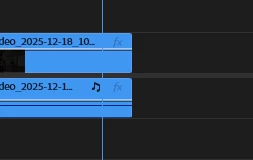
871803i3B35EFE1D9C61394.png

This is what happens when you hit End:
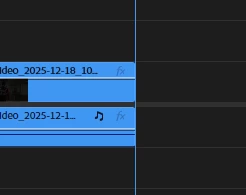
871804iD361069D0EB7687C.png

It's easy to explain why one would need to go to the end of a sequence or a clip - to cut off everything after the playhead or place there another clip. But what are the exact scenarios of using Shift + O and End?

Because when you mark it out after using shift + o you get this:
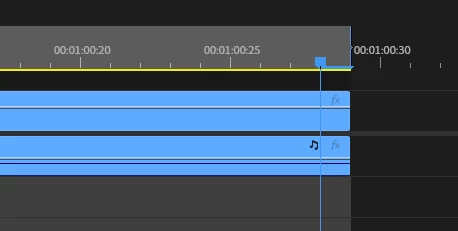
871805i9E2FD82221AEDC07.png

And when you use End and mark it all out, you get this:
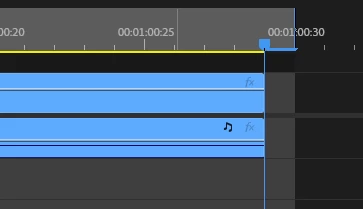
871806i627092DA564CB3BF.png

Share your thoughts, please.


1 reply

R Neil Haugen
Legend
December 27, 2025

The playhead is always attached to a frame ... the frame after the blue vertical line "playhead". It is never a 'separator' between frames.


So think about it ... if you go to the end, that actually includes one more frame past the last actual video from the last frame of the media on the timeline.


End is where you go to add more media.


Out is where you go to set an output point to export the current actual timeline. Without that extra black frame.

Everyone's mileage always varies ...
AndrewTheGreat
Known Participant
December 28, 2025

Thanks, Neil, you confirmed what I thought about it. It may be a bit confusing though. It's interesting how different software handles it. Davinci Resolve has the same function for both the hotkeys - the playhead always goes to the end of the last frame of a clip:

871856i6102BE3BF1434C38.png

Both with Shift+O and End

Stop trying to edit and EDIT!
Warren Heaton
Community Expert
Community Expert
December 28, 2025

@AndrewTheGreat 

In both Premiere Pro and Resolve, an Out Point is the last frame at the tail of a Clip (as opposed to an In Point that is the first frame at the head of a Clip).

To go to the last frame of the last Clip in a Timeline in Resolve, select the last Clip, then mark the Clip (Mark > Mark Clip), then press Shift + O.  You'll probably want to follow up with clearing the In to Out (Mark > Clear In and Out). 

Premiere Pro simply doesn't require an Out Mark to present to go to the last frame of the last Clip in the Timeline.

Fortunately, the default keyboard shortcuts for marking clips are the same.  So, while the Playhead is over a Clip, X, Shift + O, Option + X works that same.  

If editing on both applications, it's important to note that in Resolve that Shift + O goes to the In Point of the Gap at the tail of the edit if no Out Point is marked.