3DDDanny
Participating Frequently
March 29, 2018
Answered

Shorten a sequence for Facebook

  • March 29, 2018
  • 1 reply
  • 254 views

I have created a 106-second sequence and it is just the way I want it.  Facebook will only allow me 90 seconds for the sequence (it's a long boring story). Without trimming or removing any clips, can I compress/shorten/time warp/squeeze the sequence -- without comical fast motion or audio distortion -- to fit the 90-second-or-less requirement?  I've heard this is done for TV to make room for more commercials.
    This topic has been closed for replies.
    Correct answer Ann Bens

    1 reply

    Ann Bens
    Community Expert
    Community Expert
    March 29, 2018

    You can nest a use the stretch tool to make in 90 second.

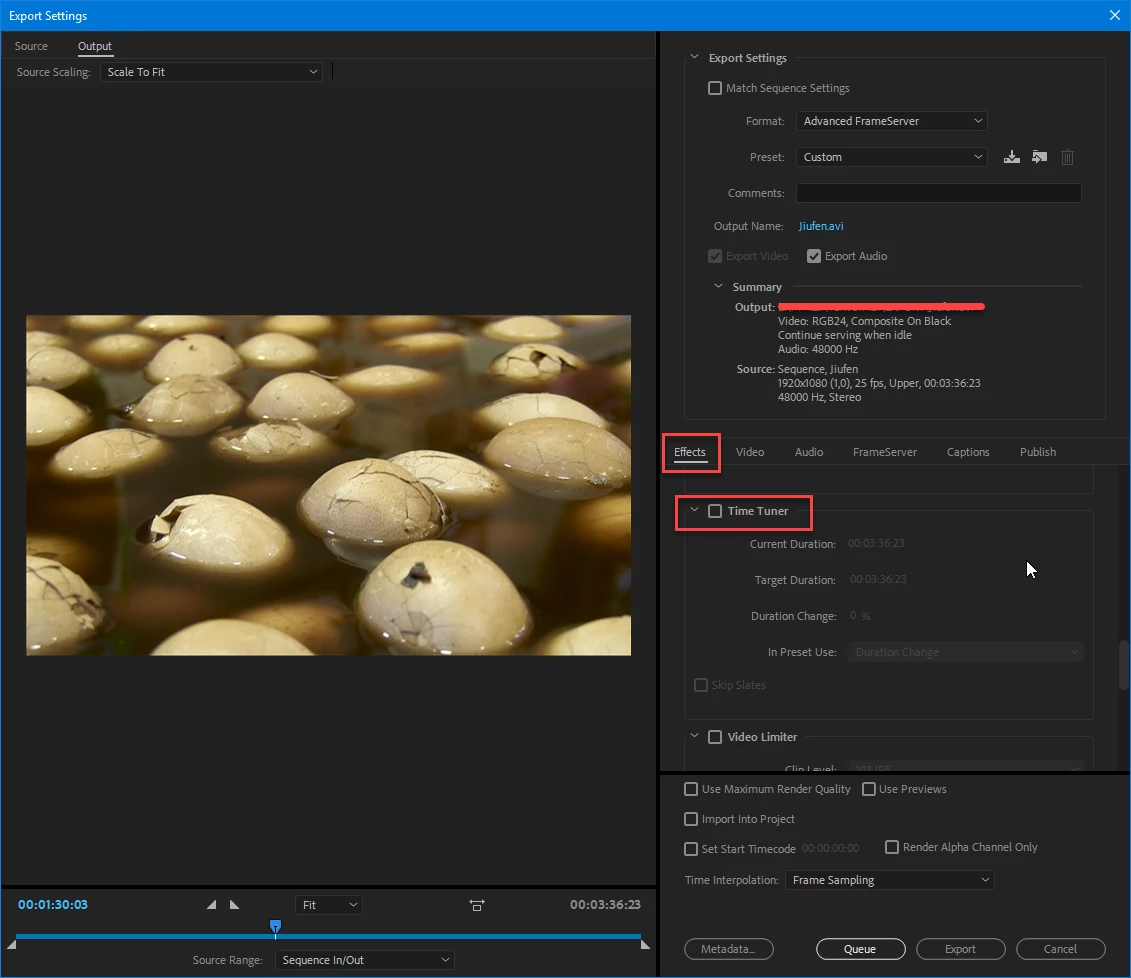
    Or you can try the Time Tuner under Effects in the Export Settings.

    3DDDanny
    3DDDannyAuthor
    Participating Frequently
    March 29, 2018

    Thank you Ann.  Where is the Time Tuner under Effects in Export settings?   I'm new to Premiere Pro CC.

    Ann Bens
    Community Expert
    Ann BensCommunity ExpertCorrect answer
    Community Expert
    March 29, 2018