Inspiring
April 23, 2021
Answered

Should Project Audio Format be 32 bit floating point?

  • April 23, 2021
  • 1 reply
  • 5937 views

I can't find any way to change this setting, even when creating a new project. Is it changeable? All my source audio files are 16-bit.


The problem I'm experiencing is this WAV plays normally in a multi-track sequence where I sync up clips.

It is overmodulated in my editing sequence. (Visually and audibly.)

If I crank down the volume by -8dB it sounds fine in my editing sequence.

But I'd like to see the waveform as it actually is, and hear it as it actually is.

I can drag that WAV directly into other sequences and it sounds fine there.


-Gord


File Path: V:\20120229 TR2016\Media Video TEAC4-A\2012-06-01 TEAC4D1 bit of D2 audio\Misc Preproduction\TEAC4 Day1 A01 During Kirk presentation RX7ed v20210421c.wav
Type: Waveform Audio
File Size: 488.17 MB
Source Audio Format: 48000 Hz - 16-bit - Stereo
Project Audio Format: 48000 Hz - 32 bit floating point - Stereo
Total Duration: 00:44:12:15184


Version 15.1.0 (Build 48)

Win10 (latest updates) 64GB RAM

This topic has been closed for replies.
Correct answer Averdahl
quote

But I'd like to see the waveform as it actually is, and hear it as it actually is.

I can drag that WAV directly into other sequences and it sounds fine there.


By @Gordon James McDowell


Yes, 32 bit floating point is correct.


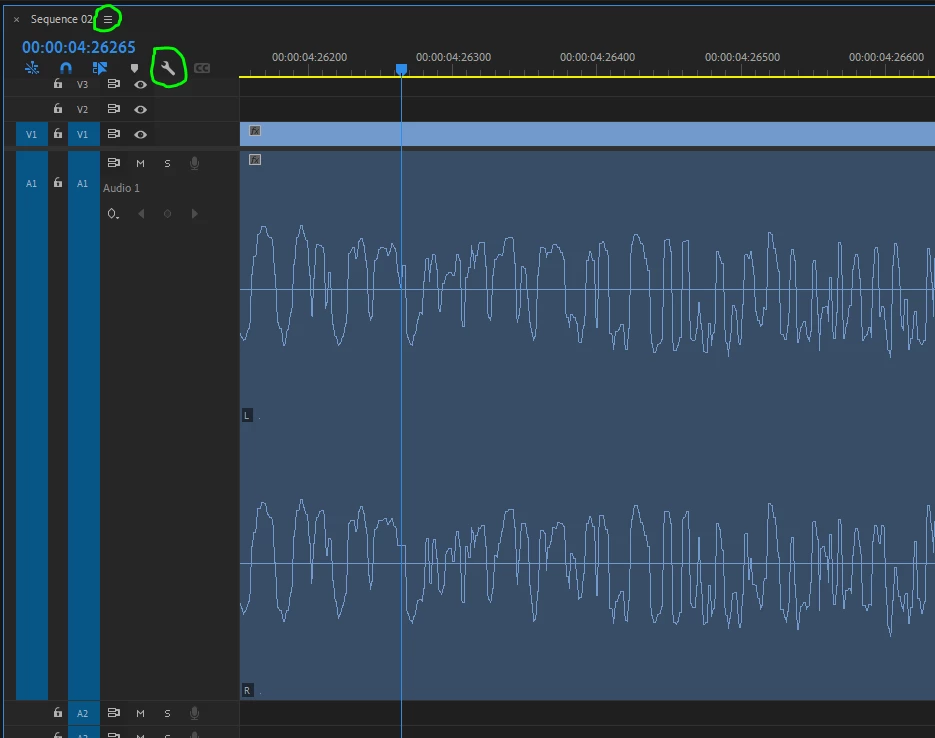
There are several ways of seeing the wave forms better. Un-check Rectified wave forms is one, make the audio track higher is another, zoom in is yet another and setting the timeline to Show Audio Time Units is great when syncing audio.


The options to change can be found under the green marked menues.


1 reply

Averdahl
Community Expert
AverdahlCommunity ExpertCorrect answer
Community Expert
April 23, 2021
quote

But I'd like to see the waveform as it actually is, and hear it as it actually is.

I can drag that WAV directly into other sequences and it sounds fine there.


By @Gordon James McDowell


Yes, 32 bit floating point is correct.


There are several ways of seeing the wave forms better. Un-check Rectified wave forms is one, make the audio track higher is another, zoom in is yet another and setting the timeline to Show Audio Time Units is great when syncing audio.


The options to change can be found under the green marked menues.


Inspiring
April 24, 2021

So everyone everywhere in every PPro project sees...
Project Audio Format: 48000 Hz - 32 bit floating point - Stereo

? (41k or 48k.)


Okay, I checked my Mac it is the same. That's not the problem.


Thanks for exposing me to that menu. I've confirmed the audio level for my sync-sequence audio track is not boosted.


It looks fine in the sync-sequence. It sounds find in the sync-sequence.


Yet in the edit sequence it is audibly overmoduled (by around 10dB) and looks like it is peaking too.


Anyway, thank you. I'll try submit the question again without this 32-bit-float diversion.


Averdahl
Community Expert
Community Expert
April 24, 2021

When you edit video, always use 48 KHz audio since all output is 48 KHz. Mixing sample rates can be problematic and should be avoided. (48000 Hz = 48k)


If the actual audio file is ok but sounds loud and make the audio meters peak it seems that you by mistake has moved the white/grey "rubberband" in the timeline. It is very easy to move it up or down by mistake without noticing it. Just hover the mouse over it to see it´s value. The default is 0.00 dB but i guess your´s is set to a higher value.


When i am not using them i always hide them by going to the wrench menu in the timeline and click on Show Audio Keyframes.