



AndrewTheGreat
Known Participant
September 17, 2024
Answered

Show Clip Keyframes disappears if Show FX Badges if off BUG

  • September 17, 2024
  • 6 replies
  • 548 views

Premiere Pro 24.6.1 (build 2)

If the Show FX Badges is switched off in the Timeline Display settings (the wrench):
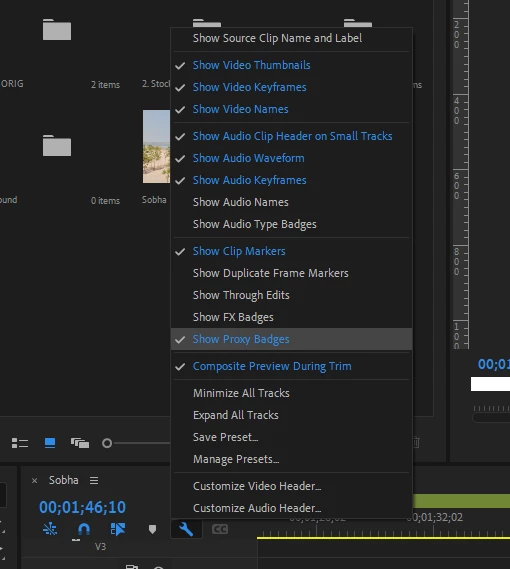
... then the whole set of the right mouse button context menus called Show Clip Keyframes drops out.
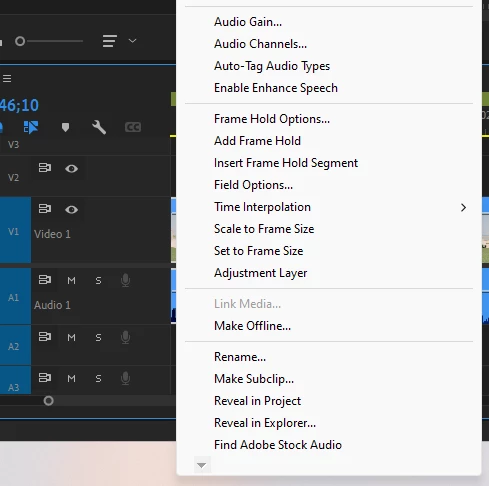
This menu includes:
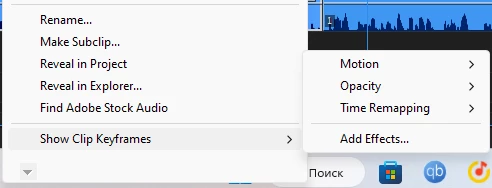
Once you switch the Show FX Badges back on the line appears in its place at the bottom of the context menu.

This is definitely a bug - showing or not showing badges should not canceal a vital set of tools.

 

Correct answer Ann Bens

It's not a bug, it's by design.

It has been that way ever since I can remember.

Check even 2023 and beta.

6 replies

Ann Bens
Community Expert
Ann BensCommunity ExpertCorrect answer
Community Expert
September 17, 2024

It's not a bug, it's by design.

It has been that way ever since I can remember.

Check even 2023 and beta.

AndrewTheGreat
Known Participant
September 18, 2024

Then the naming is wrong. "Show" badges must not "remove a menu set from the context menu". You can show and hide other features but they do not remove a whole set of tools.

Stop trying to edit and EDIT!
Kevin J. Monahan Jr.
Legend
September 17, 2024

Hi @AndrewTheGreat,

Are your tracks collapsed to the max level? Let the team know.


Thanks,
Kevin

Kevin Monahan - Sr. Community and Engagement Strategist – Adobe Pro Video and Audio
AndrewTheGreat
Known Participant
September 18, 2024

They are not, but it doesn't matter - you can collapse them or collapse some of them and expand some others, the problem remains. Only the Show FX badges changes this behavior.


Stop trying to edit and EDIT!
Ann Bens
Community Expert
Community Expert
September 18, 2024

When show FX is off, there is no context menu.

If show FX is turned on, there is Show Clip Keyframes in the context menu.

Been this way for many versions.