Participant
November 10, 2016
Answered

Slip Tool Not Working

  • November 10, 2016
  • 3 replies
  • 15882 views

Hi, just going through the Tutorials as I am new. All fine but when I try to use the Slip Tool nothing happens. The icons comes up and when I click on the clip the right icon comes up and the four little windows in the program block. When I click/hold and slide left and right nothing happens. The timecode on the two clips don't move. Can you help?
This topic has been closed for replies.
Correct answer Ann Bens

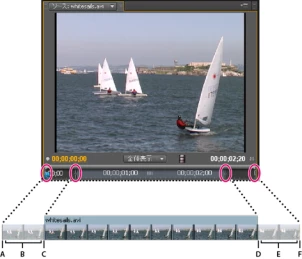
A clip needs handles in order to slip.

3 replies

mikem62153914
Participating Frequently
March 2, 2017

The tutorial that you're referring to is F quality, maybe F minus.

Ann Bens
Community Expert
Ann BensCommunity ExpertCorrect answer
Community Expert
November 10, 2016

A clip needs handles in order to slip.

wocanmeAuthor
Participant
November 11, 2016

Thank you for the advice. Works now. First time posting a question and really impressed with the response.

Inspiring
November 10, 2016

Is the clip you are trying to slip the entire contents of the clip? If so, there is no "room" for Premiere Pro to slip anything, as all available  frames of the clip are currently showing - so it won't do anything.

Load a clip to the source monitor. Mark an in point a few seconds after the clip begins, and an outpoint a few seconds before it ends. Now edit that clip to the timeline. Now if you use the slip tool on that clip in the timeline, does it work?

MtD

wocanmeAuthor
Participant
November 11, 2016

Thank you for this. Really helped.