Participant
September 23, 2023
Question

Slow Motion Playback

  • September 23, 2023
  • 3 replies
  • 363 views

Hello, 


I'm having issues with my playback once importing my videos. I've tried the following...

1: Handbrake and made the file smaller

2: Made it an MP.4

3: Checked the sequence and match the framerate and it didn't work


What else do I need to do? 
 

This topic has been closed for replies.

3 replies

Peru Bob
Community Expert
Community Expert
September 23, 2023
Peru Bob
Community Expert
Community Expert
September 23, 2023

Delete the Media Cache and Media Cache files:
https://community.adobe.com/t5/premiere-pro/faq-how-to-clear-your-media-cache-in-30-seconds-in-premiere-pro-2020/m-p/11017257/thread-id/260446?page=1

If that doesn't work, try resetting the preferences:
https://community.adobe.com/t5/premiere-pro/faq-how-to-reset-trash-preferences-in-premiere-pro/td-p/8236158?page=1

If that doesn't work, try resetting the Workspaces:
Reset a workspace
Reset the current workspace to return to its original, saved layout of panels.
1. Do one of the following:
• Click the Workspace menu icon and select Reset to Saved Layout.
• Choose Window > Workspace > Reset to Saved Layout.
from here:
https://helpx.adobe.com/premiere-pro/using/workspaces.html

If that doesn't work, try Preferences > Audio Hardware and set Input to None.

If that doesn’t work, try updating or rolling back your graphics driver directly from the video card manufacturer’s site. If NVIDIA, do a clean installation of the latest Studio Driver (NOT the Game Driver).

If that doesn't work, try creating a new project and import the old one into it.

Community Expert
September 23, 2023

Hi there,

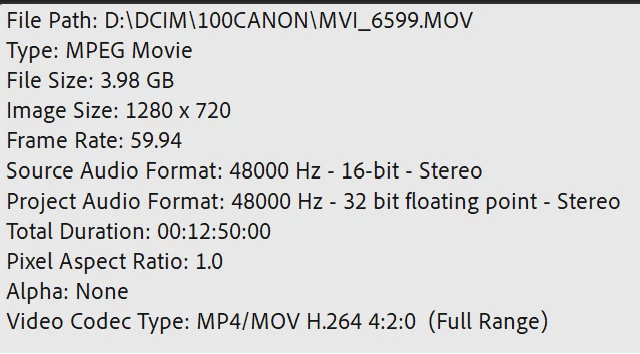
What was the codec and size of the video before you transcoded it to MP4?

You do NOT want to edit with H.264/MP4. It's a compressed codec that it is even more intensive on your system to edit; ease of editing has nothing to do with the size of the file and everything to do with the codec and bitrate.

Please list your PC specs also. We need to know what you have in order to advise you as to whether it shoudl work with your footage.

-------------------------------------------------------------------------JVK | Editor/Designer/Software Instructor. Pr, Ae, Ch, Ps, Ai, Id