chrisp58976499
Participating Frequently
July 4, 2016
Question

So how do you make a GOOD DVD in Encore?

  • July 4, 2016
  • 4 replies
  • 15151 views

     So I know how to make a grainy low res VHS quality DVD in Encore. You basically use any setting you want at whatever "Codec" or "resolution" or "quality" or "bitrate" or "UMPQ" and have it exported form Premier then import it into Encore (which by the way doesn't come with Premiere even though it is a base level program that one would need to export anything to DVD. That in an of itself is simply amazing ((it's hidden within an old version of CS6 inside the Creative cloud. You'll probably need a few u-tube tutorials to find it. ))). THEN you take your 4.6 GB exported video and watch Encore retranscode it to something around 2.7GB. You can mess with every setting and for the experts, "Advanced Settings" and watch as the quality of the transcode goes form poop to mud while the render time goes form one hour to 11 hours. Then have it burn the worthless fart it created onto a DVD, plug it into any DVD player, sit back and enjoy the 240i looking footage on you 30" monitor.

So I've become a pro at making DVDs that look like that over the past few days. So I ask you all how do you make a DVD with Encore that looks Good?

A few things I don't want to hear

"DVDs are SD so they will always look bad" I've edited footage on much less prestigious programs before and it looks, sharp, clear, grainless and professional, Don't tell me it can't be done.

"Your stock footage is probably bad" No it's 4K

"It's a Premiere Pro export problem" Nope the file Pr puts out is flawless. It's Encore.

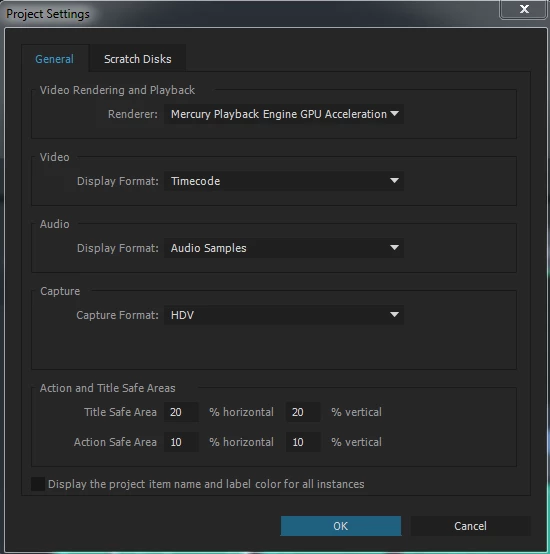
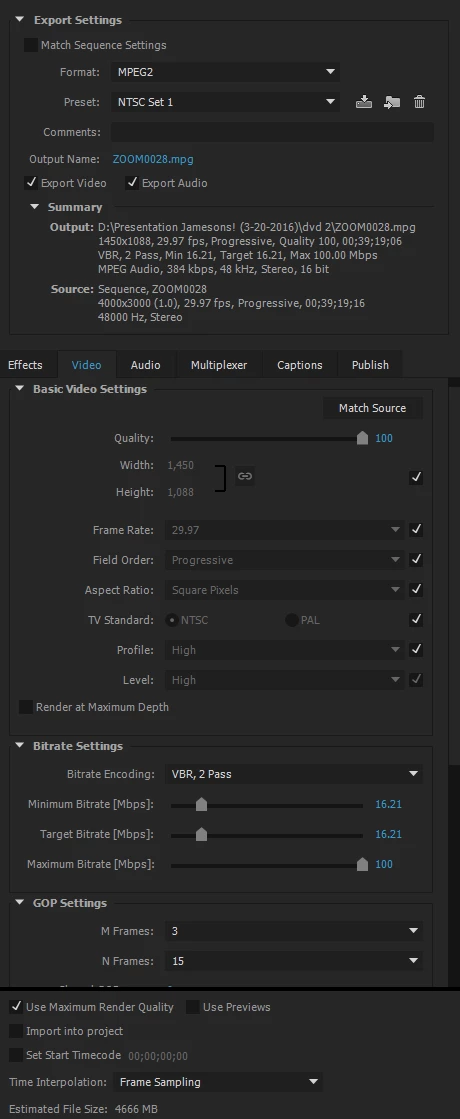
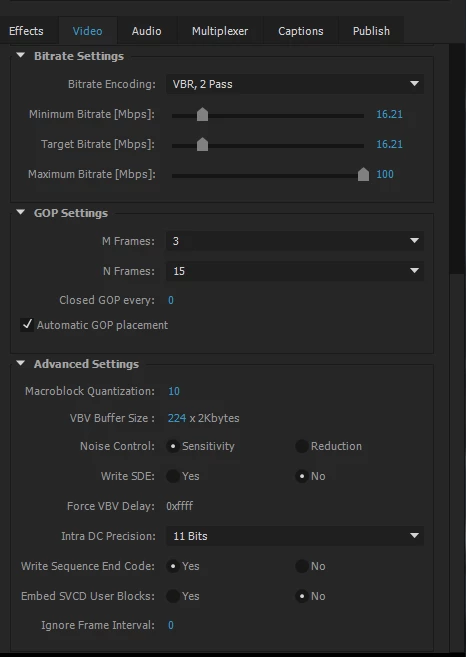
Now some useful information for you guys. Here all all of the screen shots for all the Project Settings and export settings in Premier that have led to the best quality for a NTSC export so far.
And here are the best settings I have tried in Encore that has yield the best of the worst footage I have made so far.
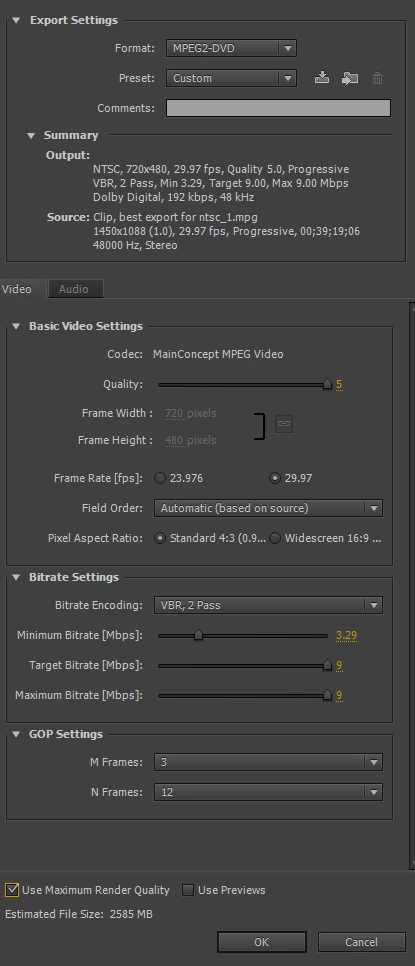
To be even more descriptive the video Encore puts onto a DVD is supper Grainy, especial around the edges of contrast areas and during any photo. There are dark chunky lines around borders, and the footage looks like it's lost about 80% of it's dynamic range especial when displaying black sections of video. Let me know what I am doing wrong.

This topic has been closed for replies.

4 replies

Stan Jones
Community Expert
Community Expert
September 18, 2019

Nested threads in the new forum are making it hard to follow a discussion. So I am posting this to the original post.


Nested under chrisp58976499 on 7/4/16 is this p9ost 9/17/19 by donkjohnson:


"these links go to the same place and have nothing to do with Encore! There is NO link to Encore on the page, they have destroyed it all."


It is referring to the links in John Smith's post 7/4/16. When I got to it this morning, the first link, an Encore FAQ, is not found, and I assume was not moved to the new forum. I hope they fix it. 


The other 2 links are now working.


Do let us know when you find bad links. We believe that they can be made active if the old post is useful.


Known Participant
June 7, 2017

Hi Chris,

any luck resolving bad quality DVD issue from Encore? Or, finding a workaround? I've been hating this problem for years.

Inspiring
September 9, 2017

OK, it's now Sept 9, 2017.  After all the talk for the last  year, it would be nice for someone to reply to the last question, that "dimailer" asked on June 7, 2017.  "Any luck resolving ....?" 

Stan Jones
Community Expert
Community Expert
September 10, 2017

Many users have gotten acceptable quality DVDs. The devil is in the details. This thread is not a good example of the difficult problems users struggle with because there were unnecessary problems (sequence mismatch etc).

Generally, post a new thread with your specific issues for help. Or find a better thread example if you want to point to recurring issues that you believe have not been solved.

Ann Bens
Community Expert
Community Expert
July 4, 2016

"It's a Premiere Pro export problem" Nope the file Pr puts out is flawless. It's Encore.

No its not Encore: if you are watching Encore encode again you using the wrong setting in Premiere

Encoding 4000x3000 to mpg 1450x1088 (weird setting) is not the way to go.

Second encoding: mpg 1440x1088 1.0 encoding to 720x480 4:3 is not the way to go

If your stock footage is 4K then all should be with a 4K sequence in 16:9 in Premiere. Export to mpeg2-dvd in 16:9.

chrisp58976499
Participating Frequently
July 4, 2016

Roger that exporting mpeg2-dvd in 16:9...

chrisp58976499
Participating Frequently
July 4, 2016

Ok here are the export settings from Encoder (original set in Premier)

And here is a still from that export before it even gets to Encore.

Again not going to wast a DVD on this export.

Keep the ideas coming. I'll keep trying them until I get something that works.

John T Smith
Community Expert
Community Expert
July 4, 2016

Export from PPro using the MPEG2-DVD preset and import the 2 files (audio and video) in Encore for authoring... exporting to ANY other codec means that Encore has to RE-code to make the file legal for a DVD... you show that you are doing that, so you should produce a DVD that is "almost" as good as one you buy in a store

You may experiment with the export settings, as long as you don't go over what is legal for a DVD... if what you imported into Encore shows as "do not transcode" you are legal for a DVD

Link to DVD Demystified FAQ http://forums.adobe.com/thread/544206

CS5-thru-CC PPro/Encore tutorial list http://forums.adobe.com/thread/1448923 has lots of tutorial links to help learn Encore

CS6 is the final Encore, see #8 here for why http://forums.adobe.com/thread/1337952?tstart=0

chrisp58976499
Participating Frequently
July 4, 2016

Thank you for the quick reply John. I looked at all of your links and I'm afraid to say that following their advice has made things much worse. Here is what I am looking at guys.

Here is the MPEG-2 export from Premier with my settings.

Fairly good right? I would be happy with that if I could get it on a DVD.

Here is the fart that Encore turns it into with my settings.

Ok? What happened? This is unusable. The fact that I pay money for this is literally insulting.

And here is the export from Premier with the exact settings of "Dave" from the video link you sent me.

No. I'm not even going to waste a DVD on this to find out if Encore with magically turn this into a piece of usable work.

I thank you for responding John. I need your help in putting the pieces together though.

From the links you sent me, and I read/watched all of them, it looks like there is no actual way Adobe lets one publish usable work onto a DVD.

CORRECT ME IF I AM WRONG!

Back in the 2000s Adobe farmed out the program they needed to turn edited videos into DVDs.

A third party company came back with Encore.

Encore then became the single solitary way for any user to take their work and encode it onto DVD natively within Adobes programs.

The third party that made the program pulled their support for it in 2012 because they thought everyone would be "steaming" by now.

Adobe said "Yep seems legit" and kept the last version of Encore that came out in 2012 with NO INTENTIONS ON UPGRADING IT!?

And now Adobe still refuses to dedicated the R&D into making their own encoder.

Did I get that right? I don't want to make false allegations here.

Because IF I'm right there is literally no reason to use any programs made by Adobe to do any serious editing work if the final project needs to be made on a DVD.

AVID would be better right? Because at least they take their video editing seriously right. Am I wrong? Someone tell me I'm wrong because If I'm right this is literally too stupid to be true.

To hammer my point home about how generic encoding programs are better at making a DVD then Encore here is a still from the same GOOD Premier export that was then encoded and burnt onto a DVD using Windows DVD Maker.

AND IT COMES FREE WITH WINDOWS 7 AS IF IT WAS JUNK WARE!