
Inspiring
March 18, 2019
Answered

"Software Only" encode option and no GPU usage in Premiere Pro CC 2019 and Media Encoder CC 2019

  • March 18, 2019
  • 4 replies
  • 15879 views

Hi,

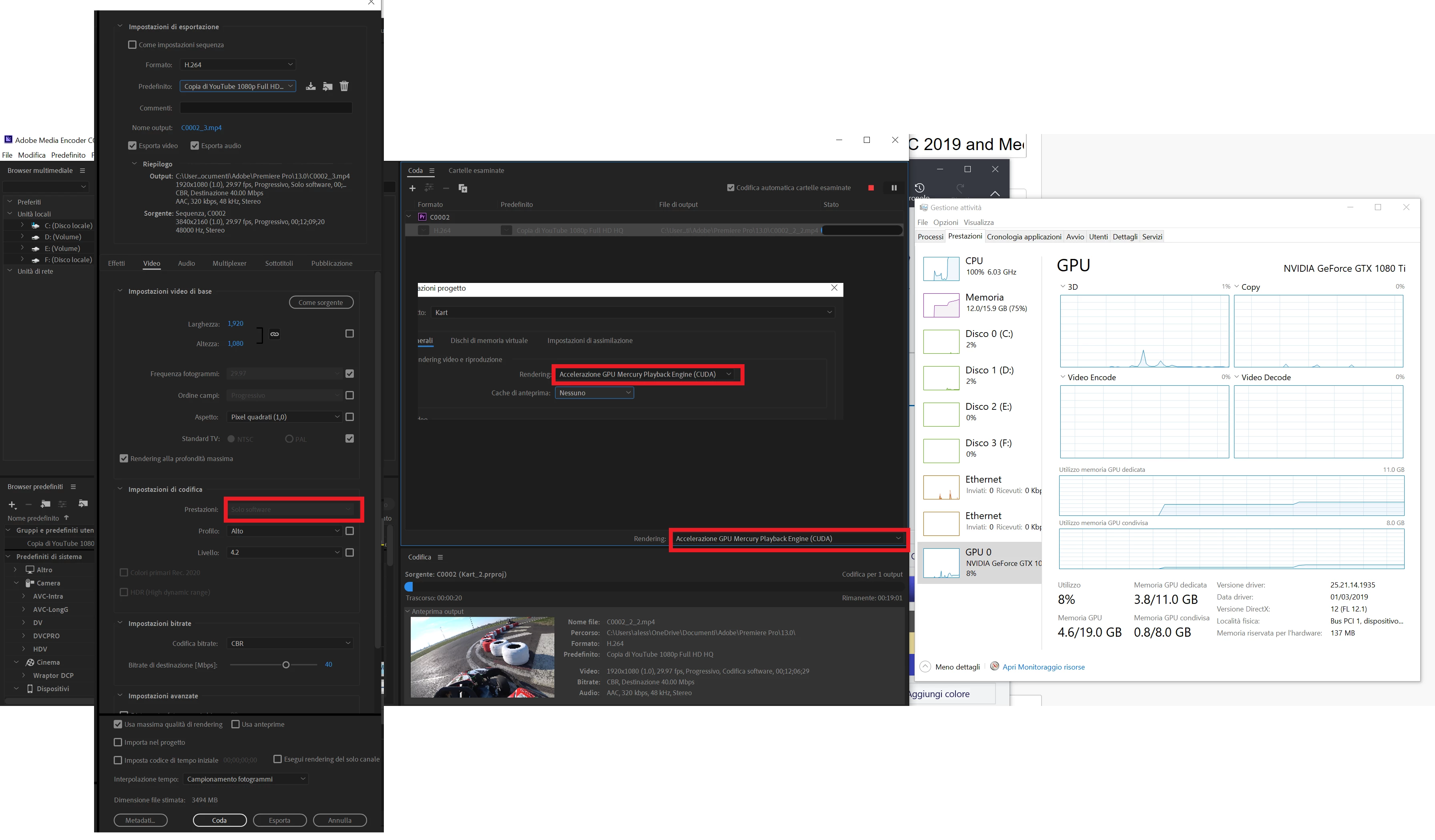
I've an issue with CC 2019. When I export a h.264 video, in the encoding options->performance there is "software only" with no other options.

- I've enabled CUDA acceleration in the project settings

- in the NVdia control panel i've enabled the CUDA settings in the specific software (Premiere and Media Encoder)

- in Media Encoder I selected the CUDA option

- the OS/Drivers/Premiere are up to date

- OS is fresh. I formatted tonight because I had another issue with premiere pro.

but, the GPU remains in idle, only CPU burns.

Can you help me?

Thanks

My PC:

i7 3770K 4.6ghz

16GB DDR3 2400mhz

1080Ti

Win 10 PRO 1809 with all updates

CC 2019 updated to 13.0.3 build 9, the latest

Driver 419.35
    This topic has been closed for replies.
    Correct answer R Neil Haugen

    There's two completely different issues here.

    The first is a CPU issue. Even though the i7 3770K officially has QuickSync 'available', in showing the software only in the Summary section it means that either Pr isn't recognizing that Quicksync is available and operable ... or your computer isn't. I don't know what you have set in your Pr's Preferences for H.264 encoding, but go check to make sure you have that set to enable hardware encoding.

    Next ... the GPU is NOT at all linked to the "software encoding" in the summary section of the Export dialog. That is purely about Intel's QuickSync being 1) available on the CPU and 2) used.

    If you are just doing a "straight" export without frame-size changes going on, no color say Lumetri or stuff like Warp, then the GPU won't be used much by Pr to begin with. Here's a link to the GPU Accelerated Effects list. What is on here gets GPU use, what isn't ... doesn't.

    Neil

    GPU Accelerated Effects: https://helpx.adobe.com/premiere-pro/using/effects.html

    4 replies

    korra88Author
    Inspiring
    March 19, 2019

    sooooo, I updated the GPU driver with the latest 419.35 with a clean installation (as previously), but now everything works well. I don't know why this time it works, but doesn't matter

    Thanks for all your support

    Legend
    March 19, 2019

    Although Neil has the "correct" answer, I would like to add that the integrated Intel HD graphics MUST be enabled in order for the hardware H.264 acceleration to work at all. If you have the integrated on-CPU Intel graphics disabled, or if your Intel CPU lacks integrated graphics whatsoever, or if you're using any AMD CPU, you cannot have hardware acceleration at all because Adobe neither officially supports nor includes a hardware encoder specifically for NVIDIA GPUs, which is REQUIRED for the GPU to even accelerate H.264 encodes at all.

    korra88Author
    Inspiring
    March 19, 2019

    Yes, my HD graphic card is disabled. I'll try to enable it.

    Kevin-Monahan
    Community Manager
    Community Manager
    March 18, 2019

    Hi Korra88,

    Sorry about your issue. I'm running an earlier driver, 416.78 and it's running great on the most recent version of Premiere Pro. Can you try rolling back? Another thing you could try is a "clean reinstallation" of those GPU drivers: FAQ: Why is my GPU not available for Mercury Playback Engine GPU acceleration?

    Thanks,
    Kevin

    Kevin Monahan - Sr. Community and Engagement Strategist – Adobe Pro Video and Audio
    Peru Bob
    Community Expert
    Community Expert
    March 18, 2019

    How much VRAM on the 1080Ti?

    korra88Author
    Inspiring
    March 18, 2019

    11GB

    R Neil Haugen
    R Neil HaugenCorrect answer
    Legend
    March 18, 2019

    There's two completely different issues here.

    The first is a CPU issue. Even though the i7 3770K officially has QuickSync 'available', in showing the software only in the Summary section it means that either Pr isn't recognizing that Quicksync is available and operable ... or your computer isn't. I don't know what you have set in your Pr's Preferences for H.264 encoding, but go check to make sure you have that set to enable hardware encoding.

    Next ... the GPU is NOT at all linked to the "software encoding" in the summary section of the Export dialog. That is purely about Intel's QuickSync being 1) available on the CPU and 2) used.

    If you are just doing a "straight" export without frame-size changes going on, no color say Lumetri or stuff like Warp, then the GPU won't be used much by Pr to begin with. Here's a link to the GPU Accelerated Effects list. What is on here gets GPU use, what isn't ... doesn't.

    Neil

    GPU Accelerated Effects: https://helpx.adobe.com/premiere-pro/using/effects.html

    Everyone's mileage always varies ...