Participant
April 30, 2025
Answered

Software render only is not available

  • April 30, 2025
  • 3 replies
  • 1060 views

We just installed latest version of Premiere 2025 (25.2.3)  and it's not possible to render "only software" using CPU. And it's a problem cause our workstation and workflow is based mainly on working usinh our threadripper instead our GPU. Anyone had this problem? How do you solved it?

My specs are:

AMD Ryzen Threadripper 7970X 32-Cores

NVIDIA GeForce RTX 4090
256 Ram

Asus mainboard.


Warm regards, Demetra

Correct answer Averdahl

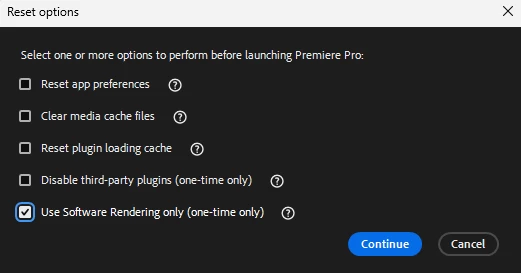
Press the Shift -key and launch Premiere Pro to launch the Reset options dialog. Check "Use Software Rendering..." and click Continue.


Now you will have what you want, but you need to do it everytime you launch Premiere Pro since Adobe removed the option you/we had before.


quote

...it's not possible to render "only software" using CPU.


By @Evoque Art House

3 replies

Participating Frequently
February 11, 2026

I hold “shift” on start up,. but that 5th option is missing for me. I don’t have the checkbox “Use Software Rendering only (one-time only)"
I am on Premiere Pro Version 26(Build 72)
Windows 11 
RTX 3080

I want to disable GPU acceleration but it is greyed out and I am getting render compile errors on some of my clips.

Averdahl
Community Expert
AverdahlCommunity ExpertCorrect answer
Community Expert
April 30, 2025

Press the Shift -key and launch Premiere Pro to launch the Reset options dialog. Check "Use Software Rendering..." and click Continue.


Now you will have what you want, but you need to do it everytime you launch Premiere Pro since Adobe removed the option you/we had before.


quote

...it's not possible to render "only software" using CPU.


By @Evoque Art House
Participant
May 1, 2025

Super, fixed! Very useful information.  I don't know why but GPU rendering is not only slower (certainly due to an extreme combination of plug-ins) but also less reliable. With powerful processors it is certainly better to export using only software. Thanks

Community Manager
May 1, 2025

Hi Evoque Art House,


Are you experiencing issues with any specific plugins? Are these inbuilt or third-party? We would like to know more about the reliability/performance issues that you are experiencing with GPU accelerated renderer.


Thanks,

Sumeet

kglad
Community Expert
Community Expert
April 30, 2025

in the future, to find the best place to post your message, use the list here, https://community.adobe.com/

p.s. i don't think the adobe website, and forums in particular, are easy to navigate, so don't spend a lot of time searching that forum list. do your best and we'll move the post (like this one has already been moved) if it helps you get responses.


<"moved from cc desktop bugs">