Hrishikesh5C4D
Participant
June 3, 2021
Answered

Solve "GPU acceleration needed"

  • June 3, 2021
  • 2 replies
  • 1364 views

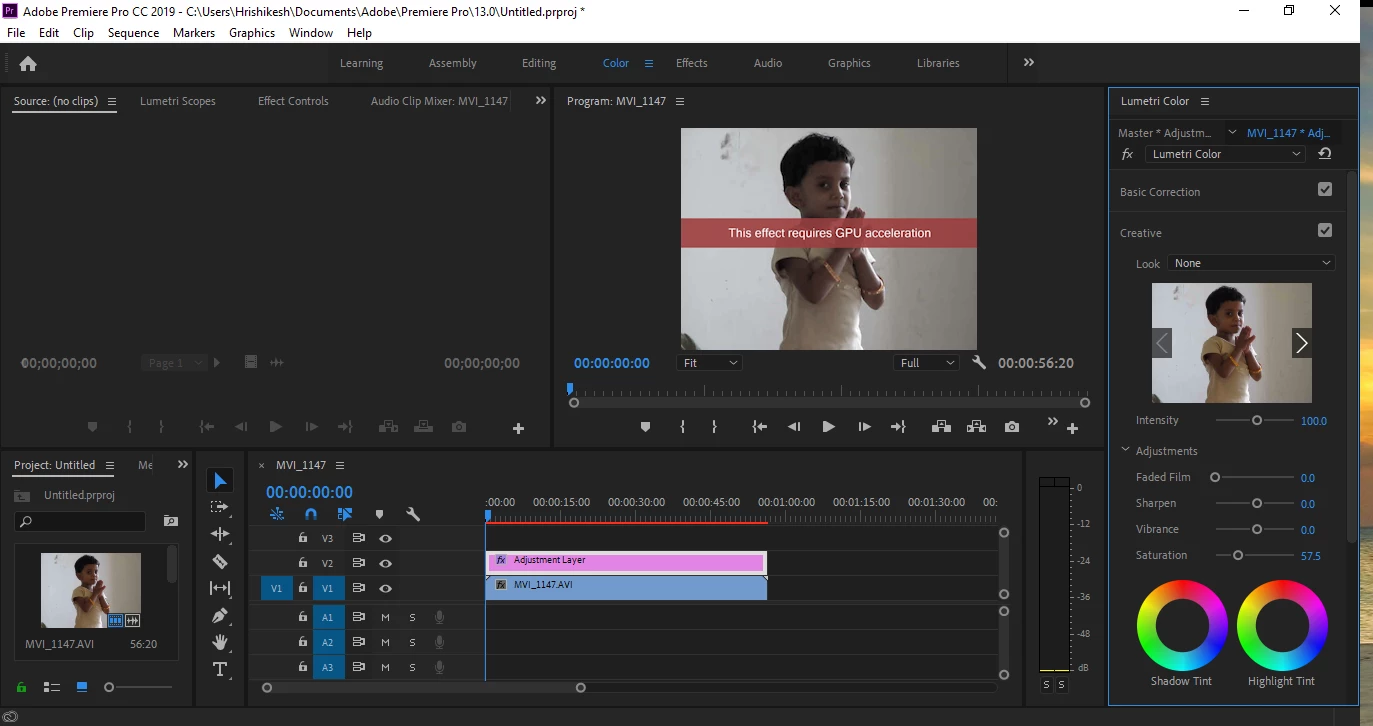
Hello , I am a beginner level premiere pro user. I have been getting this error - "GPU acceleration needed" while using the noise effect. I have a NVidia GT 730 (4 GB) GPU  card. I got this same error on my on board graphics too. (Intel HD 4600). Kindly requesting anyone to solve this issue . Thank you!


This is a screenshot of the error. I use Adobe Premiere Pro CC 2019.

This topic has been closed for replies.
Correct answer RjL190365

I am sorry to tell you this, but Premiere Pro 13.x and later no longer supports either of your PC's two GPUs at all anymore. Both of those GPUs are now effectively or completely obsolete. You see, Intel had discontinued all mainstream support for the 4th-Gen CPUs in October 2017; this meant that no more new compatibility fixes ever for the integrated GPU while only critical security fixes continued. And your particular GT 730 is the version that I had warned everyone against even in 2015, and is now completely obsolete as it used the Fermi architecture with only 96 CUDA cores whose driver support from Nvidia itself had been completely ended (EOSL'd) in 2018.


Unfortunately, most 4 GB GT 730's used that obsolete Fermi architecture (as described above) rather than the newer (but still outdated) Kepler architecture with 384 CUDA cores.


And given today's super-inflated GPU prices and very limited availability, you are stuck between a rock and a hard place - a no-win situation. Right now the only cost-effective upgrade for your desktop PC would be to get a new 11th-Gen Intel i5 6-core/12-thread CPU (such as an i5-11600K) plus an Intel 500-series-chipset-based motherboard and 16 to 32 GB of DDR4 RAM. At least the 11th-Gen's integrated graphics would tide you over until the discrete GPU prices come back down to sane levels.

2 replies

RjL190365Correct answer
Legend
June 4, 2021

I am sorry to tell you this, but Premiere Pro 13.x and later no longer supports either of your PC's two GPUs at all anymore. Both of those GPUs are now effectively or completely obsolete. You see, Intel had discontinued all mainstream support for the 4th-Gen CPUs in October 2017; this meant that no more new compatibility fixes ever for the integrated GPU while only critical security fixes continued. And your particular GT 730 is the version that I had warned everyone against even in 2015, and is now completely obsolete as it used the Fermi architecture with only 96 CUDA cores whose driver support from Nvidia itself had been completely ended (EOSL'd) in 2018.


Unfortunately, most 4 GB GT 730's used that obsolete Fermi architecture (as described above) rather than the newer (but still outdated) Kepler architecture with 384 CUDA cores.


And given today's super-inflated GPU prices and very limited availability, you are stuck between a rock and a hard place - a no-win situation. Right now the only cost-effective upgrade for your desktop PC would be to get a new 11th-Gen Intel i5 6-core/12-thread CPU (such as an i5-11600K) plus an Intel 500-series-chipset-based motherboard and 16 to 32 GB of DDR4 RAM. At least the 11th-Gen's integrated graphics would tide you over until the discrete GPU prices come back down to sane levels.
Hrishikesh5C4D
Participant
June 4, 2021

Hello

Thank you for the support

What do you think is the best graphic card for my system please


Joëlle Bh
Community Expert
Community Expert
June 3, 2021

Hello,


Your GPU is not powerful enough to support GPU accelerated effects. You'll need to use software only mode for the Mercury Playback Engine, 

Please check this link: https://community.adobe.com/t5/premiere-pro/faq-how-to-change-the-video-renderer-in-premiere-pro-and-adobe-media-encoder/m-p/9851383


Hrishikesh5C4D
Participant
June 3, 2021

Hello, 

Thank you for your valuable support ...

I will try and change my GPU card..

Another problem I experience is that while rendering the video clips, (not exporting as media) I experience that the GPU is not at all being used... The CPU usage sky rockets upto a 100%... 

And it's very slow too. I meant the rendering process.


Is this normal or should the rendering process use the GPU as well?


Kindly requesting to provide support on this.

Thank you

Joëlle Bh
Community Expert
Community Expert
June 3, 2021

Do you have a pc or a laptop? i'm trying to figure out if it's better to change your laptop instead of upgrading these things