
Known Participant
February 25, 2020
Answered

(SOLVED) Only half of my proxies play.

  • February 25, 2020
  • 3 replies
  • 1622 views

Hi, I'm stuck here so if anybody more saavy could help that'd be fantastic!

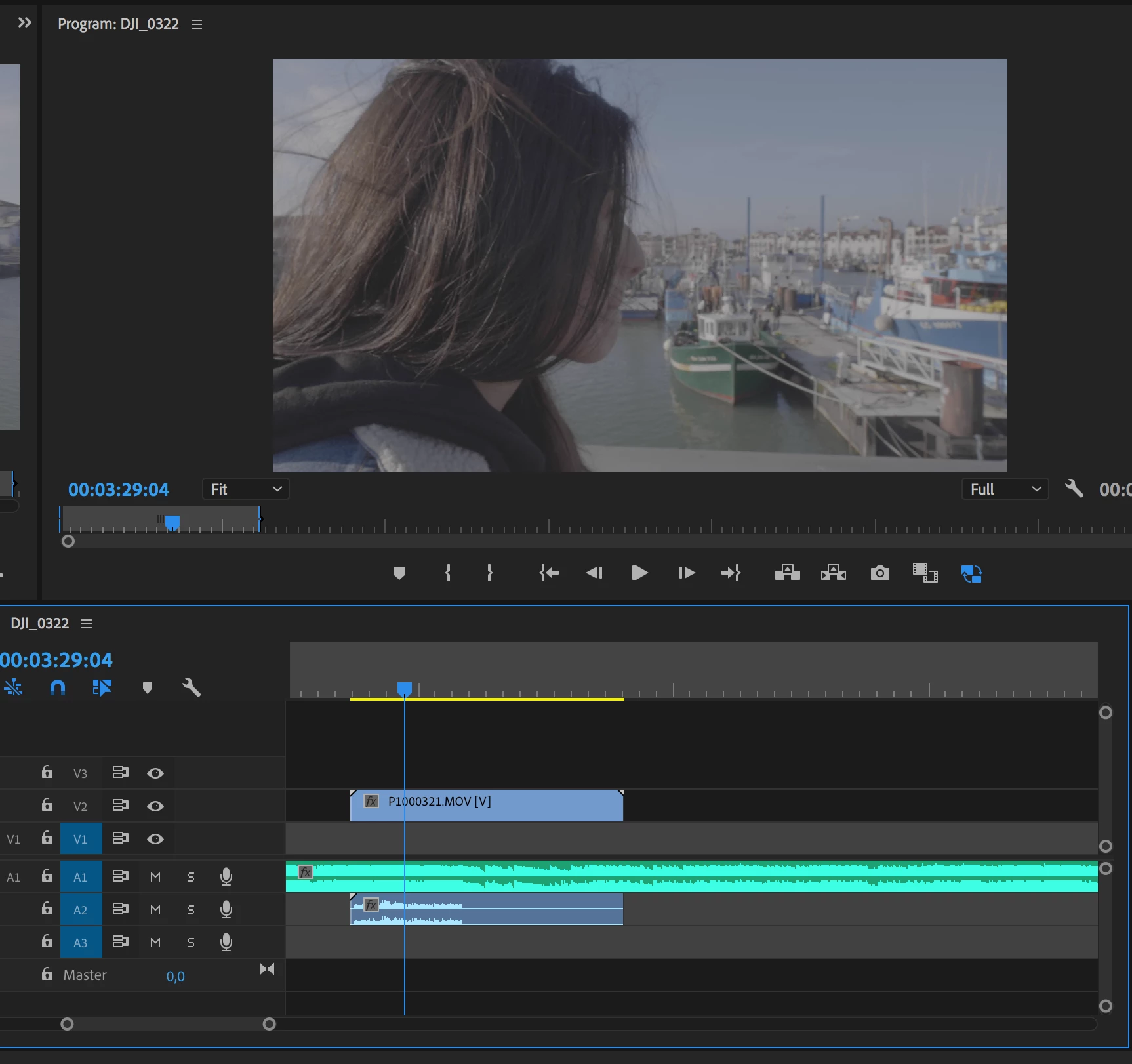
I have some 4K / 60fps footage shot with my GH5. First I interpret it as 24 fps, and then I create 720p proxies so I can start editing. Maybe I'm doing something wrong but my clips end up having an audio waveform only up to a certain point (I ditch the audio anyway) beyond which the clip won't play. It will stay still as if it was a picture.

BTW I noticed my proxies don't play with either quicktime or VLC outside of premiere pro. Shouldn't they be able to like a simple 720p footage?

This is how my clip looks like in the timeline, after where the audio waveform stops the clip won't play anymore:
Thanks in advance to anyone that can help!
This topic has been closed for replies.
Correct answer R Neil Haugen

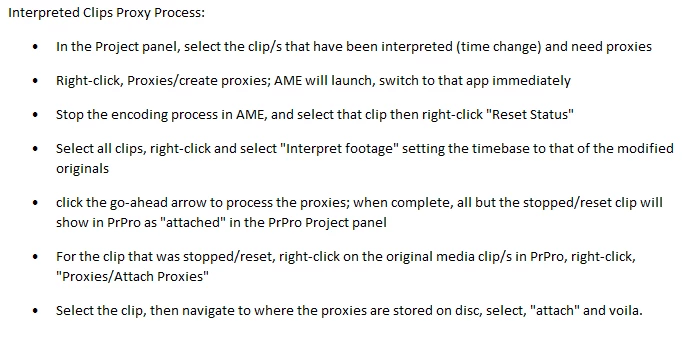
Premiere's built-in proxy process doesn't tend to work well with interpreted footage unfortunately. I think that's the problem here. There was an instruction set some time ago for creating proxies for modded time clips ... here ...

I haven't tried it in a while, but would suggest this as a possible fix.


Neil


3 replies

Inspiring
June 20, 2023

So the latest workaround I've found to work quiet well.


 - Create the proxies using the ProRes preset from Premiere.

 - Remove the clips from the project.

 - Import the proxies instead.

 - Interpret the footage as desired.

 - Relink original media.


I don't know why, but in this way, the interpretation you apply will reflect on both the proxy and original media.

firasm418746
Participant
June 20, 2023

Just had the same problem, which is weird because usually it works fine. But yeah, it's definitely the fact that you interpreted your footage. Just going back into the project panel, highlighting all clips, right click --> modify --> interpret footage --> (under frame rate) click on use frame rate from file. That's the quick fix if you have over 400GB of footage and you don't have time to re-create proxies the right way.

R Neil Haugen
R Neil HaugenCorrect answer
Legend
February 25, 2020

Premiere's built-in proxy process doesn't tend to work well with interpreted footage unfortunately. I think that's the problem here. There was an instruction set some time ago for creating proxies for modded time clips ... here ...

I haven't tried it in a while, but would suggest this as a possible fix.


Neil


Everyone's mileage always varies ...
Participating Frequently
February 25, 2020

OR


1. Interpret footage in premiere.

2. right click in premiere and "create proxies"

3. When they populate in media encoder hit red "STOP" right away on top right corner

4. Highlight the clip that began to encode and right click and "Reset Status"

5. Delete that partial clip in the finder

6. Highlight all the clips in encoder and right click and interpret them as you did in premier and start the encode

7. Make sure you add the toggle proxies button and you are good to go

Known Participant
February 26, 2020

Thank you very much for answering me.

That looks like the same method as Neil's and it solved my problem.

Thank you guys so much!