
Participant
July 1, 2025
Question

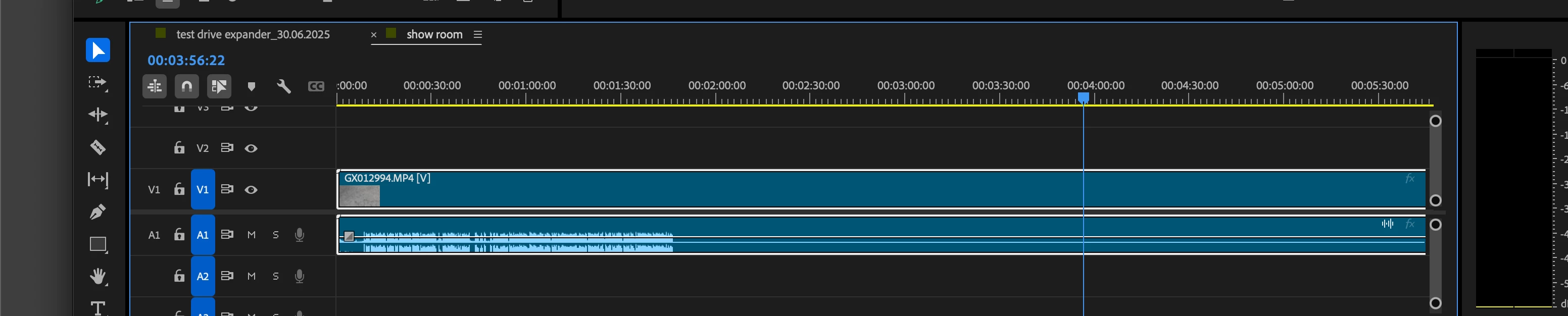
some part of video don't have an audio

  • July 1, 2025
  • 5 replies
  • 196 views


I check the video through Quicktime player. It has a normal sound.

But when imported to Premier pro, the sound disappears as shown in the picture.

I want to know how to solve this problem.


Note: This file is obtained from data recovery. I don't know if it affects the use or not.
 

5 replies

R Neil Haugen
Legend
July 2, 2025

This can happen if the media is say produced "high frame rate" ... like on some BlackMagic cameras and others, where you have a set 'normal' framerate and a faster one for creating slo-mo. The audio is recorded at the standard framerate, and so is 'short' compared to the video clip.


You can "undo" the slo-mo by dragging the length of the video file down to the length of the audio file, which I've done I don't know how many times. Yea, it cuts a lot of frames out, but they wouldn't have been there at normal framerate anyway so there's no image issues.


So ... my question here is, does the audio sound normal when you play the file? If so, this might be a high framerate clip ... 

Everyone's mileage always varies ...
Community Manager
July 2, 2025

Hi kitiphan_0553,


Sorry to hear about this. Is the issue happening specifically with this recovered media? If so, please try Peru Bob's suggestion of transcoding it to check if it's working properly. Also, if possible, please share a download link of the affected media to test it at our end.


Thanks,

Sumeet

Peru Bob
Community Expert
Community Expert
July 1, 2025

Please use the free MediaInfo and post a screenshot of the properties of your media in tree view:
https://mediaarea.net/en/MediaInfo

Many users are having issues with VFR. If the file is variable frame rate, use Handbrake to convert to constant frame rate before importing into Premiere Pro:
https://handbrake.fr/downloads.php
Here is a tutorial:
https://www.youtube.com/watch?time_continue=34&v=xlvxgVREX-Y

Shutter Encoder may also be used to convert to Constant Frame Rate:
https://www.shutterencoder.com/en/

Peru Bob
Community Expert
Community Expert
July 1, 2025

Try Preferences > Audio Hardware and set Input to None.

jane-e
Community Expert
Community Expert
July 1, 2025

@kitiphan_0553 


I've moved your post from Creative Cloud desktop to the Premiere Pro forum.


Jane