



peterkellner1
Inspiring
April 20, 2017
Answered

Somehow My Title Menu Is Missing

  • April 20, 2017
  • 9 replies
  • 94818 views

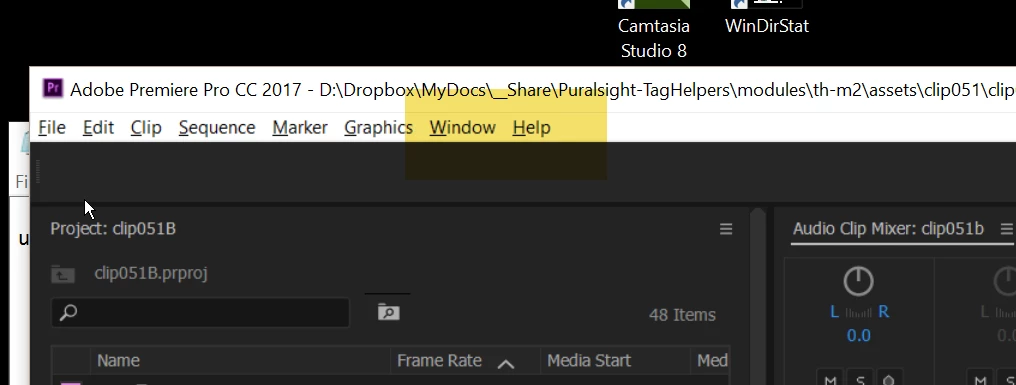
I just installed the latest PR CC 2017 on a new windows computer and I was working along, pressed "Control-T" thinking I'd get a title dialog and nothing happened. Then, I looked up at my menu bar (see attached) and the Title menu is gone!  Where did it go and how do I get it back?
This topic has been closed for replies.
Correct answer Vidya Sagar

Hi peterkellner1,

This was removed in 11.1 since the new Essential Graphics was added. You can now go to File menu > New > Legacy Title.

Create title graphics |

Thanks,

Vidya

9 replies

Kevin-Monahan
Community Manager
Community Manager
May 12, 2020

Please, all.
Move away from even using Legacy Titles. Anything called "Legacy" means that it will be phased out of the product eventually.


Use the newer Title tools and Essential Graphics panel.


If that's a serious problem for your workflow, let the product team know here.


Thanks,
Kevin

Kevin Monahan - Sr. Community & Engagement Strategist – Pro Video and Audio
R Neil Haugen
Legend
May 12, 2020

John,


So what are the things in the Legacy titler that you need that aren't possible in the EGP? It's always good to know what are the precise pain points.


Neil

Everyone's mileage always varies ...
Fulani Filot
Participating Frequently
August 16, 2019

Excellent, I found it. What about the options for making the title the "still" or "crawling" type...like in Premiere CS6? I didn't see these options in the Premiere CC "File menu > New > Legacy Title."

Inspiring
August 16, 2019

Click here:

MtD

Participant
July 1, 2017

You should change important things when you update to the next CC. How can you change our workflows from 11.1.1 to 11.1.2. Come on guys. Be serious. I have huge projects with tons of Lower Thirds. And the thing is you make it more stupid to create a title.

Participating Frequently
June 7, 2017

Thank you. I've sitting here raking my brain, even reset my workspace while holding down Shift/Alt during start up. This created an even bigger headache because now all my previous files are gone, all my saved title templates are gone and I have to start from scratch. I really wish I had seen this before the 3 hours it took me to try to figure out the issue.

Inspiring
June 16, 2017

I have found the workaround to allow one to use legacy templates, however it's a horrible hack really.

There is an adobe help page on this, however it has a typo which means it doesn't work, so here's what you do.

  • You find where your templates are, mine were in C:\Users\Dave\Documents\Adobe\Premiere Pro\11.0\Profile-Dave\Templates
  • You create a new project called eg "Title Templates", and put this somewhere where your media browser favourites allow you to quickly access it
  • You then import those template files into the project.
  • Save the project

Now to use one of your templates, you do:

  • Media Browser, find that "titles" project, open in media browser, and then either
  • Double click them into source, drag them into timeline, then double click to edit, or
  • Import them into project, and edit / use them from the project panel

It's painful, however hopefully that helps anyone who, like me, has a library of saved templates they want to continue using...

AlexandrTRK
Participant
June 27, 2017

Why create a project? You can simply import the required template

richarde99565350
Participant
June 6, 2017

Are there any editors actually designing this software anymore? It was SO MUCH better and faster in the workflow to take an exiting project with titles and create a new title "based on current title" and just change the font or move it without having to re do everything. I have many clients that simply want a font change or or something without saving over the title already there.. Looks like i'm going to try going back a version. RIDICULOUS!

Inspiring
June 16, 2017

Totally agree, simple changes made hard, plus lost all my templates :-(

Absolutely ridiculous change...

Participant
May 21, 2017

This change in the workflow in the middle of a huge project really sucks. So Your message to users is not to update?

Participating Frequently
June 7, 2017

Same here. I had to redo a project. A whole half a day, gone.

Participant
April 25, 2017

this is the biggest BULLSHIT ever!!!!!!!!!!!!!!!!!!!!!!!!!!!!!!!!!!!!!!! Can't even make titles easily anymore

Inspiring
April 25, 2017

You can't use the Legacy Title Tool?

MtD

chris-bogle
Participating Frequently
April 28, 2017

I love the way that while Resolve and Avid continually strive to make their products editor friendly, Adobe seem determined to go the opposite way and complicate workflows. Every time you think you have PP sussed something fundamental changes, like when a supermarket changes all of the aisles around.

*Bangs head off desk and considers move to now very good Resolve*

Participant
April 21, 2017

But what about the title templates? Is it gone?! I've got lot of title templates and now I can't use them, I'm really sad and angry about that.

Vidya Sagar
Adobe Employee
Vidya SagarCorrect answer
Adobe Employee
April 20, 2017

Hi peterkellner1,

This was removed in 11.1 since the new Essential Graphics was added. You can now go to File menu > New > Legacy Title.

Create title graphics |

Thanks,

Vidya

peterkellner1
Inspiring
April 20, 2017

Thanks! sounds like this a big deal.  Any good videos out there on this new feature? I'm glad I can still get to the old title page.  I often end up in photoshop so I'm hoping this will make it so I don't have to go to photoshop so often.

Inspiring
April 20, 2017