
Known Participant
October 28, 2018
Answered

Something is totally broken in TIMECODE effect

  • October 28, 2018
  • 9 replies
  • 15270 views

Look, this is really frustrating. Timecode effect applied to any clip produce some random TC on screen. Effect is totally unusable

What i found out:

  1. this issue somehow depends on project, clip and sequence FPS. I've got the most frustrating results on a 24 fps (project, sequence and clips)
  2. Premiere 2018 and 2019 - both have this issue, but in 2019 it's even more severe.
  3. Timecode overlay tab in Export window produce a timecode, which is not in sync neither with sequence TC, generate TC preset and clip TC
  4. This issue is likely produced by wrong math in programming.

When I apply the Timecode effect to a clip in sequence, it displays timecode with a random shift.

I have 24fps project, 24fps clip and 24fps on sequence.

My aim was to have on-screen timecode starting from 00:00:00:00. Apparently, 'Generate' and 'Media' presets produced wrong results.

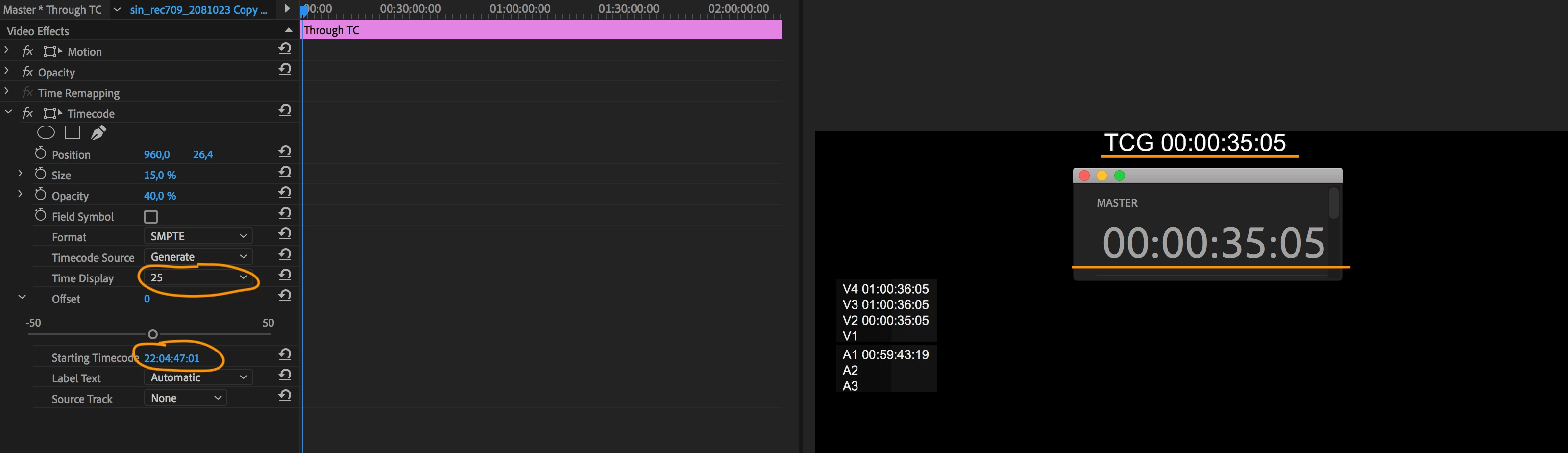
In the end to have it right, I set 'Starting timecode' to 22:04:47:01 and frame rate to 25. Which resulted in 00:00:00:00 on screen (see screenshot).

Basically my question is WHY??

Am i the only one who face this issue?

Screen recordings below:
tc premiere 2018 - YouTube

tc premiere 2019 - YouTube

Correct answer weccleston

I've had similar headaches with the TC effect, but switching to "Mercury Playback Engine Software Only" fixes it for me.  It fixes a lot of other issues as well, particularly with transparency and track mattes, and probably others.  I wish everything worked with OpenCL, but that just isn't the case yet.

9 replies

ryanm88358274
Participant
October 12, 2021

I had the problem a wild back nest the Adjustment Layers and then put the timecode on the nest.

Participating Frequently
July 28, 2020

July 2020 update. The timecode plugin still does not work PROPERLY on an adjustment layer - it does appear and half works but it has all kinds of offset issues. However it does work fine on a TRANSPARENT LAYER. This does make some sort of sense as the timecode preset is not performing an adjustment. Hope this helps others who are searching still.

whatsarobinson
Participant
August 1, 2020

Transparent layer doesn't work for me either. It offsets my TC by around 9 min and change. Software Only works. Same issue with Media Encoder. Media Encoder will simply not read the video if I have a Timecode effect with the renderer not set to Software Only.


This was fixed a few months ago in one of the iterations of CC 2020... but the bug has returned in this latest version 14.3.1 .

Participant
March 18, 2021

Hi Everyone,


I've also had issues with both adjustment layers / transparent layers over the years depending on what version I was using at the time... This is kind of a stupid workaround, but with the most up to date version of CC (as of this post), I've found that using a BLACK MATTE does the trick with a slight OFFSET adjustment... You'll have to create an OPACITY MASK within your matte, but a simple rectangle will do the trick.


Hope that works for you!

x Jordan


Participating Frequently
July 13, 2019

Just updated to version 13.1.3 (Build 44) and mismatched TC issue seems to be fixed with a 24 fps timeline

Known Participant
August 11, 2019

Not for me Harry(

We still have the same story in Media Encoder. It produces WRONG timecode, while Premiere displays and renders out CORRECT on the same sequence.

Participant
July 23, 2020

Have you tried adding TCG to a transparent video layer instead of  adjustment layer.

This fixed the issue for me running CC2019

Participant
April 6, 2019

I have also been facing issues related to 24fps TCG

I am yet to find a workaround, but perhaps this is the same issue?

TCG~Burnt in timecode JUMP/SKIPS

wecclestonCorrect answer
Inspiring
January 14, 2019

I've had similar headaches with the TC effect, but switching to "Mercury Playback Engine Software Only" fixes it for me.  It fixes a lot of other issues as well, particularly with transparency and track mattes, and probably others.  I wish everything worked with OpenCL, but that just isn't the case yet.

thomask49286771
Participant
January 24, 2019

Thanks for the tip! This worked for me, too.

Bugs like this is why I don't cut features in Premiere. Unfortunately, it seems as if the bugs keep getting worse - enough for me to seriously consider moving to AVID exclusively.

Known Participant
December 25, 2018

I've just updated to 13.0.2 and still no fix there.

Looks like some problem with programming: as I switch from 24 to 25 and back in effect controls the display shows different values on the SAME cursor position. I suspect some count buffer won't get cleared and keep adding calculation errors.

Additionally, how do you like 'offset =-0' frames?

Come on, Adobe team! Are you here? We have 4 movies in production, 10+ paid licences and 15+ editors fighting this random TC calculations daily. This topic is 2 months old, the bug is apparently 6+months old. Not even a message from Adobe.

Completely disappointed.

R Neil Haugen
Legend
December 25, 2018

Have you checked the UserVoice page for timecode issues ? This forum is primarily user to user, that system is linked to the engineers and both shows the bugs or requests filed and also some engineers responses.

Don't have the link handy on my phone but it's easy to find on the Overview page of this forum.

Neil

Everyone's mileage always varies ...
Participating Frequently
November 30, 2018

My timecode absolutely not showing applied to my Adjustment layer. So I spent so much time to figure out why. I switched to only software mode from Open CL, but it still did not show the timecode. Then I tried to export it out and finally it showed up in the preview screen. So in Premiere 2019 it is definitely a bug.

Known Participant
November 10, 2018

Timecode in 2019 is totally jacked across the board. If you open a 2018 or early project and the clips are not linked, relinking them in 2019 totally messes up the clips timecode by over a minute!

Clips exported in 2018 with timecode reference embedded on the screen are over a minute off once imported into 2019, which means it's not reading the correct timecode from the original clip! This is a major problem!

Legend
October 28, 2018

I've seen odd results when applying Timecode to Adjustment Layers.  The solution was to use a Transparent Layer instead.

Known Participant
October 28, 2018

Thanks, Jim. It didn't work for me, but produced another kind of offset: