Participant
December 21, 2018
Question

Sony files shifted in the timeline!

  • December 21, 2018
  • 4 replies
  • 695 views

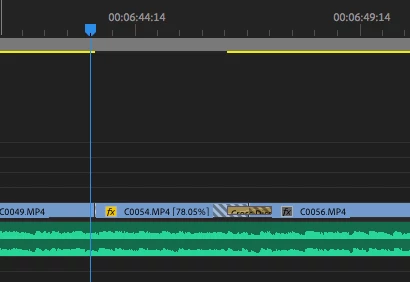
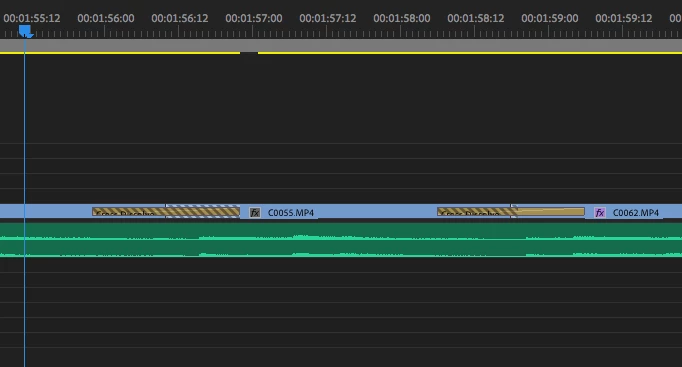
Hi I hope someone can assist me with this issue. I am reviewing my editors work and each time I get a project which has been captured by Sony the edited file in the timeline is shifted around 3 - 4 second later. We work with a few cameras. We generally work with Canon, Panasonic and Sony. Only recently the Sony files has been doing this. It appears to have that zebra lines on the timeline which basically means there's not footage at that particular point.

I work with around 3 hours worth of footage including multicam sequences so it's a real headache.

When i open my project on my MacBook pro I5 8gb late 2015, model it doesn't have this issue. it's only my main iMac computer (I7 32gb late 2014) which has this problem. I have updated my software and still no joy.  

This issue occurs when i open any of my editors who has a Sony file in their project. Editing Sony files on my computer isn't a problem.

Please see stills below for reference. It also has nothing to do with the transitions used, just video been shifted.

I would appreciate it if anyone can help as soon as possible please.

Thanks
 

This topic has been closed for replies.

4 replies

Kevin J. Monahan Jr.
Legend
January 30, 2019

KJ,

We heard that completing the project in CC 2018 works for most folks. Is that what you ended up doing? Let us know.

Thanks,

Kevin

Kevin Monahan - Sr. Community and Engagement Strategist – Adobe Pro Video and Audio
Kevin J. Monahan Jr.
Legend
January 10, 2019

KJ,

We didn't hear back from you. Is everything OK or do you still need help?

Best,
Kevin

Kevin Monahan - Sr. Community and Engagement Strategist – Adobe Pro Video and Audio
Participant
January 13, 2019

This is happening to me too. Especially after updating Premiere Pro. Very frustrating esp being that I have a project due very soon.

Legend
December 27, 2018

I notice one of the clips has a speed adjustment on it.  It's possible that needs to be 'redone' on the new machine.

Participating Frequently
December 27, 2018

In my case, it's random. I have clips with nothing aplied and clips with motion keyframes, effects or timeramps. Luckily I notice the problem because some clips with Stabilitation warp effect showed the alert "new frames to stabilize".

It is strange because all the keyframes remains on the same spot but not the source clip within.

Kevin J. Monahan Jr.
Legend
December 21, 2018

KJ,

Sorry for the frustration.

  • I am reviewing my editors work and each time I get a project which has been captured by Sony the edited file in the timeline is shifted around 3 - 4 second later.
  • It appears to have that zebra lines on the timeline which basically means there's not footage at that particular point.
  • When i open my project on my MacBook pro I5 8gb late 2015, model it doesn't have this issue.
  • it's only my main iMac computer (I7 32gb late 2014) which has this problem. I have updated my software and still no joy. 

It looks like your editors are working with native .mp4 files. Is that correct? I think it is possible that there are some clips that contain different content but might be named identically by the camera. Once reconnected on a new computer system, the file path changes, and then Premiere Pro might not reconnect to the right clips, then you see these awful zebra stripes—a sure sign that you're not connected to the proper clips. That is the only way I can think that this might be happening. The solution is to find make media offline for every clip showing zebra stripes, then reconnect the clips to the proper media one at a time.

To future proof this problem, rename the clips after importing them so that they all have unique names. Then start your edit.

Personally, I'd go one step further and—before the edit—transcode these .mp4 files to something like ProRes for a smoother editing workflow, which would include smart rendering. I would rename these clips as part of the transcoding process. Since you have a lightweight laptop, as my producer, I'd deliver copies of these transcodes in a more compact format or as proxies to you for reviewing purposes.

Hope that info might help.

Regards and Happy Holidays,
Kevin

Kevin Monahan - Sr. Community and Engagement Strategist – Adobe Pro Video and Audio
Participating Frequently
December 27, 2018

Same problem here, but on same pc, same configuration. Only different version of Premiere. The timeline cuts are in place but some clips are shifted sometimes a few frames, sometimes seconds, like some troll shifted them with the "slip tool".

I found a previous answer from months ago and it seems to be the right issue, but not satisfying...

Video edits in timeline are shifted/delayed when re-opening project weeks later