Legend
October 20, 2017
Answered

Sony PWX-Z150 Shaking Lines, and Codec

  • October 20, 2017
  • 3 replies
  • 817 views

Hello Everyone.

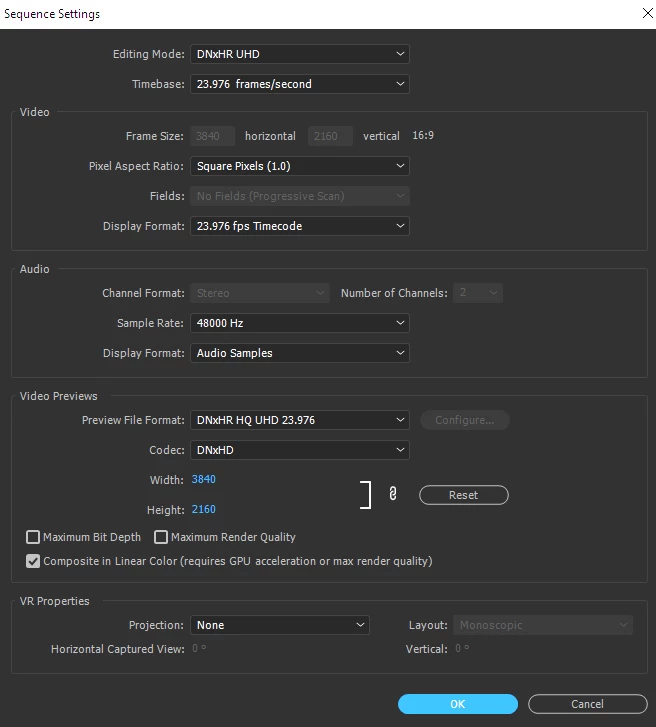
I have a Sony PXW-Z150, I have Shot a small Clip for Testing Purpose, It was done Hand Held, No Tripod. 4K Mode. 24fps. Would you please look at this small clip, and let me know, what I need to do to get ride of this weird shaking or jerking lines, and also, for editing Purpose, what Codec do I need to Install. By default when I bring Import a Clip to Premiere Pro,this Is what I have for Sequence Settings. Also, I export my Clips as: H264 Progressive.

Dropbox - Hand Held.mp4

Thank you very much.

    This topic has been closed for replies.
    Correct answer Richard M Knight

    I think this might just be an issue of putting too much movement using a film framerate.

    Google provided this link

    Cinematography Tip: Capture Smooth Panning Shots at 24fps

    3 replies

    Legend
    October 20, 2017

    Looks normal to me, for what it is.

    Legend
    October 20, 2017

    Dear Jim.

    I was shooting hand Held for Testing Purpose Only.

    Notice: Panning to left you see Jerking, and shaking.Not Smooth Al All.

    Also, regarding Codec, Should I stick to The Premiere Pro Build In Codec, or Download Specific Codec for this Camera

    Thanks.

    Legend
    October 21, 2017

    That's pretty normal for 24p.  To get it smoother, slow down your moves.

    Ann Bens
    Community Expert
    Community Expert
    October 20, 2017

    I have to agree with Richard.

    Hold the camera still or pan way much slower.

    Richard M KnightCommunity ExpertCorrect answer
    Community Expert
    October 20, 2017

    I think this might just be an issue of putting too much movement using a film framerate.

    Google provided this link

    Cinematography Tip: Capture Smooth Panning Shots at 24fps