


Sony XDCAM to H.264
I'm still a little new to Premiere Pro, as I have only recently transitioned over from FCPX.
I work as a freelance editor, and from time to time I need the ability to edit proxy files while on the go. The type of media I generally deal with is a mixture of 5D Mark 4, 5D Mark 3, Sony XDCAM & DJI Drone.
I've gone through a few YouTube videos in order to wrap my head around what others are doing when using a proxy workflow. From what it seems, a lot of YouTubers are transcoding to quarter sized H.264 as their proxy choice.
At this stage I have successfully managed to create proxy files from both 5D cameras, plus the DJI drone footage. However when I attempted to transcode any clip shot on the Sony XDCAM, being a .MXF file, I get this error message.
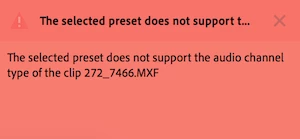
Further investigating this through forums, I've come to the knowledge that H.264 does not support the 8 channels of audio the camera produces, therefore I need to use a codec with an "uncompressed" audio setting. From what I understand is that I need to choose from either the GoPro CineForm codec, or possibly the Apple ProRes 422 (Proxy) one.
I have tried both these codecs, and although everything seems to work out to be perfectly fine with the transcoded proxies, It's a little hard to swallow the file size difference, and not to mention the quality of the proxies between the three codecs.
So I guess my question is, does anyone know if there is a way to transcode the .MXF files to a "H.264" type that retains the audio, plus benefit from the smaller file size and better quality proxy image?
Like mentioned above, I come from FCPX where one doesn't even have to think about what is happening in the background, the proxies just get made, and they are VERY acceptable to work with. I know they end up being a lot larger in file size than H.264, but all that aside, you just don't have to worry if you've chosen the right frame rate, frame size etc....


 AdChoices