
Participant
June 20, 2018
Question

Source Sans Pro Regular Weight Not Showing Up

  • June 20, 2018
  • 4 replies
  • 6175 views

Hi all,

For some reason the font Source Sans Pro regular weight option is not showing up in Premiere Pro CC 2018 - running Mac OS 10.13.5. The font is installed. All weight options show up correctly in other programs including Photoshop CC and inDesign. Of course, the client wants Source Sans Pro regular for lower thirds. I realize I could create them  in Photoshop and import - which is what I'll do for now, but it's an annoying workaround.
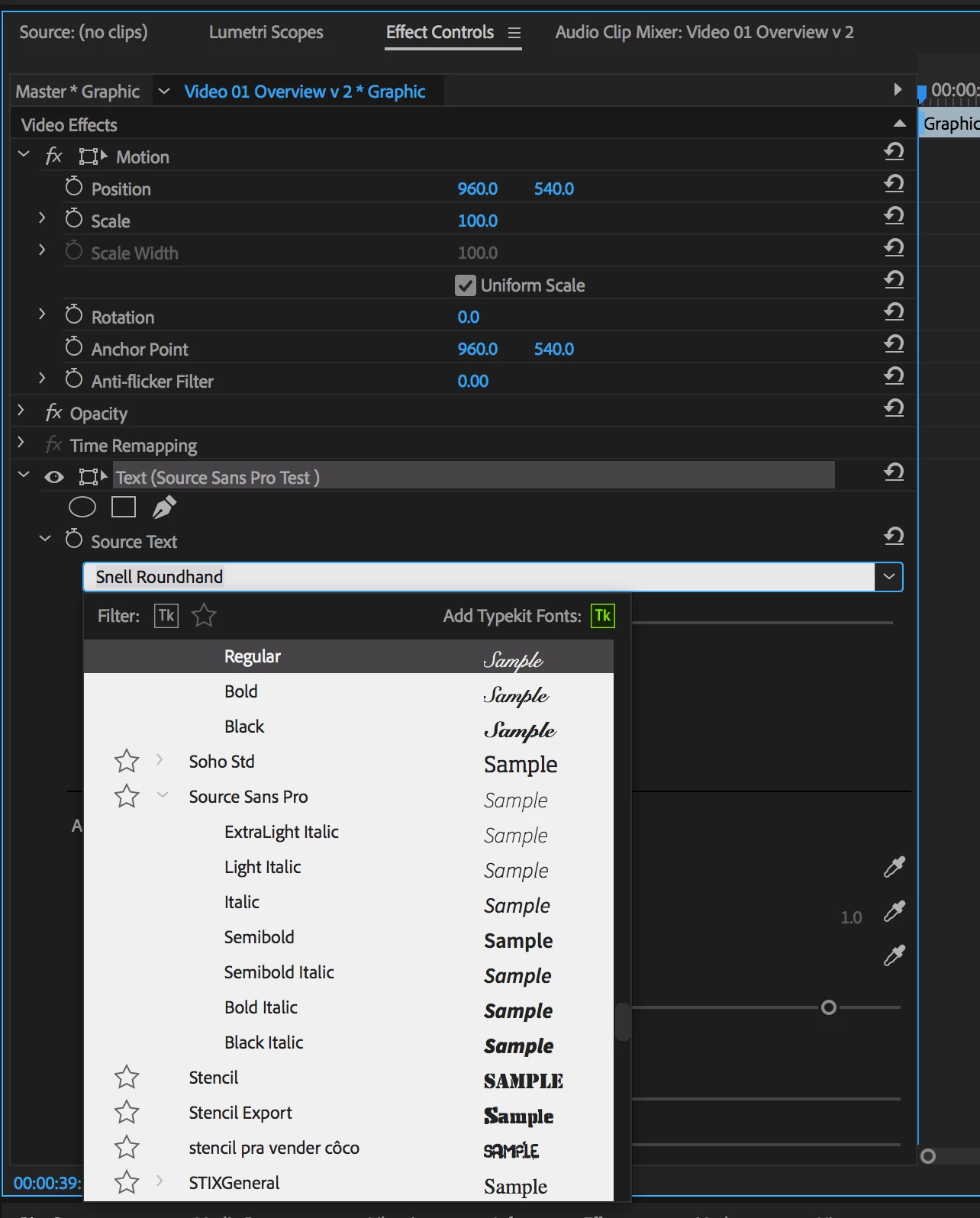
Thanks!

Fivel

This topic has been closed for replies.

4 replies

Inspiring
December 5, 2023

Restart your computer. Delete the Source Sans Pro font set from the Windows - Fonts folder. Open Adobe Cloud and navigate to the Fonts App. Search for Source Sans Pro. One entry will reveal - Source Sans. Install this to your computer.

All your Adobe applications should now show the complete font set for Source Sans Pro


Participant
February 18, 2022

I went to my font book application, removed the font, and then opened the font menu in creative cloud and re-tried the download and it worked. Looks like for some reason if the font was downloaded via another source (google fonts for me) it will block any addition Adobe is making. Fun times.

Jente DH
Participant
May 8, 2023

I unchecked all source Sans fonts in the adobe Create Cloud app and magicially they re-appeared in my AE. 

Inspiring
July 3, 2023

omg, this seems to do the trick if you got the font from google and installed it via windows (explorer)... so weird. but thank you! and if you did "windows-install" the fonts they will also stay in Illustrator or InDesign - even if uninstalled them in creative cloud. Weird bug / incompatibility...

CreativeSpill_23
Participant
August 10, 2021

Im having the same issue and couldnt find any solution to this. It's so frustrating. Anyone can help? T.T

Vinay Dwivedi
Adobe Employee
Adobe Employee
June 20, 2018

Hi Fivel,

Try this.

Quit  all Adobe applications.

Delete all instances of the Adobe font database files (AdobeFnt.lst, AdobeFnt10.lst, AdobeFnt11.lst, AdobeFnt12.lst, AdobeFnt13.lst, and so on).

To find other occurrences of these files, search your hard disk for 'AdobeFnt'.

Restart the computer.

Restart After Effects.

On Mac OS, the AdobeFnt.lst files can be in several locations, including the following folders:

/Library/Application Support/Adobe/TypeSupport/CS5/CMAPS

/Library/Application Support/Adobe/PDFL/9.9/Fonts

On Windows, the AdobeFnt.lst files can be in several locations, including the following folders:

C:\Program Files\Common Files\Adobe\TypeSupport\CS5

C:\Program Files\Common Files\Adobe\PDFL\9.9\Fonts

C:\Program Files\Common Files\Adobe\PDFL\9.9\CMAPS

//Vinay

Inspiring
January 11, 2021

I'm having this exact same problem.  Regular and Bold fonts are fine in client-provided Illustrator file but I can only access Source Sans Pro Italic in After Effects, even though they're installed on the system.  On Mac, used Find to locate three AdobeFnt_.lst and deleted them and restarted system (the folders mentioned in this post don't exist on my system running CC2020).  Didn't fix the problem.

jacksneogen
Inspiring
April 7, 2021

Having the same problem, too. And the Regular font in the Source Sans Pro family disappeared about the same day that yours did in both After Effects and Premiere Pro. I've tried every fix Adobe has given me, and chatted via messager and phone probably six times. Tried older versions, newer versions, etc., and nothing is fixing it. This is getting to be just a little bit (read: a lot) ridiculous.