


Participant
September 28, 2018
解決済み

Source timecode in sequence

  • September 28, 2018
  • 返信数 6.
  • 1359 ビュー

Hi,

I consolidated several clips into a sequence (item). The newly created sequence doesn't use the original source timecode. The timecode from the sequence starts from zero. Does anyone know how i could display my source timecodes?

Many thanks,

Clem
    このトピックへの返信は締め切られました。
    解決に役立った回答 Meg The Dog

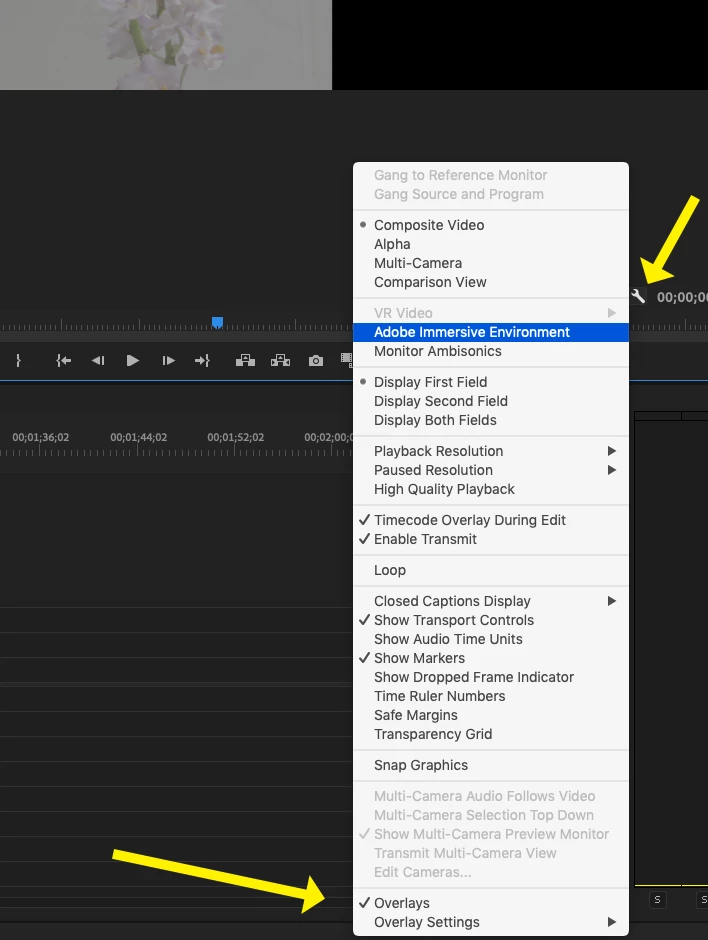
    In the bottom right corner of the Program Monitor, click on the wrench icon and on the drop down menu, select (check, toggle on) Overlays.

    If you choose Overlay Settings, you can configure the type a placement of the overlay information:

    MtD

    返信数 6

    Participant
    January 18, 2022

    some reason this is not working on one of my producers work stations

    Participant
    January 18, 2022

    PS in the window with the clips they all start at 0 and not like 12;02:22

    Participant
    December 22, 2024

    I've set the overlay to the source timecode and it's still not showing that timecode in the monitor?

    Mike Dziennik
    Community Expert
    Community Expert
    September 28, 2018

    Alternatively, use the Timecode Window or the Info panel. Both can show you source timecode.

    Meg The Dog解決!
    Inspiring
    September 28, 2018

    In the bottom right corner of the Program Monitor, click on the wrench icon and on the drop down menu, select (check, toggle on) Overlays.

    If you choose Overlay Settings, you can configure the type a placement of the overlay information:

    MtD

    Participant
    October 1, 2018

    Thank you so much!