

Question
Source Window - Drop-Frame / Non-Drop-Frame Options
Hi,
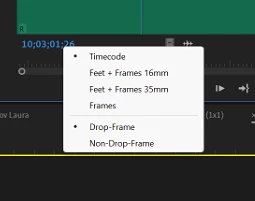
I have noticed one of our edit suites (PC) is defaulting to 'Drop-Frame' timecode when a WAV is loaded into the source window. This shouldn't be the case.
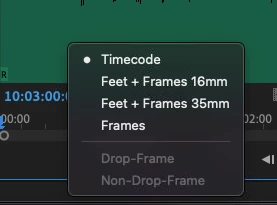
Every other edit suite (Mac and PC), including my home set-up, has the options for Drop-Frame and Non-Drop-Frame greyed out. The timecode with the same WAV will show as 25FPS which it should do.
How do I get the first system to display the timecode as 25FPS by default as the other systems do?
Edit: Nevermind, I've found the issue - Prefs > Media > change timecode base to 25fps


 AdChoices