
Inspiring
February 23, 2018
Question

Source Window - Timeline is covered by scroll bar - Premiere Pro CC 2018

  • February 23, 2018
  • 9 replies
  • 11122 views

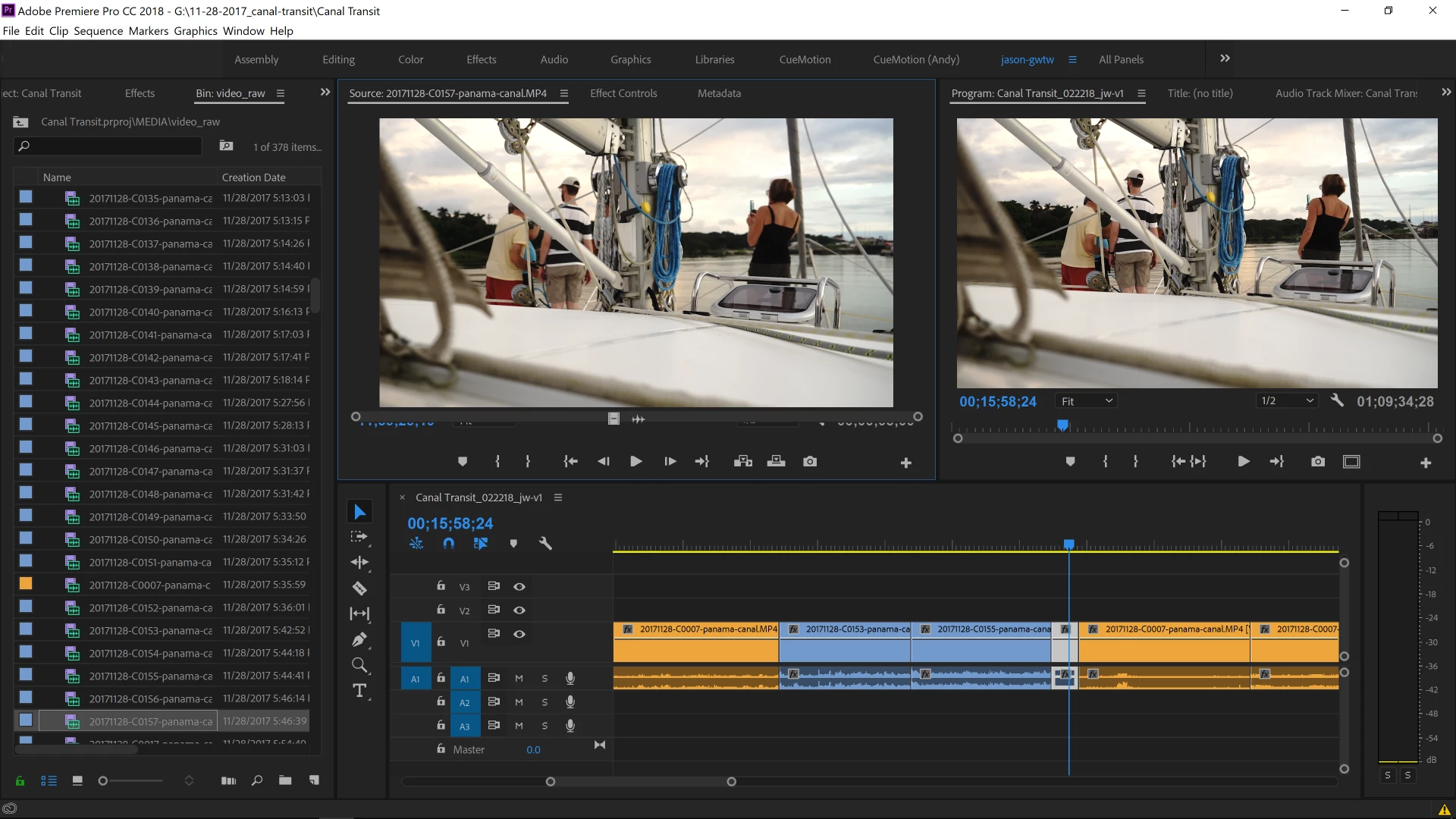
In my source window the timeline randomly gets covered up by the scroll bar.  (not sure I've got the proper names here).  This has been happening for the past few weeks. Screen grab attached.

Only solution I can find is to relaunch the program.  Perhaps there's a bug that needs to be fixed on the next update?  Any advice or tips would be happily accepted.

I'm using the latest version of Premiere Pro CC and Windows 10 x64.

2017 Alienware 17R4

Intel i7-7820HK

32GB Ram

NVIDIA GeForce GTX 1080 8GB GDDR5X

Thanks.
This topic has been closed for replies.

9 replies

Sydney G
Participating Frequently
March 1, 2023

5 years later and this is STILL an issue!
Exact same issue as here:
https://community.adobe.com/t5/premiere-pro-discussions/source-window-timeline-is-covered-by-scroll-bar-premiere-pro-cc-2018/td-p/9686850

In my source window the timeline randomly gets covered up by the scroll bar.

I'm using the latest version of Premiere Pro CC and Windows 10 x64.

Really tired of having to close / reopen the app!


Bander ALALI
Participant
March 5, 2023

same here. running a powerfull PC with the latest ver of PP.

only way to fix it is to restart the app again which is a pain.

Inspiring
January 21, 2021

hopa!

i have the same annoying issue here, but i think i've found a work around!

in the keyboard shortcut menu, i've assigned a shortcut to the command 'close' under application/file (alt+3 in my case). that would close every panel which is highlighted such as the sorce panel. then, i assigned another command in the keyboard shortcut menu for 'source monitor' under application/window (ctrl+3 for me). then, every time that bug occurs, it's a matter of two keyboard clicks (alt3, ctrl3), and your monitor is back to normal 🙂


Alexozean
Participant
June 29, 2020

Same issue - much later....still not fixed.....

Ann Bens
Community Expert
Community Expert
June 29, 2020

Its a nuisance. Close window and the double click on a clip in the timeline: works for me.

The_WynnsAuthor
Inspiring
April 24, 2019

I'm still having the same issue.  I've tried updating PR hoping everytime it may get fixed...at this point it's just something I've accepted that i will have to restart my project file a few times each day to get the scroll bar back.

R Neil Haugen
Legend
April 24, 2019

That's ... stupid. Thankfully not a crucial broken-project issue, but ... stupid to have. Annoying. And I suppose nothing like "Workspaces/Reset to saved layout" or closing the Source panel, reopening it work ...

Hope that gets sorted.

Neil

Everyone's mileage always varies ...
dimwitdave
Participant
April 17, 2019

Ugh, so irritating. Same exact issue here. Been happening for about a year or so. How have they not addressed this yet?

R Neil Haugen
Legend
April 17, 2019

I think because however annoying, it's a "non-critical" issue for a rather small subset of users. They've been fixated on some rather larger, nastier issues. For which I am of course thankful. The bug-fix list for the last couple drops has been rather larger than was often the case.

But that said ... yea, it would be ever so nice if this went away also ... sigh.

Neil

Everyone's mileage always varies ...
Inspiring
April 17, 2019

I would definitely not consider a missing scroll bar as a "non-critical" issue...

Regarding the long bug list in many apps, I find the cloud and fast internet has in some respect brought many convenience improvements to the update process, but in many ways, it has also become a curse.

Its not just Adobe. I am having issues with almost all software manufactures. Keyword "Windows Update Nightmare" just to mention another problem we have to deal with. I really can't remember that I have spend so much of my limited productive time researching software issues, spending time in forums or with software support teams, as in the past three years. The fact that companies can now send updates whenever and how often they want at much lower costs, has led to extremely sloppy updates. At high costs for us users.

We are now facing corrupt features more and more... When they finally get fixed, new corrupted features and issues are introduced and so on. Its becoming a real issue for me and my hunch is, for many others too. Plus, I now have to spend hours updating my knowledge of new features with endless tutorials. Again, if you are working with one app, it might be bearable. But not in my case. I have a multimedia studio and need to work with many apps. It's become a never ending story and its cutting my productive "up-time" down considerably.

New features, it might be argued, will improve your productivity. But these feature enhancements are in no relation to the time I am currently loosing with instabilities introduced with bad updates. I wish companies would just cool down and start to introduce best practices regarding updates and will start to understand that we need stability more then anything now.

Before, software updates were well conducted and implemented thoughtfully. Now its like: "Lets get the update out there and who cares if it doesn't work for a minority of users, we can always add new updates later on". 

Making all things new might be a good argument for share holders, but its a bad idea for the end user and our stable systems. Its time to start reflecting on the needs of the user again. That's said, don't create anymore updates at the cost of stability.

Inspiring
April 14, 2019

I am also having a serious issue with my vertical scroll bar in the my sequence timeline. First it did not appear at all, then after resetting my preferences it reappeared, but it is only 1mm thick and barely visible. Since I have many audio tracks to work with, its nearly impossible for me to continue working on any of my projects. I contacted support, no answer yet (I am sure they will get back to me soon).

In the meantime I also want to post here.

I am using three screens, but also in one screen configuration the bar is not displaying properly. This is an absolutely necessary and core functionality, which if not working is extremely annoying!!!

If anyone has a suggestion over and beyond resetting the preferences, please let me know.

Cheers

R Neil Haugen
Legend
April 14, 2019

You really need to learn the keyboard shortcuts for changing the timeline when dealing with many audio or video tracks. The scroll-bar is way too slow to use.

With Timeline in "focus" you can increase audio track height by Alt/Opt=, decrease by Alt/Opt- from the pre-set shorts. But you can go into the Keyboard Shortcuts panel to find and assign many more shortcuts to say, move up/down the sequence tracks.

You can also set viewing preferences and presets for the Timeline area. For someone dealing with many audio tracks, you *really* need to set the view the way you need it, and save it as a preset. Probably you should have several presets.

It will speed your work far more than using the scroll-bar.

Neil

Everyone's mileage always varies ...
Inspiring
April 14, 2019

Hi Neil,

Thank you for the tip! It will be a workaround for now and I will definitely give it a try. In the long run, I wouldn't mind having a working copy of Premiere though.

I use many apps from Cubase Pro, Wavelab, all Adobe CC apps etc. Maybe 15 apps or more. Not all of them on a daily basis... Remembering key commands for all of them is a little too much to ask. If I were to remember only 10 important key commands per app, that would be in excess of 150 commands. I do know my key commands for the main apps I use.

Support did contact me and we are working on a solution for the scroll bar glitch.

Thanks again, Cheers.

Participating Frequently
January 12, 2019

I am having this same issue! I've been having it on and off for the past six months. It's not a screen resolution issue, as I have a 4K screen. It's very annoying and the only way I know how to fix it is the same as above: quit the program and relaunch it. Very annoying. This seems like a bug.

Here's my system:

Ryzen 2700X

32GB DDR4 RAM

GTX 980 4GB DDR5

512GB SSD Samsung boot drive

3TB RAID 1 storage

Ann Bens
Community Expert
Community Expert
January 13, 2019

Yes known issue, seen this on my system also.

Legend
February 24, 2018

You're screen is too small.  I recommend nothing less than 24" to start.

The_WynnsAuthor
Inspiring
February 24, 2018

Sadly, a 24" screen is impossible as we live on a sailboat.

Also this has never happened in 7+ years of editing on laptops, so back to my original thought that this is likely a bug.

The_WynnsAuthor
Inspiring
February 25, 2018

I've been working on PR most of the day and only had the above issue happen once, maybe twice.  Tonight I found a new glitch in the same window.  This one has never happened before.

All the information has disappeared from the "source window", the same window that was buggy from my original post.

Anyway, just wanted to share in case someone else comes across this same issue.  Screen grab below.

You can see the double arrows on the top right are the only thing on the "source window".  When I click the arrows they function as normal, but when I select any of the three options the window just stays blank.  Just like before if I close and restart PR it functions normally again.

R Neil Haugen
Legend
February 23, 2018

As that's a custom space so I'm not aware of what it's "supposed" to look like, it looks fine.

What's amiss?

Neil

Everyone's mileage always varies ...
The_WynnsAuthor
Inspiring
February 23, 2018

Thanks for the reply.

On the "Source Video" window notice there is no timeline as it is covered by the scroll-slider thing.  The "Program" window has the timeline and looks normal with the scroll-slider underneath the timeline.  That is the issue, I cannot scrub or trim the source video because all the functions are covered by the scroll-slider bar.

R Neil Haugen
Legend
February 23, 2018

Ah yes, now I see what you mean. I can't replicate it here ... I wonder if Window/Workspace/Reset to Saved Layout (Alt-Shift-0) would fix this.

Neil

Everyone's mileage always varies ...