
Known Participant
August 9, 2019
Question

Spacebar Only Plays 'In to Out' on Timeline

  • August 9, 2019
  • 3 replies
  • 1673 views

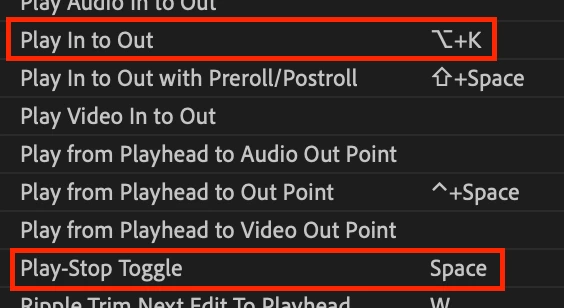
Just found a glitch with the latest update of Premiere, at least my copy (13.1.4).  Hitting Spacebar does the exact same thing as hitting Option+K (on a Mac) in that it only plays from the In point to the Out point on the timeline. 

As long as I have an In point and an Out point I am unable to just play in the timeline as normal, it always jumps straight to the In Point.  If I want to just hit play I have to first clear the In/Out points.

As you can imagine this is disruptive. Has anyone else seen this/found a fix?

Attached is a screenshot of my keyboard preferences (which have not been changed) showing that these two behaviors (Spacebar vs Opt+K) should behave differently.

Cheers!
This topic has been closed for replies.

3 replies

Participating Frequently
September 18, 2024

I'm having the same issue with the newest update (September 2024 version 24.6.1 (Build2)). Never been an issue in my 15 years of Premiere work, but now, space bar just takes me back to the in point UNLESS I'm somewhere inside my In and Out points, then it plays from wherever the trackhead is. This makes is SUPER difficult to pull b-roll from my little stash at the back of the timeline where I've preferred to keep it for 15 years.

Went into my keyboard shortcuts and deleted everything assigned to spacebar (Play & Play-Stop toggle), put only Play-Stop Toggle back on. Restarted the whole thing, and still having the issue. I've tried resetting the shortcut to anything that says "play" in it to see if they've come up with some new term for what I want (and used to have), but nothing gets me that sweet sweet "start playing from where I just set my trackhead" that I used to get.

I've been through the message boards and over to Creative Cow, and nothing. Apparently I can EITHER have an In and Out point set OR I can watch the b-roll that's outside my In and Out points.

Resolve looks more intriguing every day.

Community Expert
September 19, 2024

Have you tried setting your Keyboard Layout Preset to "Adobe Premiere Pro Default" to see if the spacebar behavior persists? This would help eliminate whether it's an issue with your custom preset or something else.

Participating Frequently
September 19, 2024

Turns out I didn't need to. I just needed to come over to Adobe message boards and complain about it. And now it's working just fine. I have literally done NOTHING different in the settings. Still running my newly mucked around shortcuts preset. I AM in a different project file that I just got from my assistant editor, so I'll be curious to see if it's fixed now in the problem project file when I go back to make revisions in the morning. If it's the project, I'll open a new project file and import the old project and see if I still have the same problem. The project I was working in last week was also acting weird, and both of the problem projects have multicam clips while this nice project is just single clips. So who knows. But I'm under too many deadlines to do too much more research this week. I'll come back with more info after I have a chance to try some things, though.

MyerPj
Community Expert
Community Expert
August 9, 2019

There might have been some shortcut strangeness with the latest upgrade? Check this thread in case.

Premiere Pro file Shortcuts not compatible with Last Update (13.1.3)

Ann Bens
Community Expert
Community Expert
August 9, 2019

If Premiere is acting weird: FAQ: How to reset (trash) preferences.