
Participant
April 2, 2024
Answered

Speed-Duration - cannot lock percentage

  • April 2, 2024
  • 15 replies
  • 1304 views

Hello, I want to report an error I encountered after installing 24.3.

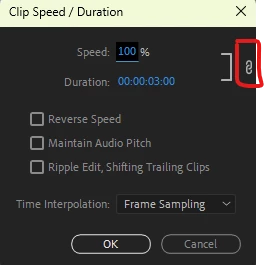
When we right-click on an image in the Timeline and open the Clip Speed/Duration menu, we cannot lock the % symbol and open it yet. By locking this, we could automatically cut the clips at a certain time. We can't do it now and I have tons of videos I need to use urgently


.
 

Mod note: Title changed. Moved to bugs.

This topic has been closed for replies.
Correct answer Trent Happel

This should now be resolved in 24.4, which just shipped.

15 replies

Participating Frequently
April 5, 2024

This should be working again in the Timeline with 24.4 beta build 038+

Kevin J. Monahan Jr.
Community Manager
Community Manager
April 2, 2024

Sure looks like it, @Stan Jones. Noted. However, for now, I will avoid moving Beta bugs into the main forum.


Cheers,
Kevin

Kevin Monahan - Sr. Community and Engagement Strategist – Adobe Pro Video and Audio
Stan Jones
Community Expert
Community Expert
April 2, 2024
Kevin J. Monahan Jr.
Community Manager
Community Manager
April 2, 2024

A member of the product team has verified this bug, @Recep Ergin. I have updated the status to "Investigating."


Thank You!
Kevin

Kevin Monahan - Sr. Community and Engagement Strategist – Adobe Pro Video and Audio
Participating Frequently
April 2, 2024

Thank you for the report! This is under investigation.