Participant
December 10, 2020
Question

Speed/Duration Causes Audio Glitch

  • December 10, 2020
  • 2 replies
  • 317 views

Hello.  I use speed/duration to make video and audio of dance performances match up.  When I change the speed/duration of the audio track I frequently get a moment of louder audio immediately following the edit point.  It doesn't show up graphically but it's very apparent and frustrating.  Changing the speed of the audio is less obvious (sometimes) than changing the speed of the dancing so I'd like to use that but the pop at each edit is keeping me from being able to.  I've tried to create a sample but (of course) it's hard to make it do it when you want it to.
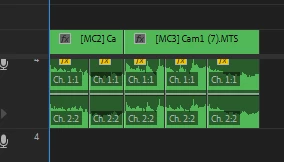
But in making it I've come up with a theory: if I see that I need an additional two frames so I extend the duration by two frames, it may not come out even and extend just beyond where the next clip begins.  That would cause a brief interruption in the sound.  Would using an even frame rate (like 30 fps rather than 29.97 fps) solve this?  Because someone will likely ask here is what that little sample looks like on the timeline:


This topic has been closed for replies.

2 replies

Participating Frequently
February 20, 2022

Having the exact same problem and I am not able to find any answer to this. Really frustrating…

Participating Frequently
February 20, 2022

By the way, if I uncheck Maintain Audio Pitch in Clip Speed / Duration, the glitch disappears – but I need to maintain the pitch, so that wouldn't be a solution to the problem.

Inspiring
December 10, 2020

Try adding a 2 frames cross-fade at the edit point.