
Inspiring
October 8, 2025
Answered

Speed ramp problem

  • October 8, 2025
  • 1 reply
  • 160 views

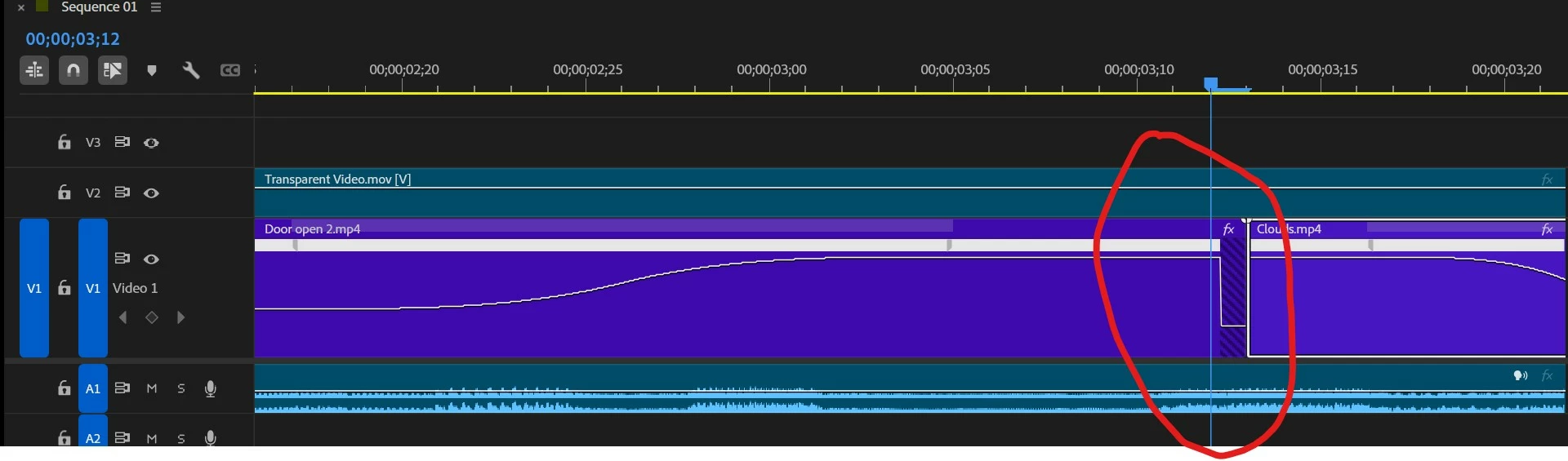
When I create a speed ramp on the left end of a clip, PP drops the ramp for the last frame (see red circle, below).  It doesn't do it for the left end of a clip (see the clip following the offender).  What's causing this, and how can I get it to stop?  I've already deleted the clip and reapplied the ramp, but had the same problem.  Thanks for any tips.
Correct answer caroline_edits

Hey, sorry to see this issue with speed ramping! Let's see if we can figure it out together. Usually when we see zebra stripes on a clip like that, it tells us that Premiere can't find the source material for that clip. When your playhead is set at that moment in the timeline (like it is in the screenshot) is the Program Monitor blank? 


If you're speeding up the clip, that means that the clip would be done playing in a shorter amount of time. It could be that the last frame is "non-existent" because it has already played. What happens if you trim the clip back by one frame? Does it erase the speed ramp dropoff? 


Let us know,
Caroline

1 reply

caroline_edits
Community Manager
caroline_editsCommunity ManagerCorrect answer
Community Manager
October 8, 2025

Hey, sorry to see this issue with speed ramping! Let's see if we can figure it out together. Usually when we see zebra stripes on a clip like that, it tells us that Premiere can't find the source material for that clip. When your playhead is set at that moment in the timeline (like it is in the screenshot) is the Program Monitor blank? 


If you're speeding up the clip, that means that the clip would be done playing in a shorter amount of time. It could be that the last frame is "non-existent" because it has already played. What happens if you trim the clip back by one frame? Does it erase the speed ramp dropoff? 


Let us know,
Caroline

Inspiring
October 8, 2025

I can't put the playhead over the gap, only to either side as it's exactly one frame wide, but the video displays in the program monitor when the playhead is on either side of the gap.  Trimming the frame out seems to solve the problem, though.  Thanks.

caroline_edits
Community Manager
Community Manager
October 8, 2025

Happy to help! Thanks for circling back to let us know what worked.


Caroline