
Participant
April 12, 2024
Answered

Spliting a two channel audio file into MONO not working

  • April 12, 2024
  • 2 replies
  • 428 views

So. I have a clip with dual audio recorded. I am changing the clip to MONO and setting it to 2 tracks. When I drag the file into the timeline it only brings in the second audio track. I have tried deleting the file and re-importing, same thing everytime. A similar clip recorded on the same day has worked fine.... WTF

This topic has been closed for replies.
Correct answer Averdahl
quote

...When I drag the file into the timeline it only brings in the second audio track.


By @Jake36698086jnbo


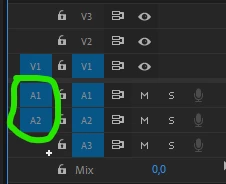
Make sure that both A1 and A2 are selected and blue. In your screendump only A2 is selected and thus you will get only one audio track instead of two.


2 replies

Averdahl
Community Expert
AverdahlCommunity ExpertCorrect answer
Community Expert
April 12, 2024
quote

...When I drag the file into the timeline it only brings in the second audio track.


By @Jake36698086jnbo


Make sure that both A1 and A2 are selected and blue. In your screendump only A2 is selected and thus you will get only one audio track instead of two.


Participant
April 12, 2024

I just figured that out, haha. I certainly did not diselect that... For a program that is so smart it sure can be dumb sometimes. Thanks all.

R Neil Haugen
Legend
April 12, 2024

What were the steps you used to set that to dual mono? In detail please as the details matter...

Everyone's mileage always varies ...
Participant
April 12, 2024

Modify>Audio Channels>Preset: Mono>Ok

And

Clip channel format: Mono>Number of audio files: 2>ok

Have both ended up with the same result.


I did it earlier with another clip and it worked fine.