
Inspiring
February 12, 2023
Answered

Still bad quality after export PNG to MP4

  • February 12, 2023
  • 2 replies
  • 375 views

I dont know why, but when I add my rendered PNG to Premiere and export it to MP4, the quality is so bad...and I don't know why.
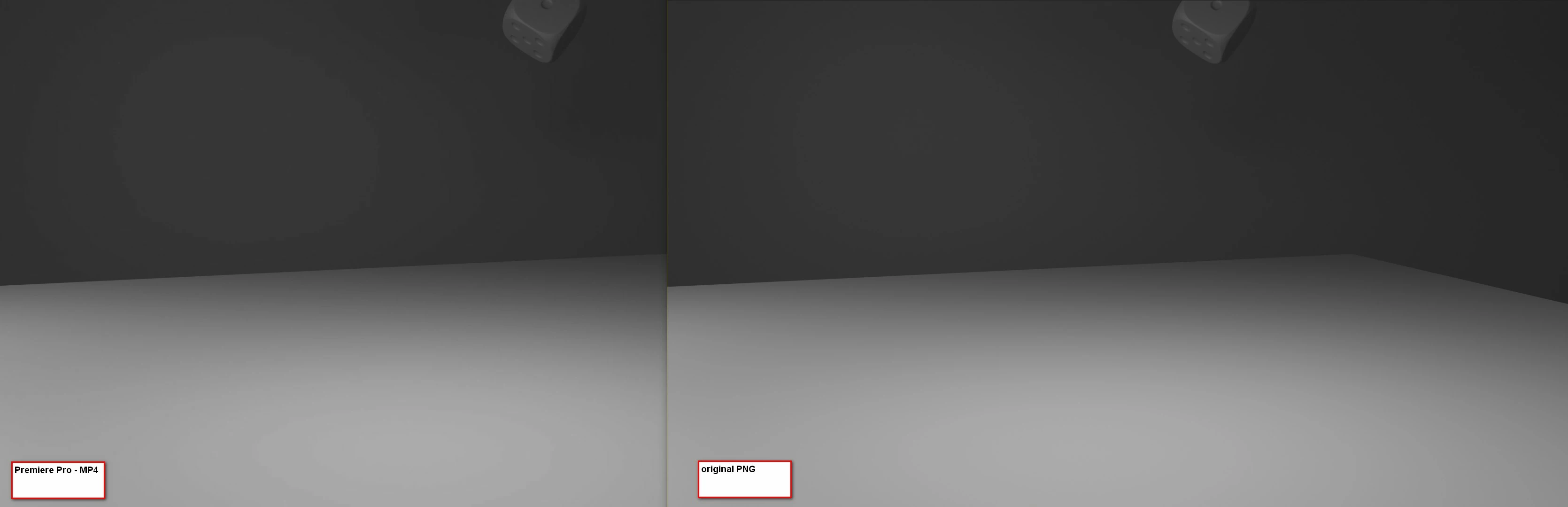
I know, in the original PNG (right one) it looks not perfect, but it is...that's Paint quality 🙂
 

This topic has been closed for replies.
Correct answer Byron Cortez

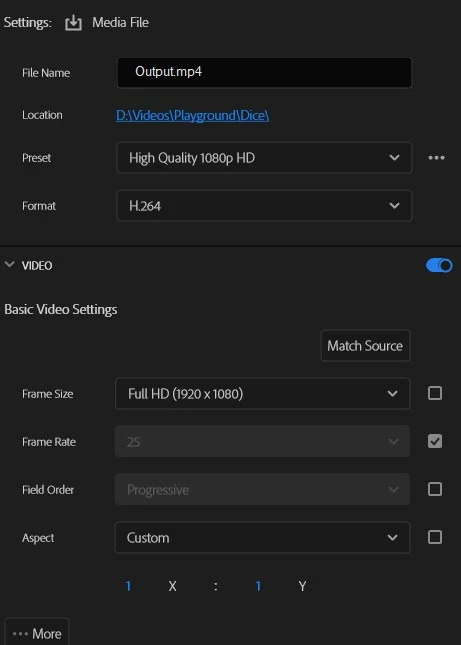
MP4 does not support color depths beyond 8 bpc and to avoid those stripes you must go up to at least 10 bpc. So that they do not appear (if the original does not have it) you must change to a QuickTime container and an Apple ProRes codec, for example.

2 replies

Community Expert
February 12, 2023

If you want to do it, activate the sequence and go to the menu Sequence / Sequence Settings... there activate the checkbox of Maximum Bit Depth. Then in the Export panel, in the video tab activate the Render at Maximum Depth checkbox and turn it up to 16-bpc. You will have a very large file but with the highest possible quality, however, everything will depend on where your video is directed. If you want it for Social Networks, these settings will not work for you and you will have to use 8-bpc MP4.

Byron.
Byron CortezCommunity ExpertCorrect answer
Community Expert
February 12, 2023

MP4 does not support color depths beyond 8 bpc and to avoid those stripes you must go up to at least 10 bpc. So that they do not appear (if the original does not have it) you must change to a QuickTime container and an Apple ProRes codec, for example.

Byron.