Known Participant
February 9, 2021
Question

Strange behavior

  • February 9, 2021
  • 3 replies
  • 573 views

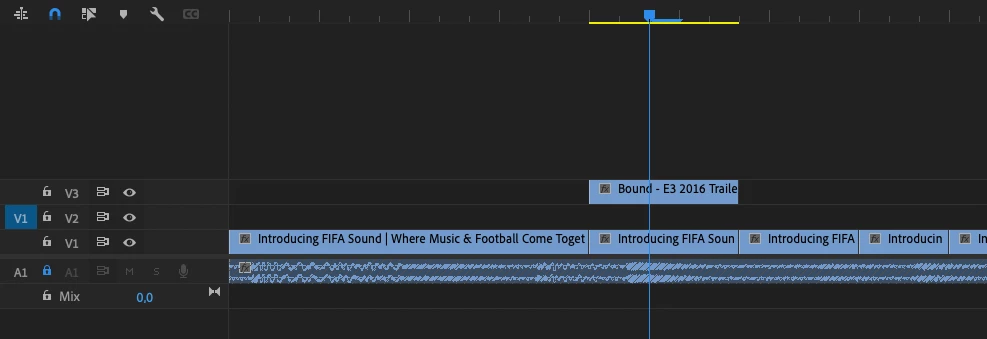
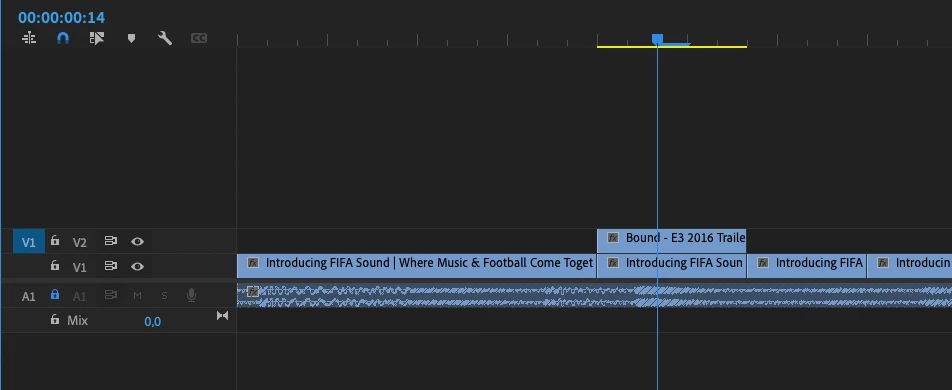
Why does the add video track shortcut  bring an existing track up ?. Is it possible to disable this fiunction? What is this function for ? I noticed that it doesn't matter how the source/program targets are set 

Thanks for the answer!
  

This topic has been closed for replies.

3 replies

R Neil Haugen
Legend
February 9, 2021

I see what you're talking about ... adding a track via the shortcut is different than via the right-click/add-track process.


Right-click in the header bar, "add track" will do so by inserting a track where the mouse cursor is sitting, and all tracks currently there and above go up one track.


But if you set a keyboard shortcut for "add track", then hit that ... it always adds another track at V2 moving all currently at V2 & above up a track.


And ... no clue why it's different, there's a very real possibility even the engineers would have no clue. This may be behavior from the dawn of time, before any current engineers were working on the app.


To get it changed, you would need to:


1) go to the UserVoice site and search to see if there's a current request about it, and either upvote or add a new request if one isn't there already;


2) get others to go upvote it.


Neil

Everyone's mileage always varies ...
woytekzAuthor
Known Participant
February 9, 2021

Thanks Neil,

I have habits from working on Media Composer, and  I try to implement it into Premiere Pro . I also worked with FCP7, but it was very limited in terms of shortcuts.

Over the last  few years ( from 2014 till now ) Premiere  has become  professional, and I use it on a daily basis, but it still has some behaviors from when it was rather amateurish. Of course, such behaviors can be used, but it will be more as  "workaround"  tricks .. 🙂 

Wojtek

@mj
Community Expert
Community Expert
February 9, 2021

Hi @woytekz ,


To @Ann Bens , point, tracks are always placed above the selected track.


What kind of behavior would you like?


Best

mj

Ann Bens
Community Expert
Community Expert
February 9, 2021
To @Ann Bens , point, tracks are always placed above the selected track.


I think I said that.

Ann Bens
Community Expert
Community Expert
February 9, 2021

Has nothing to do with source or track targeting. As in your screenshots only one track is source patched.


Add Track places the new track above the track your mouse was pointing at.

Add Tracks will give you several options.