tonys13193045
Participant
August 16, 2017
Question

Strange colour afterimage when exporting from adobe premiere

  • August 16, 2017
  • 2 replies
  • 248 views

I'm exporting a video and I find this strange colour afterimage that wasn't in the footage or anywhere during the editing process. This effect is especially obvious in scenes with quick movements.

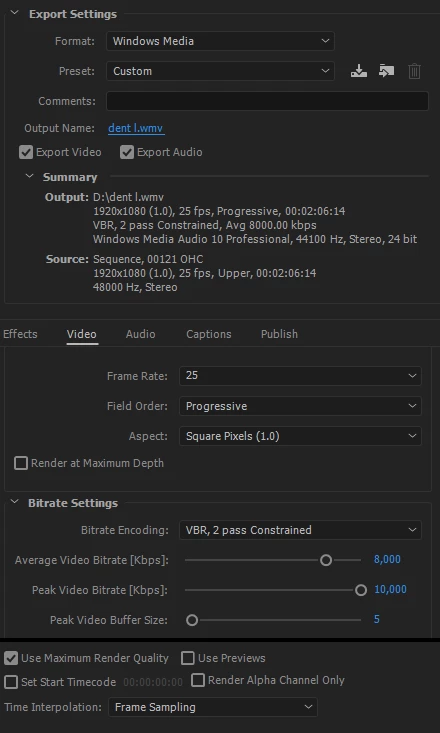
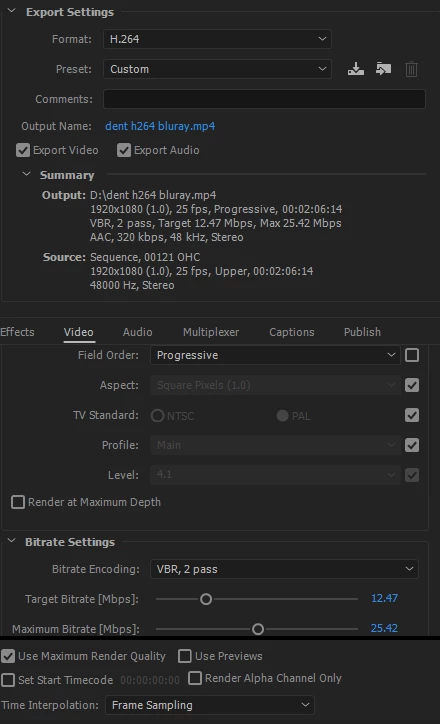
The settings are as below

Can anyone please help me out? I have no idea why this is happening and if there's a way to fix it

Exporting in windows media

Exporting in H.264

Original footage

This topic has been closed for replies.

2 replies

Legend
August 16, 2017

One thing I notice is that you're exporting a 25i sequence as 25p.

I do recommend using a single frame rate for all footage, throughout editing and exporting.

So if you shot 25i/UFF, then edit and export at 25i/UFF.

chrisw44157881
Inspiring
August 16, 2017

is your original media framerate 25fps? your sequence says upper field, try progressive sequence. I also see frame sampling enabled there. also turn off max render quality since you're not resizing anything, waste of time.