joanarccampos
Participant
July 28, 2018
Question

Strange lines in video

  • July 28, 2018
  • 2 replies
  • 423 views

Hello Everyone,

I need some help...

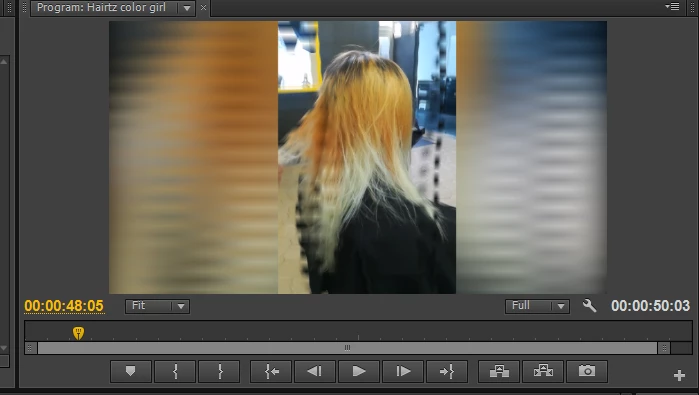
I recorded some videos with my smartphone. Turns out that, when I import files to premiere pro, it appears with some strange lines while playing (like on the image below)

Can you tell me how to fix this?

Thank you in advance.
This topic has been closed for replies.

2 replies

Ann Bens
Community Expert
Community Expert
July 28, 2018

Moved to Premiere Pro CS6 & Earlier

CS6 is quite old.

Might want to run the files through Handbrake first. Make sure it is set to Constant Framerate

guessing you duplicated the file superimposed and blurred the bottom one.

HandBrake

juanmario
Participating Frequently
July 28, 2018

In the project panel, drag the file to the New Item icon, this will create a sequence with the correct settings to your clip.

If you continue with the problem, comment on which version of the program you use, because it can also be a codec problem.

joanarccampos
Participant
July 30, 2018

Thank you for your answer.

I'm using Adobe Premiere Pro CS6.

It's still happening. I already let the program create the right settings for the sequence, but it continues to happen.

I guess, as you said, it might be a codec problem.

Can you help with that?

Thanks

juanmario
Participating Frequently
July 31, 2018

Hi.

I could put a MediaInfo report in see> text mode of the file with problems.

https://mediaarea.net/en/MediaInfo/Download

You installed some codec or pack of codecs ?.

You can also tell me the configuration of the sequence.