Inspiring
August 5, 2026
Question

Strange messages about autosave

  • August 5, 2026
  • 16 replies
  • 72 views

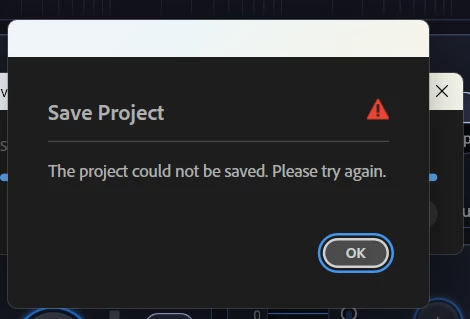
I've been seeing these strange messages the last few days. I just updated Premier, and now I'm seeing them again on another project.

 

    16 replies

    Stan Jones
    Community Expert
    Community Expert
    August 6, 2026

    @Paul_Gringo,

    > “I don’t need it, and I don’t want to see it.”

    You don’t want the autosave?

    In Preferences → Autosave, do you have “Autosave also saves project” checked?

    Stan


    Inspiring
    August 7, 2026

    I don't want to see this image; it should be a background process. I shouldn't have to wait for Premier to freeze while automatically saving the project or see this error.

    MarekMularczyk
    Community Expert
    Community Expert
    August 12, 2026

    Sure thing. Maybe it’s just an issue on certain version of Premiere

    Adobe Community ExpertAdobe Certified Professional
    Peru Bob
    Community Expert
    Community Expert
    August 5, 2026

    Try creating a new project and import the old one into it.
    See if autosave then works properly.

    If not, try temporarily connecting an external drive and changing the autosave location to it. Do a manual save and allow an autosave attempt.
    Restart Premiere and change the location of autosaves back to your internal drive.

    Inspiring
    August 5, 2026

    This is a new project, and I already updated Premiere today. It’s actually a different version. I can save the project, but sometimes this message pops up. I don’t need it, and I don’t want to see it. If it were a slow HDD, I wouldn’t even be writing this, but I have a Samsung PRO SSD—the speed is insane, and writing 50 MB per second is no problem at all. We can rule out the drive right away, and I’ve already mentioned that. Something in the program code is causing this error

    MarekMularczyk
    Community Expert
    Community Expert
    August 12, 2026

    What version of Premiere are you using?

    Adobe Community ExpertAdobe Certified Professional
    MarekMularczyk
    Community Expert
    Community Expert
    August 5, 2026

    Have you tried saving your project to another drive/location?

    Adobe Community ExpertAdobe Certified Professional
    Inspiring
    August 5, 2026

    That's not an option—I'm using an SSD and don't want to use a regular hard drive. Speed is important to me!

    Inspiring
    August 5, 2026

    The drive is 100% functional and has passed all tests

    MarekMularczyk
    Community Expert
    Community Expert
    August 5, 2026

    Is your project on a drive that’s write-enabled?

    Adobe Community ExpertAdobe Certified Professional
    Inspiring
    August 5, 2026

    If Windows is installed on the drive, then it can most likely write files to it.) 

    MarekMularczyk
    Community Expert
    Community Expert
    August 12, 2026

    Sounds good ;-)

    Adobe Community ExpertAdobe Certified Professional