

aTomician
Inspiring
December 10, 2018
Answered

Struggling to apply double sided transitions to precomps

  • December 10, 2018
  • 3 replies
  • 2133 views

I don't know if i'm doing something wrong. 

I'm really struggling to consistently apply double sided transitions to precomps.  Mainly transitions such as dip to black, cross dissolve, film dissolve, sometimes wipes, refuse to be put over two precomps.  They seem to work fine straight on the clips.

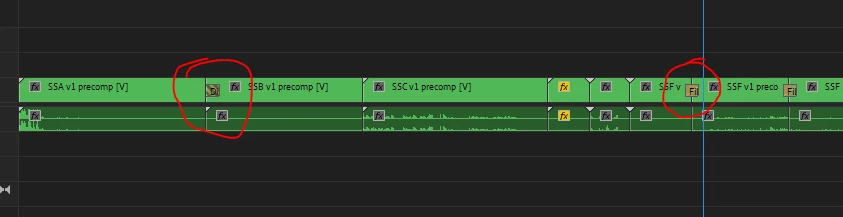
See my timeline: in the first instance, the dip to black won't cover the two clips, just applies itself to the beginning of the next clip.  Second instance, this is a film dissolve, and has worked fine across the precomps.
Another example.  First dissolve is fine, the second just will not be a double sided transition.
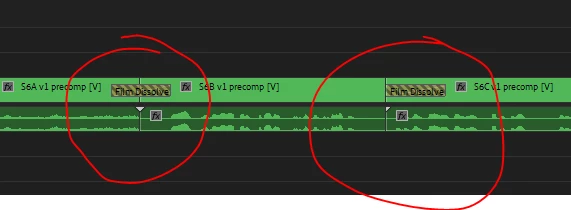
Here's a different example below.  The first film dissolve is fine.

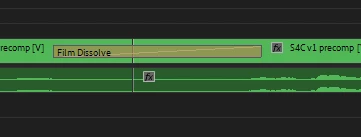
The second dissolve is off balance, it has a longer span on the right hand side then the left hand side - close up below.
What on earth is going wrong?  All footage has been coded to exactly same standard and format in Prelude, so there's not mismatches of formats or codecs.  Likewise, the whole lot is the same resolution.

Really appreciate any help on this.
This topic has been closed for replies.
Correct answer Meg The Dog

Your material does not have sufficient handles. If those "precomps" are nests, you need to extend the head and tails duration within the nest before placing it on the timeline in order to have sufficient handles to do your transitions.

These little triangles indicate you are at the absolute end or beginning of your source media on the timeline:

See:

Applying transitions in Premiere Pro

MtD

3 replies

aTomician
aTomicianAuthor
Inspiring
December 12, 2018

Thank you all.  Got a lot to learn still so appreciate the help.

That all makes sense now, and seems to be working well.  Really hoping this one turns out OK, it's the biggest video project I've done to date!

Regards, aTomician
Legend
December 11, 2018
Legend
December 11, 2018

I think the basic concept (with handles) is that you do a effect (cross dissolve) that had in out points from source monitor, which can get trimmed to your exact frame ( end of clip one beginning of clip two). Even though it's trimmed it still has those 'handles' , which just means you have junk you don't want to see but want a nice automatic effect to go from seeing one clip transition to another clip.

In my way of editing in the past I've stacked the video levels with exact cuts ( no handles) and use opacity to fade one out (lower) and fade one in (upper) to be exactly what I want. No handles, not problems.

But NOW, years later, I've found that it works pretty good most of the time to just go with the programming auto stuff, and adjust if possible with the time of the dissolve. Make it shorter and faster if not enough handles. Or else stack it.

It's lot of work to do it manually, but sometimes it is worth it.  Most stuff done with this stuff is not critical like that... and adobe is just trying to make it simple and automatic, like most NLE's, so everyone can enjoy doing stuff with less work and time invested, etc. Saving time is a big plus !

Legend
December 11, 2018

Is hard to explain.

Lets say you got shot of someone looking out airport terminal window and watching plane take off with a loved one. At end of shot 1 (close up of looking out window with sad face) we wait a couple beats before saying CUT. We cut to interior of plane flying around with nice person on board that man was longing for.

The cross dissolve would be the last second of 1st clip (opacity to zero) and the next clip ( person on plane) going UP in opacity. Different time and place. Hence a cross dissolve.

Could be a montage, like a wedding or event, but in this case I'm using a drama to exemplify.

I used to do that manually ALL the time, but it's a lot of work compared to just sticking stuff on a timeline on one level and using handles. What adobe does in my opinion, is try to use the handles ( junk stuff you don't want to see ) as the "dissolve" so that we do see the last frame of first clip and first frame of second clip at 100% opacity.

It's ADDING junk stuff to make the dissolve.

(handles )

I could be wrong.. just my gut feeling.

Anyway, keep working on solving stuff cause it will look great !

Meg The DogCorrect answer
Inspiring
December 10, 2018

Your material does not have sufficient handles. If those "precomps" are nests, you need to extend the head and tails duration within the nest before placing it on the timeline in order to have sufficient handles to do your transitions.

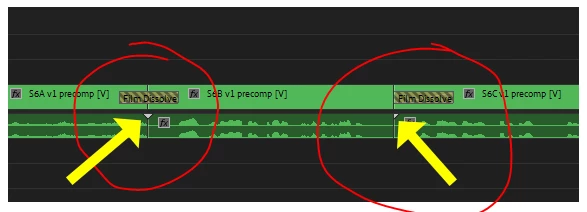
These little triangles indicate you are at the absolute end or beginning of your source media on the timeline:

See:

Applying transitions in Premiere Pro

MtD

aTomician
aTomicianAuthor
Inspiring
December 11, 2018

Thanks @Meg The Dog

OK, I'm not clear on all the terminology, so can I just clarify a couple of points?  (yep I've looked through the link, just want to make sure I've got it right)

- Handles refer to an overflow of source material at the beginning or end of a clip or precomp?

- By extend heads and tails i presume you mean extend the beginning and end of the precomp or source material?

Now another question then.  On below image, if the triangles show an absolute end of source material, why has the film dissolve worked on the first one?  The first circle shows an absolute end and absolute beginning of the clips, yet it has still let me put the film dissolve onto these.  And on the second circle, I can put the film dissolve on the S6C clip that has no handles at the start, yet it won't let me put it on the end of S6B clips that has an overflow of frames on the end? 

I have tried extending the beginning and end of source material on a couple of clips I was having issues with, and seems to be working, so that's awesome.  Just like to know why the above happens, bit confused.

Regards, aTomician
Inspiring
December 11, 2018

Premiere Pro is trying to do what you want - the diagonal lines on those dissolves means that Premiere Pro is freezing a frame on the end or start of a clip to make enough media to make the dissolve.

This may or not be OK, depending on what you want the transition to look like, and the contents of the clip(s).

Note that when you apply a dissolve to two clips on the timeline with sufficient head and tail trim, the dissolve indicator has no diagonal lines on it.

MtD