


November 25, 2025
Answered

Struggling with Transitions Effects

  • November 25, 2025
  • 1 reply
  • 171 views

I am not an expert in Premiere, so please be kind as I probably describe this poorly. Haha. 


After a recent update, when I drag transitions to my timeline, they no longer appear as separate elements; they're combined. I download these from Envato, remove what I don't need, and leave the rest. 


Now, the only way I can make this happen is if I right-click them and click Open in Timeline, which opens it in a separate timeline and looks like this...
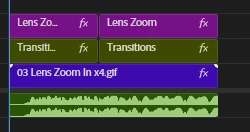
 

865962i44AB536CDB0AD5A3.png


How do I get it to appear like that on my main timeline? That's what used to happen, but now I get this...
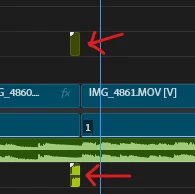
 

865963iAAC6EF107A376CA2.png


Any help would be very appreciated. Thanks! 😃


[Title edited by mod for clarity]

Correct answer Kevin J. Monahan Jr.

Hi Boogihead,

I read your post. I think I know what's going on. Try clicking the button in the upper left of the Timeline. It's called the "Insert and overwrite sequences as nests or individual clips" button. Is that working for you? Let me know.


Cheers,
Kevin


1 reply

Kevin J. Monahan Jr.
Kevin J. Monahan Jr.Correct answer
Legend
November 25, 2025

Hi Boogihead,

I read your post. I think I know what's going on. Try clicking the button in the upper left of the Timeline. It's called the "Insert and overwrite sequences as nests or individual clips" button. Is that working for you? Let me know.


Cheers,
Kevin


Kevin Monahan - Sr. Community and Engagement Strategist – Adobe Pro Video and Audio
BoogiheadAuthor
November 25, 2025

Sir, you are a hero! That was the issue. I knew it was going to be something simple, but couldn't figure it out. And I searched everywhere online before coming here (I was probably describing it wrong). 

Thank you so much!