jnicastro2
Participating Frequently
June 7, 2019
Question

Stuck trying to figure out audio export channels

  • June 7, 2019
  • 4 replies
  • 762 views

Hi everyone,

I hope that someone can assist me with this problem I am having. I have a video that I made in Premiere (using 2019) which is an hour and 40 minutes long. The video consists of 100's of clips. In the timeline of the video I believe I have only 2 audio tracks and maybe 9 video tracks.

The person that wanted the file asked me for an export which consists of: Pro Res 422 HQ (which I found), but the thing which is giving me the most difficulty is figuring out how to export the audio they want.

They are requesting: Audio: Stereo and 5.1 with 8 channels.

1= Left

2= Right

3= Center

4= LFE (Low Frequency Effects)

5= Left surround

6= Right surround

7= Left total

8= Right total

I looked up on the forums on how to make this work, but I can't figure it out. Here is my sequence setup:
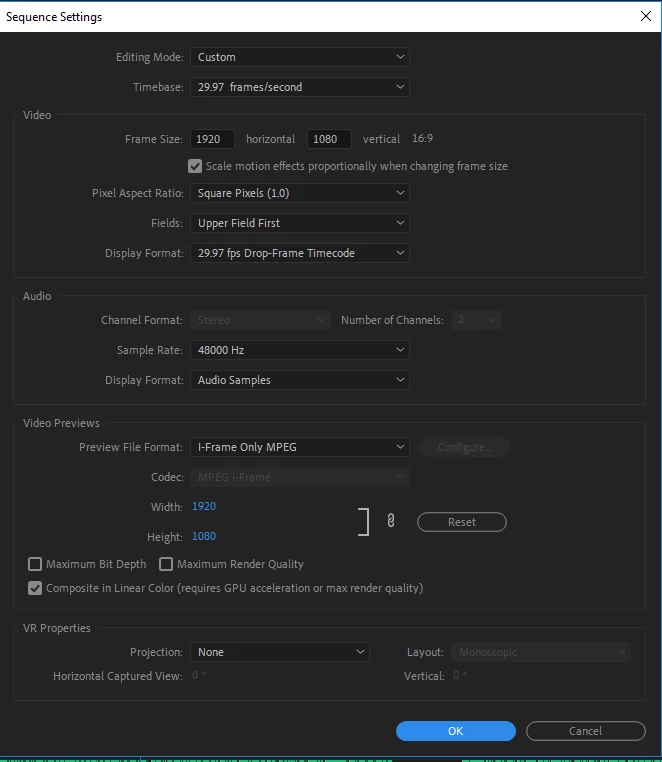
Is there a way for me to make it 8 channels and set them up like they requested above?

I have been struggling with this for a few days now.

    This topic has been closed for replies.

    4 replies

    Legend
    June 9, 2019
    Is there a way for me to make it 8 channels and set them up like they requested above?

    For your project?  No.

    For a project designed from the start with 5.1 delivery in mind, yes.

    jnicastro2
    Participating Frequently
    June 8, 2019

    I just wanted to give an update on the audio. I was able to create the Audio: Stereo and 5.1 with 8 channels by watching the following video: https://www.youtube.com/watch?v=v-2jD1WDcys from  4:26 - 6:44. It shows you how to make a new sequence and change the settings.

    My remaining question is:

    My timeline only has 2 tracks for audio as you can see here:

    1. So at 6;10 of the YouTube video above he creates 6 channels (I created 8) and he maps each channel. I did the same mapping he did but it doesn't seem to make sense because I only have 2 tracks of audio and I wasn't even sure how to map it correctly.

    Ann Bens
    Community Expert
    Community Expert
    June 8, 2019

    The big difference between the tutorial and your setup is you only have one stereo track instead of 6 separate mono tracks.

    Read post 5 again.

    jnicastro2
    Participating Frequently
    June 8, 2019

    I guess this is a little (a lot) out of my realm. Are any of you experts at this that can show me how to get the export done correctly? I can pay for assistance.

    Inspiring
    June 7, 2019

    Are you asking how do I set up a sequence for multichannel output, or are you asking how do I create the elements for a 5.1 output?

    If you don't already have the 5.1 sound, your best choice would be to take your current sound to an audio professional to create the elements you need.

    If you must do it yourself, you will need software and an audio production host application. A plug-in like the Waves UM266

    https://www.waves.com/plugins/um225-um226

    running in a host application like Logic Pro can create the 5.1 from a stereo source.

    MtD

    Legend
    June 7, 2019

    ==========

    In the timeline of the video I believe I have only 2 audio tracks and maybe 9 video tracks.

    ========

    You should make a note on paper about how many audio tracks you really have now so you are sure. Make a note about whether they are stereo or mono, etc.

    What the person is asking you for is called basically "surround sound" ( dolby ? ) and that is when sound comes out of speakers located all over the place ( from in front, the sides, the back of audience, etc. ).  You don't have the source material to make that happen cause a real surround sound recording requires mono tracks equal to the direction from which the sound is coming from.  For example, lets say you are aiming your camera at a man standing in a big camp of tents and buildings.... ( so you see a wide shot, with man in foreground and tents and buildings in the background. Now lets say a helicopter flies into the frame from the right and goes from frame right to frame left and leaves the frame but continues to fly around in a big circle to the left and then BEHIND the man you see....

    Microphones would be placed ( while shooting this scene ) so that the sound of the helicopter is recorded by all those perspectives... loud when coming in from right, then loud when going from right to left, then loud coming around (out of frame but to left of man ) and then loud going around the back of man ( out of frame ).

    So, you see, recording for surround sound really requires you actually HAVE all those mono microphones set up ( pointed on those directions ).  You have not got that.

    Your best bet is to figure out how many audio tracks you have exactly.. and what they are ( mono or stereo) and tell the person who wants you do give them surround sound that you can't do that, and will they take what you have.

    Legend
    June 7, 2019

    P.S. if you want to know more about surround sound please google "surround sound"

    Legend
    June 7, 2019

    be forewarned... if you see something like THIS on internet don't be fooled by dodos.

    https://www.filmmakingstuff.com/record-surround-sound/

    Lots of people post stuff that is stupid. In post you can FAKE surround sound to some extent, but trust me, YOU are nowhere near being able to do that and neither is the person who posted this article.