Participant
August 13, 2023
Answered

subtitle problem

  • August 13, 2023
  • 3 replies
  • 187 views

i have Premiere Pro Version 23.6.0 (Build 65). If i create a subtitle menu and will click on it in the timeline, always Premiere has a error and closed the program.

This topic has been closed for replies.
Correct answer danielp2341558

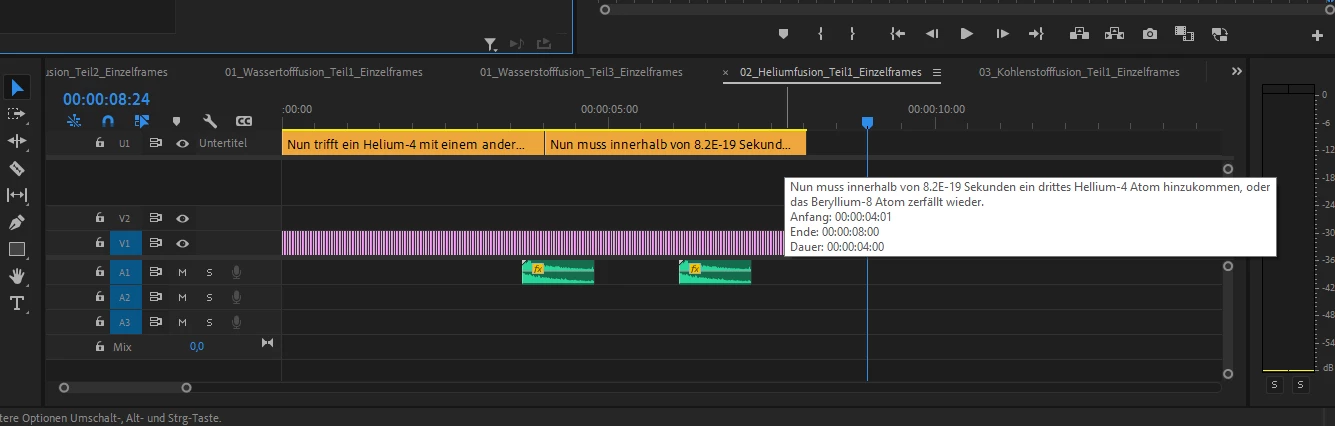
Here you can see my timeline. I create it from the menu: window > text > subtitle. If i make a double click on the subtitle timeline (orange), Premiere crash without a error message.
3 replies

Stan Jones
Community Expert
Community Expert
August 14, 2023

That is an interesting timeline! (Many items in the video track; little audio)


First, I would test the general function in a more regular timeline. Take a regular clip with video and audio. Drag to the new icon to create a sequence. Add 2 captions (as you did before), but make them short texts "This is a test caption."


First, single click on one of the caption segments. It should just select it in the caption track. Does PR crash?


If it doesn't crash, double-click on one of the caption segments. Does it crash?


Do you need to export a sidecar file, or are you burning the subtitles into the exported video? A workaround is to use regular graphics text as titles.


Stan


danielp2341558AuthorCorrect answer
Participant
August 14, 2023

Here you can see my timeline. I create it from the menu: window > text > subtitle. If i make a double click on the subtitle timeline (orange), Premiere crash without a error message.

Stan Jones
Community Expert
Community Expert
August 13, 2023

I have not experienced this and do not think it has been reported.


By subtitle menu, I assume you just mean you created subtitles (from a PR generated transcript?) and they appear in a caption track in the timeline. You then click anywhere (?) in the timeline and PR crashes.


Is there an error message? A log file generated?


What operating system?


Does it happen if you close PR, reopen without any project, and create a new project?


A screenshot just before you click in the timeline would help.


Stan