
Participant
June 14, 2018
Question

Subtitles are cut off

  • June 14, 2018
  • 3 replies
  • 13587 views

Hey everybody,

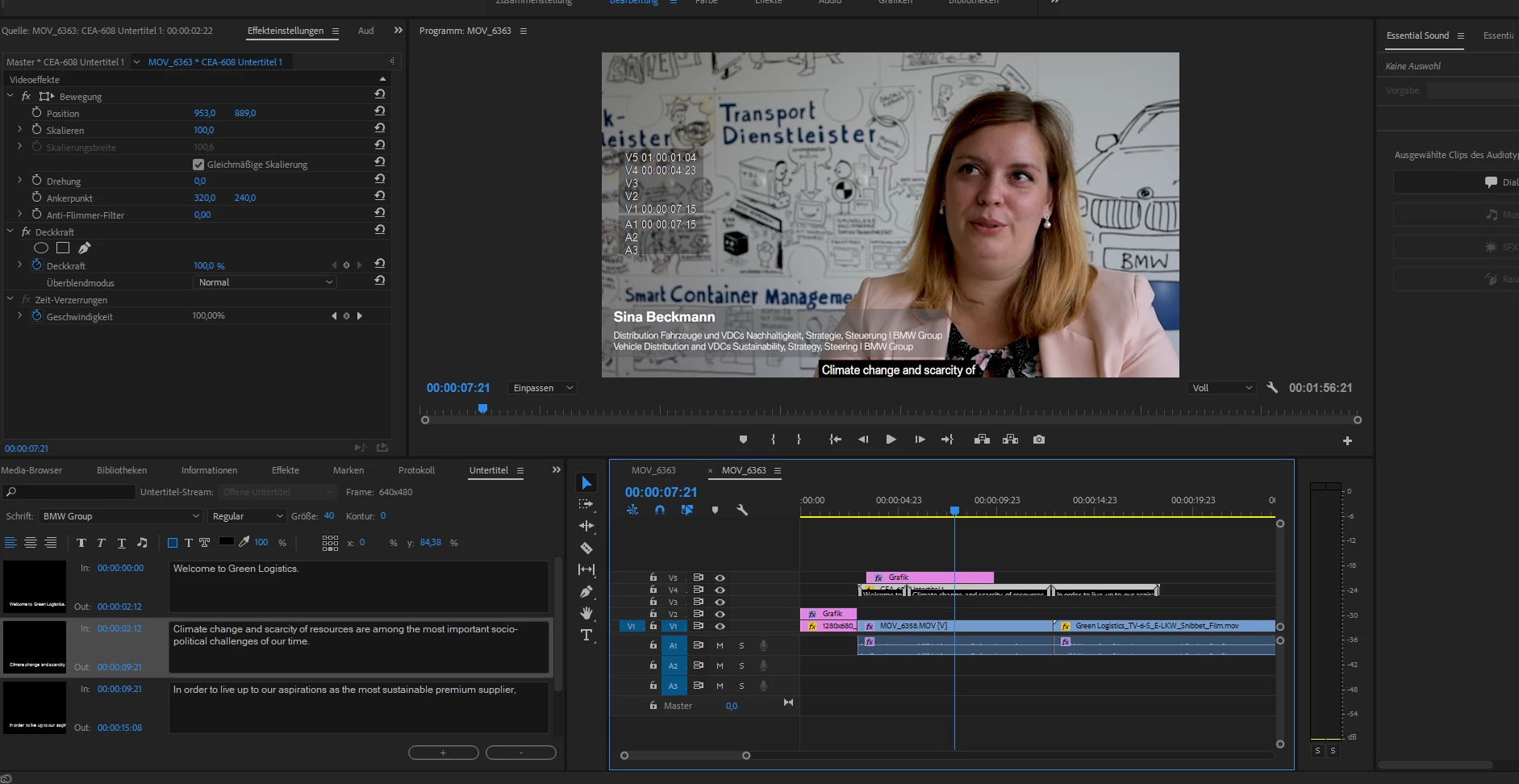
I´m just using premiere pro cc 2018 and was about to add subtitles, however, after a certain number of words the subtitles are cut off. I attached a pictures so that you can see what I mean. Do you have any help how I can fix that since I didnt find any way to do it myself.

Thanks
3 replies

Participant
April 12, 2021

I also had this issue of partial subtitles being cut off. I use a third party to create my .srt files and they seemed to work fine except for one. I clicked on the .srt file in my project < Modify < Captions - I noticed the video settings were set to 720x480 and just changed it to 1920x1080. Seemed to fix the problem! Not sure how or why, but a simple fix for me.

Participant
June 14, 2024

I know this is an old thread but I had same issue importing SRT files into Premiere Pro 2024.

Half the text was being cut off.

This Fixed it for me

  • Control Click on the word 'subtitle' under the track spanner
  • Select Track Settings
  • Under Format option Select to Subtitles (it was on teletext by default)

Participant
November 13, 2020

I just had the same problem and for anyone looking, very clear answer can be found here:

https://community.adobe.com/t5/premiere-pro/srt-caption-file-imports-as-720x480-and-i-need-it-at-1920x1080/td-p/8192273?page=1


If like me, you are doing subs for a 1920 x 1080 video you need to adjust the width of caption import settings to the same, which I did and it fixed it really quickly. By default sometimes those import settings are smaller. I know this is two years old but still relevant if anyone is stuck.

Stan Jones
Community Expert
Community Expert
June 14, 2018

Not sure what the problem is, but here's some info...

Ordinarily, adding open captions directly into PR results in the box fitting the text. And for a long caption, you must add hit the enter key for the new lines. When I did not use "enter," it added a box that ran off the screen, with no second line. But it did not cut off the caption block.

Some of your settings look odd to me.

You are adding these as new captions in PR and not by importing a file?

The caption frame is 640x480. The default for my test was same as sequence.

Also, the position in the effect controls, and the x/y in the caption window are not the sort of values I am getting. But I don't know your sequence pixel size, so all of those may be okay.